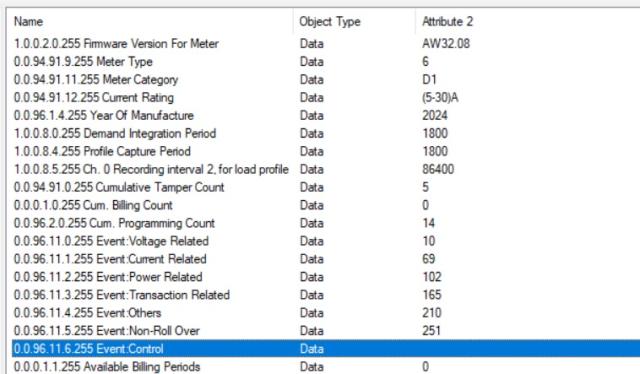
Select the 0.0.96.11.6.255 data object and then "Access rights" tab. I believe that Access is None and for that reason, the value is not read. Try to re-read the association view. Select "File" and "Refresh". Check what is the Access Right value now. It's it's Read, try to read value again. If it's changed to None after reading, the meter returns read failure and you need to ask if there is a firmware update available for the meter.
Same meter working fine with other PC with same version of GX director Why??? I am using same gxc file in my pc but my problem is not resolved. plz help
There is no issue with CTT test with this object . I am using other dlms reading tool there is no error with this object. Any option to changed the access right manually in the gx director.
For some reason, the meter doesn't allow you to read it. You need to ask the meter manufacturer if you need to use a different authentication level, or if there is a new COSEM object that you need to use. Ask also if there is a new firmware available.
There is nothing that you can do about this. You need to contact the meter vendor.
AS per your suggestion that object read successfully with other laptop with same gx version. I am unable to understand why same version have different result on different laptop.
I believe that you have read the association using a different firmware or access rights that are manually updated for the gxc file. Those are usually the main reasons.
Access rights that you can see are read from the meter when you refresh the association view and if the access right is None, that is what the meter returns.

I verify this the read…
I verify this the read request is not generated by the application.
Hi, Select the 0.0.96.11.6…
Hi,
Select the 0.0.96.11.6.255 data object and then "Access rights" tab. I believe that Access is None and for that reason, the value is not read. Try to re-read the association view. Select "File" and "Refresh". Check what is the Access Right value now. It's it's Read, try to read value again. If it's changed to None after reading, the meter returns read failure and you need to ask if there is a firmware update available for the meter.
BR,
Mikko
Same meter working fine with…
Same meter working fine with other PC with same version of GX director Why??? I am using same gxc file in my pc but my problem is not resolved. plz help
Hi, You have changed the…
Hi,
You have changed the access rights and the value is not read because of this. Check the access rights as I described above.
BR,
Mikko
There is no issue with CTT…
There is no issue with CTT test with this object . I am using other dlms reading tool there is no error with this object. Any option to changed the access right manually in the gx director.
Hi, Read the association…
Hi,
Read the association view again as I told above. It will update the access rights.
BR,
Mikko
Read the association view…
Read the association view again as you told, found NO Access of that object . how to solve this issue?
Hi, For some reason, the…
Hi,
For some reason, the meter doesn't allow you to read it. You need to ask the meter manufacturer if you need to use a different authentication level, or if there is a new COSEM object that you need to use. Ask also if there is a new firmware available.
There is nothing that you can do about this. You need to contact the meter vendor.
BR,
Mikko
AS per your suggestion that…
AS per your suggestion that object read successfully with other laptop with same gx version. I am unable to understand why same version have different result on different laptop.
Hi, I believe that you have…
Hi,
I believe that you have read the association using a different firmware or access rights that are manually updated for the gxc file. Those are usually the main reasons.
Access rights that you can see are read from the meter when you refresh the association view and if the access right is None, that is what the meter returns.
BR,
Mikko