Before commenting read Forum rules
Don't comment the topic if you have a new question.
You can create a new topic selecting correct category from Gurux Forum and then create a new topic selecting "New Topic" from the top left.

Before commenting read Forum rules
Don't comment the topic if you have a new question.
You can create a new topic selecting correct category from Gurux Forum and then create a new topic selecting "New Topic" from the top left.
Hi,
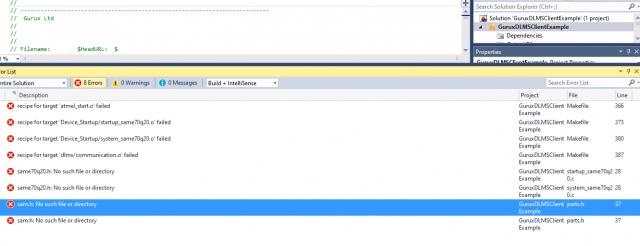
I am working on implementing the Gurux. c on my meter.. I tried compiling the "GuruxDLMSClientExample" on Microchip studio with gcc compiler but is giving me errors (I have attached Jpg file of errors)
Please how can I include the missing header file?
Thanks
Hi,
Hi,
I believe that the best solution is if you create a new project for your compiler and then simply copy main.c- file and DLMS development folder for your project.
BR,
Mikko
Could you please give me
Could you please give me configuration details like which UART ,clock or which peripherals i want to use it for.
Hi,
Hi,
Those settings depend on your HW and what need to build.
BR,
Mikko
I created a new project for
I created a new project for gcc compiler and then copied main.c- file and DLMS development folder for my project. but still there are errors see on png attached.
Hi,
Hi,
Your compiler is not supporting IPv6. Open gxignore.h and un-comment DLMS_IGNORE_IP6_SETUP.
BR,
Mikko
Yes I already uncommented
Yes I already uncommented DLMS_IGNORE_IP6_SETUP but still it gives these errors. whether I want to add these arpa/inet.h? and Where I have to add this?
Hi,
Hi,
Get the latest version. Include order is changed. What gcc version you are using? Can you run command below and add version information here.
gcc --version
BR,
Mikko
I am using gcc version:6.3.0
I am using gcc version:6.3.0
I am using gcc version:6.3.0
are these dlms files only compatible with gcc compiler?
Hi,
Hi,
You can use any compiler you want to. I just wanted to know the compiler version so this can be checked with the same compiler. Your compiler is used in internal tests. Can you compile the project now?
BR,
Mikko
No.. Not yet... please tell
No.. Not yet... please tell how I can compile this project
Hello sir
Hello sir
I compiled by using updated development files but there are some errors.
I compiled step by step main.c then I recognize that when I comment "ret = com_read(&con, &clock.base, 2);" this function then code compiles but when I uncomment it shows me errors:
Hi,
Hi,
Un-comment the DLMS_IGNORE_SERVER.
BR,
Mikko
Hello
Hello
Thank you.... Compiled successfully.
hello sir
hello sir
Code is compiled successfully but not working.
I have used usart0 and your main.c is copied as it is and make changes in cl_Init according to our design. but meter is not goes in HDLC mode.
Hi,
Hi,
If the meter is not answering your messages check your serial port settings.
If you are using optical it might be that you need to send IEC initialization command first.
Try to connect first with GXDLMSDirector and check the correct settings.
BR,
Mikko
Hello,
Hello,
We are not using Optical we are using Rj9 and Uart for communiction with Max232 IC between then it works good when arduino is used but when SAM board used it not working
Hi,
Hi,
I believe that it's in UART. Start DLMS server using the serial port in the PC.
https://github.com/Gurux/Gurux.DLMS.Net/tree/master/Gurux.DLMS.Server.E…
Then connect your reader to a PC. In that way, you can easily see send and received bytes in the command prompt.
BR,
Mikko
Hello
Hello
Board is Connected to meter following is Tx and Rx signal got from meter.
TX: 7E A0 07 03 41 93 5A 64 7E
RX: 7E A0 1E 41 03 73 8E 7F 81 80 12 05 01 80 06 01 80 07 04
00 00 00 01 08 04 00 00 00 01 53 3B 7E
Thanks for the help and quick reply.
Hi,
Hi,
The data is correct. Can you see what is the actual data in the buffer before you parse it?
BR,
Mikko
How i can check it
How i can check it
Hi,
Hi,
If you don't have Atmel-ICE debugger you can print the content of the buffer to the serial port.
BR,
Mikko
Hello,
Hello,
I want to know the Clock configuration Required to communicate using UART to meter.
Hi,
Hi,
You can use GXDLMSClock object to read or write the clock of the meter.¨
http://www.gurux.fi/Gurux.DLMS.Objects.GXDLMSClock
BR,
Mikko
hi,
hi,
I am not able to communicate with meter so I want to know it is essential to configure UART Clock. I am Using SAME54 Board. cl_Init() is also not executing.
Hi,
Hi,
You need to call cl_Init in your call to initialize the correct DLMS settings. If your UART timing is different than the meter, meter doesn't reply.
BR,
Mikko