Before commenting read Forum rules
Don't comment the topic if you have a new question.
You can create a new topic selecting correct category from Gurux Forum and then create a new topic selecting "New Topic" from the top left.

Before commenting read Forum rules
Don't comment the topic if you have a new question.
You can create a new topic selecting correct category from Gurux Forum and then create a new topic selecting "New Topic" from the top left.
Hi,
We based all our tests on the Gurux DLMS library for ANSI C, especially the Gurux DLMS server example 2 playing the role of the meter (server).
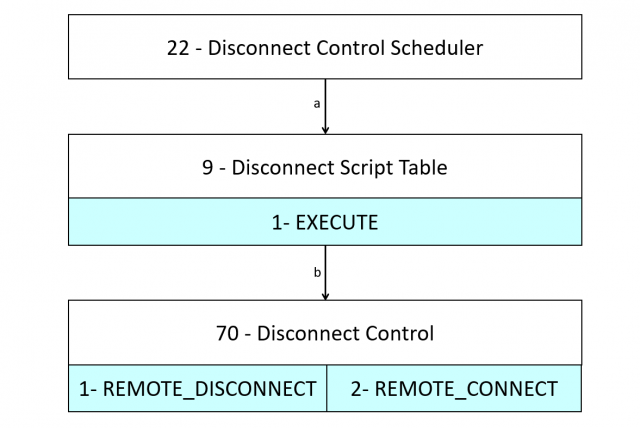
We are trying to implement the flowchart diagram below (check the image uploaded).
First, we started by testing the road "b" by using the execute methods of the script table to trigger one of the two methods of the object disconnect control (id =70). It worked perfectly.
The second step was to trigger the road "a". In fact, we want to use a single action scheduler object (id = 22) that will trigger the execute methods of the script table based on a certain time. Afterwards, all the system will run automatically based on the time introduced in the action scheduler. We noticed that this feature is not implemented yet.
We are curious to know more information and explanation about this topics and if it is possible to implemented it or give us help or guidelines to do it.
Best Regards,
Lara Wakim
Hi,
Hi,
This feature is implemented. New server example is improved to handle this. What you need to do is this.
1. Create Script table object and add Disconnect object to scripts.
2. Create Action Schedule object and set executed script.
3. Set execution times.
BR,
Mikko
Hi,
Hi,
We tried to test this new feature by following the steps listed above:
1. The script table object (0.0.10.0.106.255) is already created and linked to the disconnect control object (0.0.96.3.10.255) through two script:
- Script id = 1: trigger the execution of the method 1 (disconnect) of the disconnect control object
- Script id = 2: trigger the execution of the method 2 (reconnect) of the disconnect control object
2. The action schedule objects are also created and the executed scripts are linked to the disconnect control script object (0.0.10.0.106.255), but each object trigger a different script :
- 0.0.15.0.1.255 Disconnect control : script selector 1 (disconnect) of the disconnect control object
- 0.0.15.0.3.255 Output control : script selector 2 (reconnect) of the disconnect control object
3. The two action schedule objects listed above has no execution time defined by default. But the example code give access to add execution time through the GXDLMSDirector for High authentication.
First, we added an execution time delayed 1 min ahead to reconnect the meter. The reconnect script was triggered, BUT directly after writing the execution time without waiting the desired time to be reached. Then, we tried to disconnect the meter, it worked but the same issue appeared. (
P.S: We read the disconnect control object each time to be sure that it was affected like desired by the action schedule.
The second problem is that when we tried to repeat the re-connection and disconnection cycle after the first time by triggering the related action schedule sequentially, it didn't work at all this time and the disconnect control object was not affected anymore by the action schedule.
Best regards,
Lara Wakim.
Hi,
Hi,
We have some tests update. We tried another object based on time driven event such as the profile generic. We introduced a capture period (5 minutes for example) and it worked perfectly each 5 mins the capture method of the profile generic is triggered and data are saved in the buffer.
You can see in the picture below the diagram followed by all the object based on time event driven. Since the profile generic worked like desired we suppose that the svr_run and svr_invoke function are working fine. But since, the single action schedule is still not running like wanted (comment above) we assume that the problem resides in the svr_handleSingleActionSchedule function.
Best regards,
Lara Wakim
Hi,
Hi,
Are you using Visual Studio example? We have tried to repeat your problem and it works every time.
If you set profile generic period to 300 (5 mins). Then you remove all items from the Action schedule and add a new time pressing Now button and increasing time by one minute do you have this problem?
Have you set time zone to the clock object?
BR,
Mikko
Hi,
Hi,
We have made one change. The deviation is ignored. Can you get the latest version and let me know if you have problems.
BR,
Mikko
Hi,
Hi,
Yes, we are using the latest server example 2 on Visual Studio downloaded from github to be sure that our changes are not affecting the results. We also tested the project with the new release concerning the deviation. The problem is still not solved.
Like you said we set the time zone to the clock object. Then we removed all the items from the action schedule object and added a new time increased by one minute from the now time. When sending the write service of the new time, this action is triggering directly the action schedule (disconnecting or reconnecting) instead of waiting the introduced time.
For example, if the disconnect object is disconnected and we used the action schedule that trigger the re-connection and introduced a time increased by one minute. After sending the new time, we tried to read again the disconnect object and it appeared reconnected even though the execution time was still not reached. And the worth when we tried to repeat the same scenario another time nothing happened at all.
Best regards,
Lara Wakim
Hi Lara,
Hi Lara,
There must be something that we do differently. Can you record your actions with macro editor and send
recorded macro to me by email?
https://www.gurux.fi/MacroEditor
You can get my email address from here:
https://www.gurux.fi/AboutUs
We can fix this as soon as we can repeat it.
BR,
Mikko
Hi,
Hi,
This is fixed. Gurux server example is updated to use meter time zone. The old version was using UTC time out and it was causing this. There was also an error that some old macros was executed again when meter was started if a specific time was given.
BR,
Mikko