Before commenting read Forum rules
Don't comment the topic if you have a new question.
You can create a new topic selecting correct category from Gurux Forum and then create a new topic selecting "New Topic" from the top left.

Before commenting read Forum rules
Don't comment the topic if you have a new question.
You can create a new topic selecting correct category from Gurux Forum and then create a new topic selecting "New Topic" from the top left.
Hello everyone,
I am trying to implement DLMS server on my Arduino UNO board for my diploma thesis.
I have copied the contents of development folder in the server.ino location and i have uncommented the
#define DLMS_IGNORE_MALLOC from gxignore.h
line as it is stated in the readme file.
When I try to compile it though, I get this Error Message:
E:\School\diplomka\DLMS arduino\GuruxDLMS.c-master\Arduino_IDE\server\server.ino: In function 'void GXTRACE(const char*, const char*)':
server:259:5: error: 'Serial1' was not declared in this scope
Serial1.write("\t:", 2);
^~~~~~~
E:\School\diplomka\DLMS arduino\GuruxDLMS.c-master\Arduino_IDE\server\server.ino:259:5: note: suggested alternative: 'Serial'
Serial1.write("\t:", 2);
^~~~~~~
Serial
E:\School\diplomka\DLMS arduino\GuruxDLMS.c-master\Arduino_IDE\server\server.ino: In function 'void setup()':
server:1169:3: error: 'Serial1' was not declared in this scope
Serial1.begin(9600);
^~~~~~~
E:\School\diplomka\DLMS arduino\GuruxDLMS.c-master\Arduino_IDE\server\server.ino:1169:3: note: suggested alternative: 'Serial'
Serial1.begin(9600);
^~~~~~~
Serial
exit status 1
'Serial1' was not declared in this scope
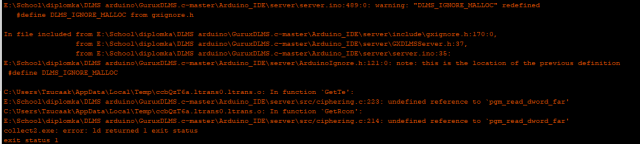
I assumed that its because my model has only one serial port and tried to Exchange all "Serial1" to just "Serial" but Ive got another Error.(picture included)
Arduino: 1.8.19 (Windows 10), Board: "Arduino Uno"
C:\Users\Tzucaak\AppData\Local\Temp\ccmcVlC7.ltrans0.ltrans.o: In function `GetTe':
E:\School\diplomka\DLMS arduino\GuruxDLMS.c-master\Arduino_IDE\server\src/ciphering.c:223: undefined reference to `pgm_read_dword_far'
C:\Users\Tzucaak\AppData\Local\Temp\ccmcVlC7.ltrans0.ltrans.o: In function `GetRcon':
E:\School\diplomka\DLMS arduino\GuruxDLMS.c-master\Arduino_IDE\server\src/ciphering.c:214: undefined reference to `pgm_read_dword_far'
collect2.exe: error: ld returned 1 exit status
exit status 1
Error compiling for board Arduino Uno.
Do I need a different Arduino board or is this issue solvable?
Any input on this matter would be highly appreciated.
Hi Lukáš,
Hi Lukáš,
There is only one serial port in Arduino UNO. That is causing this error. There isn't enough memory in Arduino UNO (33 KB) to read DLMS meters and you need to use Mega.
BR,
Mikko
Hello Mikko,
.
Hello Mikko,
Hello Mikko,
Thank you a lot for the answer. I thought that was the case. Can I have a code related question though?
Im trying to make Arduino measure AC Current and frequency. I do not understand what part of the code to change to put in values that i measure.
Once again thanks for the answer.
Best regards,
Lukáš
Hi,
Hi,
Comment all Serial1 methods and you can compile this.
You can set values in svr_preRead. use active power as a template.
BR,
Mikko
Sorry i dont know if i
Sorry i dont know if i unnerstood correctly. I need to comment those in order to compile the code on Arduino Mega or UNO should do now? I commented those so GXTRACE was basically out. After that i still get the same error.
Also with the active power i do not see any OBIS coding that would identify my values as current or frequency. Im sorry if im askind something obvious but i just do not notice it in the code itself.
Sorry i dont know if i
[deleted comment]
Hi,
Hi,
If you are using Mege, you don't need to do anything. If you are using UNO, you need to comment on all lines where Serial1 is used. There is only one serial port in UNO and that is causing this compiler error.
Always ask if you have questions. DLMS is a complicated protocol. Read your meter with GXDLMSDirector. It will read the association view and it will help you to see all the objects that the meter can offer.
BR,
Mikko
Hello,
Hello,
Getting Mega today for that. But with the values still. Im afraid i need you to be more speciffic. I already have code to measure current values. Can you please tell me where do i alter the code to input my measurements in it?
I have compiled the code on my Arduino mega and followed the guide video. But my serial monitor returns odd values(Picture included).
Do you know what could cause this output?
The middle line is with Hex toggled on. And when i try to connect my access to the port is just denied.
Best regards,
Lukáš
Hi,
Hi,
This looks like a push message. This serial port is used to communicate with the meter.
Change your serial port to another if you want to see traces.
BR,
Mikko
Hello,
Hello,
Okay I connect to my arduino through Gurux DLMS and i read values as shown in the picture.
The function
readActivePowerValue()
returns ++activePowerL1Value;
if i create a small function and return a value from that function instead, nothing happens. I honestly do not understand the function of the scaler in here as well. If you could go a bit more into detail, or show me a simple function that would actually update the value in a different way than just incrementing, that would be much appreciated. I also created another value for frequency, but that value is by default 1000 and i do not know where to alter it. If i make a read function and return any other value, its still 1000.
Best Regards,
Lukáš
Hi,
Hi,
readActivePowerValue is using reference to activePowerL1. When you change the activePowerL1Value server will get that automatically when the value is read.
Scaler and unit are set in addRegisterObject method.
Copy addRegisterObject method, activePowerL1Value and activePowerL1. Then call addRegisterObject from createObjects methods and you can see the new register object in the association view. You need to read the association view first by selecting "Refresh" from the "File" menu.
BR,
Mikko
Hello,
Hello,
I can alter the value now but no matter how i change the scaler, the value is multiplied by a 1000 in the reading and the scaler value is 100 in frequency readin that i set up yet i cust copied same values there. Is there any other variable that can do that? also when i change the unit, in DLMS director it just shows "None".
Also is it possible to make it so that the server sendss DLMS data through serial port once in a given amount of time without being requested by the dlms director?
Best regards,
Lukáš
Dear Mikko,
Dear Mikko,
Is it possible to get you on a teams or discord call for like 45 minutes? I would show you what ive done so far and you would see changes as they happen. I believe I would be able to move far with that approach instead of corresponding like this. I truly believe that making it this way would make it way less time consuming for both of us.
Best regards,
Lukáš Cu
Hi Lukáš Cu,
Hi Lukáš Cu,
You need to read the association view again if you change the Unit or scaler. You can do this by selecting "Refresh" from "File" menu.
You can use the Push Setup object to send push messages using a given time interval.
https://www.gurux.fi/Gurux.DLMS.Objects.GXDLMSPushSetup
I'm sorry, but our clients are keeping us really busy at the moment and I can't find any available time slots, but you can ask your questions in the Forum.
BR,
Mikko
Hello,
Hello,
After that the scaler stays the same.
I included a link to a youtube video to show.
https://youtu.be/xMEbC65LedE
The only changes i have made to the code was to uncomment the line and change the scaler. after that i refreshed yet is stayed the same.
One more thing. Is it possible to tweak the java example client to recieve DLMS data from Arduino via Serial port?
And if so. How?
Best regards,
Lukáš Cu
Hi Lukáš Cu,
Hi Lukáš Cu,
Values are serialized for the EEPROM and your change is overwritten on load. Find loadSettings and comment on that line and try again:
BR,
Mikko
Hello,
Hello,
Thank you that did alter the scaler.
Is there a guide on how to read DLMS data with the java example client?
Best regards,
Lukáš
Hi,
Hi,
If you set the correct serial port you can run the java client like this:
-S YOUR_COM_PORT
The example will read the association view and all the objects that the meter can offer.
Each DLMS meter is different and there are several parameters. If one of the parameters is wrong, the meter doesn't reply or return an error.
If you read your meter with GXDLMSDirector it will show the correct command line parameters when you select the meter.
BR,
Mikko
Hello,
Hello,
can you please tell me how exactly do i actually push the data from the server in the server code and where do i decide in what interval the data is sent?
I have been reading the web page but I dont know which function triggers it or even where to put it and how to work properly.
I tried to use the addPushSetup() function and i get the messages as shown in the picture.
You already said it looks like a push message. How do i include the data of activePower and my own measurements in that? And how do i actually read it?
In the linked video i tried to run the client example with arguments shown in DLMS director, but i do not understand what the return message means and it shuts itself off right away
https://youtu.be/-jsgznL2cfQ
Any advice of how i should proceed to actually read the data continuosly would be amazing.
Sorry for inconvenience.
Best regards,
Lukáš Cu
Hi,
Hi,
You define what is sent on the push message (Push object list) and when (Communication window) for the Push Setup object.
https://www.gurux.fi/Gurux.DLMS.Objects.GXDLMSPushSetup
If you invoke the Push method it will send a push message right away.
The data that you see is shown in the ASCII mode. You can use Serial Monitor from GXDLMSDirector to show received data as a hex.
I believe this will help you:
https://www.gurux.fi/Arduino
Check also the video.
BR,
Mikko
Hi,
Hi,
Thank you.
Is the java launch correct though? And if so, I do not rly understand what else to do with the client side in Java.
Best regards,
Lukáš
Hi Lukáš,
Hi Lukáš,
It will connect to the meter and read all objects that the meter can offer.
The example will read all the data from the meter, but you can modify it for your needs.
I propose that you play with GXDLMSDirector to know DLMS better.
BR,
Mikko