Before commenting read Forum rules
Don't comment the topic if you have a new question.
You can create a new topic selecting correct category from Gurux Forum and then create a new topic selecting "New Topic" from the top left.

Before commenting read Forum rules
Don't comment the topic if you have a new question.
You can create a new topic selecting correct category from Gurux Forum and then create a new topic selecting "New Topic" from the top left.
Hi,
I just implemented your android demo from Github " https://github.com/Gurux/gurux.serial.android "
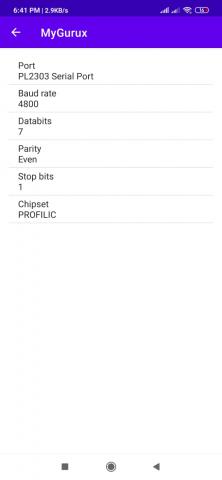
and sucessfully received port name from cl.ports[0].toString() also cl.isOpen.toString() returns true, when we are sending Random data in GXSerial(this).send("Random data") a fragment with configuration gets loaded in the app but received 0 zero in bytesReceived.() method.
After sending random string with below given detail A page is being loaded with all detail in the app automatically.
val cl = GXSerial(this)
cl.port = cl.ports[0]
Log.e("*gxport-",cl.ports[0].toString())
cl.setBaudRate(BaudRate.BAUD_RATE_4800)
cl.dataBits = 7
cl.parity = Parity.EVEN
cl.stopBits = StopBits.ONE
cl.open()
cl.send(GXCommon.hexToBytes("AkashAkashAkashAkashAkashAkashAkash"));
//
cl.addListener(this@MainActivity);
I just want to know what to send GXSerial(this).send() method so that to recive proper response or meter data in my log. Also i registered my listner (cl.addListener(this@MainActivity);) ,
but it is not responding printing any message even in case of error .
Can you please help to resolve this issue so that I can proceed in my project. I will be really thankfull to
you for your this act of kindness.
Hi,
Hi,
"AkashAkashAkashAkashAkashAkashAkash" is not a hex string. Try with this:
cl.send(GXCommon.hexToBytes("416B617368416B617368416B617368416B617368416B617368416B617368416B617368"));
You need to set trace level. Traces are disabled as default.
serial.setTrace(TraceLevel.VERBOSE);
BR,
Mikko
I tried with the changes you
I tried with the changes you suggested above , but could not find any meter detail in the log or in callback, and still there is 0 zero byte in the serial.bytesReceived.toString(), also my callback is not working even
I just want to retrive dlms meter detail, can you please suggest what changes is required in your github proj to read a meter. Please let me know if you want any detail from my side.
Hi,
Hi,
The serial port component only communicates with the serial port. If you want to read the DLMS meter you need to use this project:
https://github.com/Gurux/Gurux.DLMS.Android
BR,
Mikko
Hi,
Hi,
I launched the above suggested demo to read DLMS meter, and found data on read and refresh.
Can you please suggest what these data are or is it possible to extract meter data from the data i received.
Also let me know if anything is missing from my side,
Hi, I launched the above
Hi, I launched the above suggested demo to read DLMS meter, and found data on read and refresh. Can you please suggest what these data are or is it possible to extract meter data from the data i received.
Hi,
Hi,
That is trace. Un-check "Show trace" and you can see actual values. I propose that you download GXDLMSDirector and read your meter with it. You get an idea of what DLMS objects look like and you have a better understanding from DLMS.
BR,
Mikko
Hi,
Hi,
can you please suggest how to convert the above received value to readable one, unchecking show trace simply wipe the screen.
i Just want to retrive meter value in redable format, but receiving these data
( <- 15:51:20.469 7E A0 23 03 41 BA 26 25 E6 E6 00 62 15 80 01 00 BE 10 04 0E 01 00 00 00 06 5F 1F 04 00 00 1E 1D 00 80 24 38 7E)
in log and failed to parse it.
Does these data have meter vaue if yes, please suggest how to parse them.
Hi Gopaldas5,
Hi Akash kumar,
In DLMS you don't just read value. You need to establish the connection to the meter and then read what you want to read. This is a release request that closes the connection.
You should check our libraries and use them to read the meter.
http://github.com/gurux
BR,
Mikko