Before commenting read Forum rules
Don't comment the topic if you have a new question.
You can create a new topic selecting correct category from Gurux Forum and then create a new topic selecting "New Topic" from the top left.

Before commenting read Forum rules
Don't comment the topic if you have a new question.
You can create a new topic selecting correct category from Gurux Forum and then create a new topic selecting "New Topic" from the top left.
Need a technical documentation/ Datasheet of ARDUINO/DLMS..
And also need a pinout of MEGA2560
I"ve managed only a control of a LED (pin13)
And interested in what else I can do with it? Wanted to connect REAL TIME CLOCK with I2C???
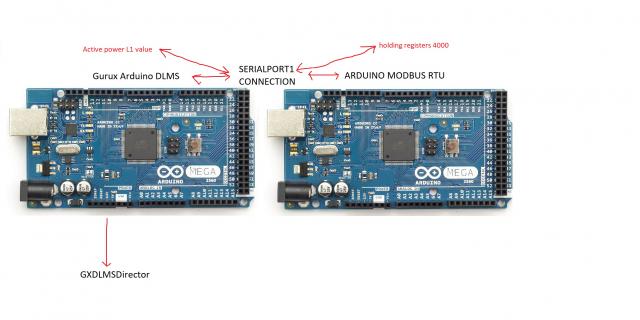
Is it possible, this type of connection as shown in picture???
Hi,
Hi,
Pinouts should be the same at all Arduino boards, but just in case check them from the board manufacturer.
You can do whatever you like. The example is simple because we didn't want to add any external HW to it.
You can read/write IOs at the same way as LED is handled.
BR,
Mikko
Please tell me how can I
Please tell me how can I change the value of the variable activePowerL1.value through serialport1?
can you show a code example
can you show a code example how can i implement modbus to dlms arduino?
Hi,
Hi,
You need to give access right to the register. You can do this on the meter code.
Find getRegisterAttributeAccess and return DLMS_ACCESS_MODE_READ_WRITE.
Then read the association view again (Select Refresh from File menu) and now you can modify register.
Set new value and select something else. Then press the Write button. Write button is activated when you change the value.
Implementing Modbus you need to create data and register objects. Then on preRead and preWrite you need to generate Modbus frames and send them to the device.
BR,
Mikko
Is it possible to expect to
Is it possible to expect to your help to realize this project, personally??
Hi Cody,
Hi Cody,
I'm sorry but we can help only our clients by email. You can post your questions to the forum. I'll try to answer to them as soon as possible.
BR,
Mikko