Before commenting read Forum rules
Don't comment the topic if you have a new question.
You can create a new topic selecting correct category from Gurux Forum and then create a new topic selecting "New Topic" from the top left.

Before commenting read Forum rules
Don't comment the topic if you have a new question.
You can create a new topic selecting correct category from Gurux Forum and then create a new topic selecting "New Topic" from the top left.
Hi!
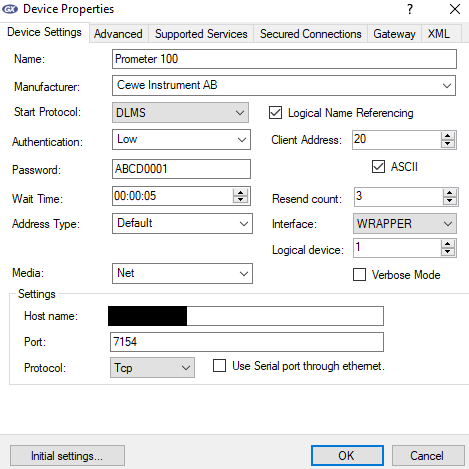
Using DLMS Director I can connect to CEWE Prometer 100 on TCP/IP using the settings in the attached image "Standalone.png".
Then (a customer) has setup 2 Prometer 100 on a RS485 bus for us, and given us this information:
Meter 1 serial no: "WP010869", MBUS address: 17
Meter 2 serial no: "WP016186", MBUS address: 16
I cannot figure out how to setup DLMS Director to connect to any of the 2 meters on the RS485 bus.
I suspect the problem might have something to do with the Serial number, as in the GuruX librarys, serial number is an integer, and, as you can see, the Prometer 100 is using letters in the serial number.
I hope I am wrong, so it would be possible to connect to these meters, but I have tried a lot of combinations, and nothing seems to work.
Thanks in advance!
Hi,
Hi,
Your serial number is for MBus. Can you connect using default settings? Just set the correct TCP/IP address and port number.
BR,
Mikko
Hi Mikko!
Hi Mikko!
I was writing an answer to you, and in that process, I should take a couple of screenshots of my problem, and in that process, I actually got this to work (after 10 hours of testing :))
I'm attaching a picture showing how I managed to get a connection. To address the 2 meters separately, I just needed to change the "Physical server" (10 and 11 hex).
Thanks for your reply Mikko!
Hi,
Hi,
Thank you for this info. Parameters are manufacturer specific and it's always a pain to get communication started. After that everything should be easy.
BR,
Mikko