Before commenting read Forum rules
Don't comment the topic if you have a new question.
You can create a new topic selecting correct category from Gurux Forum and then create a new topic selecting "New Topic" from the top left.

Before commenting read Forum rules
Don't comment the topic if you have a new question.
You can create a new topic selecting correct category from Gurux Forum and then create a new topic selecting "New Topic" from the top left.
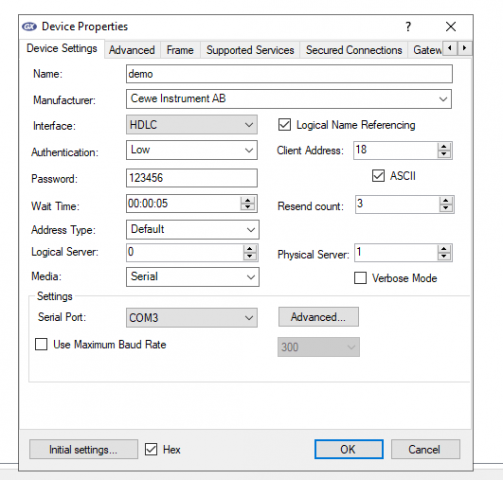
I was connect but it error
I was connect but it error
Hi,
Hi,
Your client address looks interesting. Why you did change it? Have you tried with the default client address?
Are you using optical probe or RS-232 connection?
BR,
Mikko
I using optical probe but it
I use optical probe connection but it appears error as above.
I trying connect to prometer cewe 100 - W.
I was't change client address. I don't no default client address, please show me
And tell me why I not see "Start Protocol".
please help me
Hi,
Hi,
Start protocol is changed because there will be several new interface types in the future. You can now find HdlcWithModeE from Interface type. Select that to start to communicate with optical probe.
Try with that and let me know if you have problems.
BR,
Mikko
Thanks, I did it.
Thanks, I did it.
Can you make a video on the topic reading cewe prometer 100 use tool GXDLMSDirector ?
I have no experience with it. please hepl me.
Hi,
Hi,
Meters are so different that we should make an example for each meter and it's not possible. You can access all data now. Just select the object and then press the Read button to read the wanted object from the meter.
BR,
Mikko
Can you explain more about
Can you explain more about DLMS flow, I do not understand much about its Flow.
differentiation help me DLMS and DLMS/COSEM.
I searched a lot of documentation but couldn't see how DLMS transmits the packets (Flow)
Hi,
Hi,
I have answered your question here:
www.gurux.fi/node/17555
BR,
Mikko