
Action Schedule Object
0.0.15.0.0.255 End of the Billing Period
15:40:54 Read object type ActionSchedule index: 2
TX: 00 01 00 01 00 01 00 05 05 01 02 40 C8
15:40:54
RX: 00 01 00 01 00 01 00 10 0C 01 00 02 02 09 06 00 00 0A 00 01 FF 12 00 01
15:40:54 Read object type ActionSchedule index: 3
TX: 00 01 00 01 00 01 00 05 05 01 02 40 D0
15:40:54
RX: 00 01 00 01 00 01 00 05 0C 01 00 16 05
15:40:54 Read object type ActionSchedule index: 4
TX: 00 01 00 01 00 01 00 05 05 01 02 40 D8
15:40:54
RX: 00 01 00 01 00 01 00 14 0C 01 00 01 01 02 02 09 04 00 00 00 00 09 05 FF FF FF 01 FF
Script Table
0.0.10.0.1.255 MDI reset / End of Billing Period
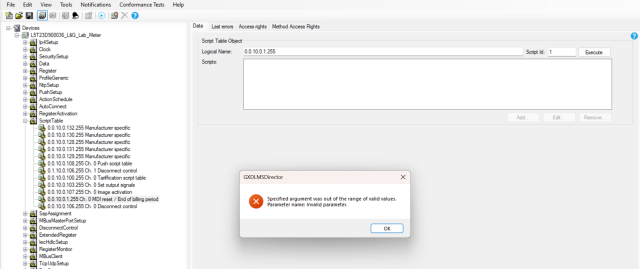
Respective action schedule object is not showing , while reading the object it shows an error that specified argument was out of the range of valid values. Parameter name: invalid parameter
( attached ) 0.0.10.0.1.255_script_table_error.png
But the execution is working fine below
15:48:33
TX: 00 01 00 01 00 01 00 09 06 01 02 4A F8 01 12 00 01
15:48:34
RX: 00 01 00 01 00 01 00 03 0D 01 00
Summary :
The action schedule object is able to read but the respective script table (0.0.10.0.1.255 ) is not able to show the action schedule table of the End of the billing period (0.0.15.0.0.255 ) in it. But the manual execution is working correctly with script ID: 1 and updating the billing profile correctly as expected
Hi, I tried to read Action…
Hi,
I tried to read Action Schedule Object using the L&G E570 and it worked without problems. Can you open C:\Programdata\gurux\GXDLMSDirector\LastError.txt and add it here so I can check if that is helping?
BR,
Mikko
LastError.txt from the…
LastError.txt from the mention folder
System.ArgumentOutOfRangeException: Specified argument was out of the range of valid values.
Parameter name: Invalid parameter.
at Gurux.DLMS.GXDLMSClient.ReadList(List`1 list)
at GXDLMSDirector.GXDLMSCommunicator.ReadList(List`1 list)
at GXDLMSDirector.MainForm.Read(Object sender, GXAsyncWork work, Object[] parameters)
Hi, In your trace below, you…
Hi,
In your trace below, you are not reading values with ReadList. You are reading them one by one.
You can try to select "Supported Services" tab from the meter settings and then un-check "Multiple references". Try to connect again and read your meter.
BR,
Mikko
Thank you very much of the…
Thank you very much of the support. it works well