
First of all, I want to thank you for your contributions sharing opensource libraries for DLMS.
After researching for a few days, I've finally been able to decode CF48 & CF101 frames from a watermeter (manufactured by Sagemcom) using your Gurux.DLMS.Python.
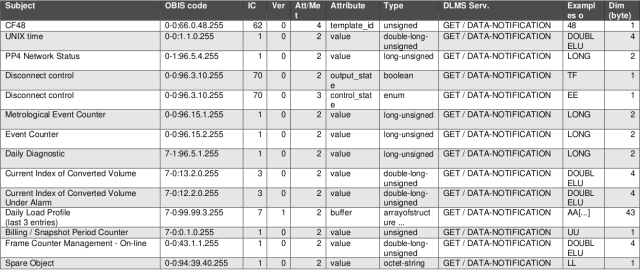
I'm writing to you now because I need a little further help. I'm wondering if there's any way to get the values decoded from this decoded frames (see attached picture).
In instance, having the following decoded CF48 frame:
0001000100010088db08b44c5603004201077d3000000016e433ab3ab040a9d5f3b1392516c9d8a670036c3416177ccecb3e0c9e9caee1b0423f42a67190ebc85a82d92ff97163543173d9c6773a1246f230b40a6213f0679d5706fdf994e60cdaca200aa75cca8987933cf63f0fdc6d0d635b6c28efd9d37bffd186430786b2589313a49e44e62eb711fc208fad4f6c
¿Is there any way to get an output (JSON or XML format) from the different fields according to the below specification? ¿Is Gurux.DLMS.Python able to perform this?
I'm looking forward to develop a service that that could be able to get an output like below:
{
"system_title": "B44C560300420107",
"deciphered": "0F000000000002010962306554DADE00030101000600100080000000D50000000003655015820080000000D500000000655167010080000000D5000000006552B8820080000000D50000000004000000001AA5F6FFAC1005146C3E00000A00290053002B00000100C0A10133",
"decoded": {
"CF": 48,
"unix_time": "2023-11-15T14:51:10.000Z",
"PP4_network_status": {
"value": 3,
"flags": [
"MODEM_ACTIVE",
"NETWORK_ATTACHED",
"PUSH_S00"
]
},
"disconnect_control_OutputState": 1,
"disconnect_control_ControlState": 1,
"metrological_event_counter": 6,
"event_counter": 16,
"daily_diagnostic": {
"value": 128,
"flags": [
"LSB_DEVICE_REGISTERED"
]
},
"volume_index": 213,
"volume_index_under_alarm": 0,
"load_profile": [
{
"unix_time": "2023-11-12T00:00:02.000Z",
"daily_diagnostic": 128,
"volume_index": 213,
"volume_index_under_alarm": 0
},
{
"unix_time": "2023-11-13T00:00:01.000Z",
"daily_diagnostic": 128,
"volume_index": 213,
"volume_index_under_alarm": 0
},
{
"unix_time": "2023-11-14T00:00:02.000Z",
"daily_diagnostic": 128,
"volume_index": 213,
"volume_index_under_alarm": 0
}
],
"billing_snapshot_period_counter": 4,
"management_frame_counter": 0,
"RSRP": "-91 dBm",
"RSRQ": "-10 dBm",
"RSSI": -84,
"SNR": 16,
"Cell_ID": 85224510,
"ECL": 0,
"Active_timer": 10,
"Nb Join Success": 41,
"Nb TX": 83,
"Nb RX": 43,
"error_flag": {
"alarm_flag": 256,
"alarms": [
"NO_WATER"
]
},
"app_version": "C0A1",
"mid_version": "0133"
}
}
Looking forward to hearing from you soon. Many thanks in advance.
Hi, Gurux DLMS libraries are…
Hi,
Gurux DLMS libraries are not able to parse the Trama compatta messages at the moment and you need to do it by yourself. All CF messages are coming in a byte array.
You can use DLMS client to parse received data notification message. Then you need to get the first byte from the data and check what CF message this is. Then you need to manually parse the messages.
Like this:
30 //CF type 48
6554DADE //Unix time
0003//PP4 Network status
01 //Disconnect control output status
01 //Disconnect control control status
000600100080000000D50000000003655015820080000000D500000000655167010080000000D5000000006552B8820080000000D50000000004000000001AA5F6FFAC1005146C3E00000A00290053002B00000100C0A10133"
BR,
Mikko
Hi Mikko, Thanks a lot for…
Hi Mikko,
Thanks a lot for your reply, it sadly confirms what I had suspected :-(
Finally this is what I am doing, once I get the decrypted frame in XML format using the GXDLMSTranslator class and the messageToXml method, I proceed to parse de output XML (needed to clean it as output info are in comments section)get the value of the OctetString (where deciphered frame is located) and start parsing the byte array according to the specification I received for both CF48 & CF101 frame types.
Now I wonder, is there any way to get the OBIS codes from the data frame received? Can you show me/link any example where these are used in the python library? I'd like to know how to use/retrieve them.
Thank you very much in advance!
Hi, No, You can't get the…
Hi,
No, You can't get the OBIS codes from the received frame. They are not saved to make the data size smaller. You need to check CT subject from the first byte and then parse the received data.
You can convert de-siphered data to XML using pduToXml-method.
0F000000000002010962306554DADE00030101000600100080000000D50000000003655015820080000000D500000000655167010080000000D5000000006552B8820080000000D50000000004000000001AA5F6FFAC1005146C3E00000A00290053002B00000100C0A10133
To:
<DataNotification>
<!-- Invoke ID: 0 -->
<LongInvokeIdAndPriority Value="00000000" />
<!-- 1/1/0001 12:00:00 AM -->
<DateTime Value="" />
<NotificationBody>
<DataValue>
<Structure Qty="01" >
<OctetString Value="306554DADE00030101000600100080000000D50000000003655015820080000000D500000000655167010080000000D5000000006552B8820080000000D50000000004000000001AA5F6FFAC1005146C3E00000A00290053002B00000100C0A10133" />
</Structure>
</DataValue>
</NotificationBody>
</DataNotification>
BR,
Mikko
Hi Mikko, Thanks a lot for…
Hi Mikko,
Thanks a lot for your quick reply, much appreciated :-)
Okay, got it. I'll do that as it's easier.
Have a nice day!
Hi, You might want to check…
Hi,
You might want to check the push listener. It listens push messages from the meters and you can get the CF messages without XML conversion. It might be a better solution if you have a lot of meters.
https://github.com/Gurux/Gurux.DLMS.Python/tree/master/Gurux.DLMS.Push…
BR,
Mikko
Hi Mikko, Thanks for sharing…
Hi Mikko,
Thanks for sharing the example. I didn't realize about it earlier, it would have helped me right from the start ^^'
Anyway, the problem I face now is that each counter is associated to a different encryption key, so I guess I should implement some database that relates each of them to its SystemTitle or Serial Number.
Imagine managing more than a thousand meters...
What do you think?
Many thanks in advance for your support!
Hi, Yes, you are right that…
Hi,
Yes, you are right that you need the database where you save the system title, serial number, and keys.
Key management is pain.:-)
BR,
Mikko