
Hi,
I am trying to read history values in Gurux.DLMS.Python (Gurux.DLMS.Client.Example.python folder - GXDLMSReader.py).
When I run the GXDLMSReader.py code - everythink is as it should be (connection is successful, also reading all values, and printing them (in HEX trace) to CMD).
Now I am trying to get "1.0.99.1.0.255 Load profile with period 1, i.e. General load profile" history values. Before that, I have specified which OBIS code to capture in load profile
I have added 4 items via MC software:
- 0.0.1.0.0.255 Clock
- 1.0.32.7.0.255 Inst. voltage L1
- 1.0.52.7.0.255 Inst. voltage L2
- 1.0.72.7.0.255 Inst. voltage L3
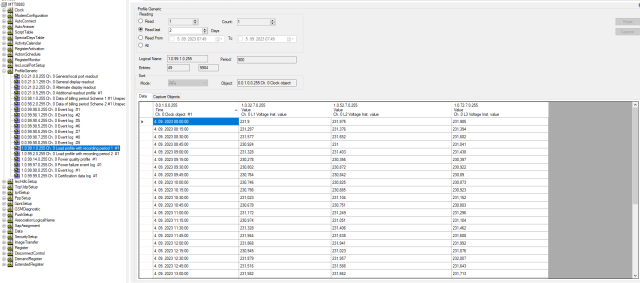
I tried to read "1.0.99.1.0.255 Load profile with period 1, i.e. General load profile" with Gurux GXDLMSDirector - successful (picture in attachment).
Which function (in Python) should I use? When I specify OBIS code for Load profile, do I have to specify also the items "inside" Load profile (0.0.1.0.0.255 Clock, 1.0.32.7.0.255 Inst. voltage L1, 1.0.52.7.0.255 Inst. voltage L2, 1.0.72.7.0.255 Inst. voltage L3)? What do you suggest?
Thank you for your answer,
Best regards,
David
Hi David, You can define…
Hi David,
You can define capture objects or you can read them from the meter.
You can do it like this:
pg = GXDLMSProfileGeneric("1.0.99.1.0.255")
#Read capture objects:
self.read(pg, 3);
#Read buffer by start and end time.
self.readRowsByRange(it, start, end)
BR,
Mikko
Hi, Thank you for your…
Hi,
Thank you for your answer.
I managed to order data from
[[<gurux_dlms.GXDateTime.GXDateTime object at 0x0000019288C07AD0>, 232913, 232993, 233045], [<gurux_dlms.GXDateTime.GXDateTime object at 0x0000019288B36ED0>, 233204, 233284, 233331], [<gurux_dlms.GXDateTime.GXDateTime object at 0x00000192888B8CB0>, 232868, 232945, 232996], [<gurux_dlms.GXDateTime.GXDateTime object at 0x0000019288C9CD70>, 233402, 233486, 233532], [<gurux_dlms.GXDateTime.GXDateTime object at 0x0000019288C9D010>, 232827, 232902, 232952], [<gurux_dlms.GXDateTime.GXDateTime object at 0x0000019288C9CEC0>, 232735, 232813, 232867], [<gurux_dlms.GXDateTime.GXDateTime object at 0x0000019288C9CD10>, 232560, 232637, 232688], [<gurux_dlms.GXDateTime.GXDateTime object at 0x0000019288C9D340>, 232806, 232880, 232926], [<gurux_dlms.GXDateTime.GXDateTime object at 0x0000019288C9CFB0>, 233131, 233212, 233265], [<gurux_dlms.GXDateTime.GXDateTime object at 0x0000019288C9D0A0>, 233766, 233844, 233900], [<gurux_dlms.GXDateTime.GXDateTime object at 0x0000019288C9D1C0>, 231903, 231981, 232036], [<gurux_dlms.GXDateTime.GXDateTime object at 0x0000019288C9D100>, 231987, 232063, 232116], [<gurux_dlms.GXDateTime.GXDateTime object at 0x0000019288C9D070>, 0, 0, 0], [<gurux_dlms.GXDateTime.GXDateTime object at 0x0000019288C9D2E0>, 231900, 231975, 231985], [<gurux_dlms.GXDateTime.GXDateTime object at 0x0000019288C9D400>, 231297, 231376, 231394], [<gurux_dlms.GXDateTime.GXDateTime object at 0x0000019288C9D3A0>, 231577, 231652, 231682], [<gurux_dlms.GXDateTime.GXDateTime object at 0x0000019288C9D580>, 230924, 231000, 231041], [<gurux_dlms.GXDateTime.GXDateTime object at 0x0000019288C9D5E0>, 231328, 231403, 231438], [<gurux_dlms.GXDateTime.GXDateTime object at 0x0000019288C9D640>, 230278, 230356, 230397], [<gurux_dlms.GXDateTime.GXDateTime object at 0x0000019288C9D6A0>, 230802, 230872, 230922], [<gurux_dlms.GXDateTime.GXDateTime object at 0x0000019288C9D700>, 230764, 230842, 230890], [<gurux_dlms.GXDateTime.GXDateTime object at 0x0000019288C9D760>, 230746, 230825, 230873], [<gurux_dlms.GXDateTime.GXDateTime object at 0x0000019288C9D7C0>, 230798, 230885, 230923], [<gurux_dlms.GXDateTime.GXDateTime object at 0x0000019288C9D820>, 231023, 231104, 231152], [<gurux_dlms.GXDateTime.GXDateTime object at 0x0000019288C9D880>, 230678, 230751, 230803], [<gurux_dlms.GXDateTime.GXDateTime object at 0x0000019288C9D8E0>, 231172, 231249, 231296], [<gurux_dlms.GXDateTime.GXDateTime object at 0x0000019288C9D940>, 230974, 231051, 231104], [<gurux_dlms.GXDateTime.GXDateTime object at 0x0000019288C9D9A0>, 231328, 231406, 231462], [<gurux_dlms.GXDateTime.GXDateTime object at 0x0000019288C9DA00>, 231564, 231638, 231688], [<gurux_dlms.GXDateTime.GXDateTime object at 0x0000019288C9DA60>, 231868, 231941, 231992], [<gurux_dlms.GXDateTime.GXDateTime object at 0x0000019288C9DAC0>, 230945, 231023, 231076], [<gurux_dlms.GXDateTime.GXDateTime object at 0x0000019288C9DB20>, 231879, 231957, 232007], [<gurux_dlms.GXDateTime.GXDateTime object at 0x0000019288C9DB80>, 231516, 231588, 231643], [<gurux_dlms.GXDateTime.GXDateTime object at 0x0000019288C9DBE0>, 231582, 231662, 231713], [<gurux_dlms.GXDateTime.GXDateTime object at 0x0000019288C9DC40>, 230546, 230626, 230676], [<gurux_dlms.GXDateTime.GXDateTime object at 0x0000019288C9DCA0>, 231340, 231417, 231464], [<gurux_dlms.GXDateTime.GXDateTime object at 0x0000019288C9DD00>, 232054, 232136, 232186], [<gurux_dlms.GXDateTime.GXDateTime object at 0x0000019288C9DD60>, 232471, 232549, 232599], [<gurux_dlms.GXDateTime.GXDateTime object at 0x0000019288C9DDC0>, 232324, 232400, 232453], [<gurux_dlms.GXDateTime.GXDateTime object at 0x0000019288C9DE20>, 232623, 232697, 232746], [<gurux_dlms.GXDateTime.GXDateTime object at 0x0000019288C9DE80>, 232886, 232968, 233016], [<gurux_dlms.GXDateTime.GXDateTime object at 0x0000019288C9DEE0>, 233323, 233401, 233444], [<gurux_dlms.GXDateTime.GXDateTime object at 0x0000019288C9DF40>, 232698, 232768, 232817], [<gurux_dlms.GXDateTime.GXDateTime object at 0x0000019288C9DFA0>, 0, 0, 0], [<gurux_dlms.GXDateTime.GXDateTime object at 0x0000019288C9E090>, 232679, 232751, 232754], [<gurux_dlms.GXDateTime.GXDateTime object at 0x0000019288C9E000>, 231004, 231080, 231099], [<gurux_dlms.GXDateTime.GXDateTime object at 0x0000019288C9E060>, 231206, 231271, 231308], [<gurux_dlms.GXDateTime.GXDateTime object at 0x0000019288C9E1B0>, 231438, 231509, 231547], [<gurux_dlms.GXDateTime.GXDateTime object at 0x0000019288C9E210>, 232406, 232481, 232522], [<gurux_dlms.GXDateTime.GXDateTime object at 0x0000019288C9E270>, 231737, 231806, 231856], [<gurux_dlms.GXDateTime.GXDateTime object at 0x0000019288C9E2D0>, 231255, 231333, 231379], [<gurux_dlms.GXDateTime.GXDateTime object at 0x0000019288C9E330>, 231121, 231204, 231245], [<gurux_dlms.GXDateTime.GXDateTime object at 0x0000019288C9E390>, 231318, 231395, 231443], [<gurux_dlms.GXDateTime.GXDateTime object at 0x0000019288C9E3F0>, 231551, 231628, 231674], [<gurux_dlms.GXDateTime.GXDateTime object at 0x0000019288C9E450>, 232312, 232387, 232435], [<gurux_dlms.GXDateTime.GXDateTime object at 0x0000019288C9E4B0>, 231964, 232048, 232098], [<gurux_dlms.GXDateTime.GXDateTime object at 0x0000019288C9E510>, 232953, 233032, 233085], [<gurux_dlms.GXDateTime.GXDateTime object at 0x0000019288C9E570>, 232021, 232099, 232152], [<gurux_dlms.GXDateTime.GXDateTime object at 0x0000019288C9E5D0>, 232354, 232431, 232482], [<gurux_dlms.GXDateTime.GXDateTime object at 0x0000019288C9E630>, 231042, 231127, 231175], [<gurux_dlms.GXDateTime.GXDateTime object at 0x0000019288C9E690>, 231231, 231306, 231360], [<gurux_dlms.GXDateTime.GXDateTime object at 0x0000019288C9E6F0>, 232556, 232635, 232688], [<gurux_dlms.GXDateTime.GXDateTime object at 0x0000019288C9E750>, 232428, 232508, 232556], [<gurux_dlms.GXDateTime.GXDateTime object at 0x0000019288C9E7B0>, 232229, 232303, 232359], [<gurux_dlms.GXDateTime.GXDateTime object at 0x0000019288C9E810>, 231917, 232002, 232052], [<gurux_dlms.GXDateTime.GXDateTime object at 0x0000019288C9E870>, 231588, 231660, 231713], [<gurux_dlms.GXDateTime.GXDateTime object at 0x0000019288C9E8D0>, 231779, 231855, 231908], [<gurux_dlms.GXDateTime.GXDateTime object at 0x0000019288C9E930>, 231398, 231473, 231529], [<gurux_dlms.GXDateTime.GXDateTime object at 0x0000019288C9E990>, 231464, 231545, 231599], [<gurux_dlms.GXDateTime.GXDateTime object at 0x0000019288C9E9F0>, 232871, 232948, 232998], [<gurux_dlms.GXDateTime.GXDateTime object at 0x0000019288C9EA50>, 232747, 232825, 232880], [<gurux_dlms.GXDateTime.GXDateTime object at 0x0000019288C9EAB0>, 231971, 232049, 232096], [<gurux_dlms.GXDateTime.GXDateTime object at 0x0000019288C9EB10>, 231891, 231963, 232018], [<gurux_dlms.GXDateTime.GXDateTime object at 0x0000019288C9EB70>, 231878, 231950, 232004], [<gurux_dlms.GXDateTime.GXDateTime object at 0x0000019288C9EBD0>, 232830, 232908, 232960], [<gurux_dlms.GXDateTime.GXDateTime object at 0x0000019288C9EC30>, 232447, 232527, 232578], [<gurux_dlms.GXDateTime.GXDateTime object at 0x0000019288C9EC90>, 232510, 232590, 232636], [<gurux_dlms.GXDateTime.GXDateTime object at 0x0000019288C9ECF0>, 0, 0, 0]]
to this:
--------------History data from: 2023-09-01 00:00:00 to: 2023-09-06 00:00:00 -------------
Timestamp: 09/01/23 11:45:00 | UL1: 232.913 V | UL2: 232.993 V | UL3: 233.045 V
Timestamp: 09/01/23 11:45:00 | UL1: 233.204 V | UL2: 233.284 V | UL3: 233.331 V
Timestamp: 09/01/23 11:45:00 | UL1: 232.868 V | UL2: 232.945 V | UL3: 232.996 V
Timestamp: 09/01/23 11:45:00 | UL1: 233.402 V | UL2: 233.486 V | UL3: 233.532 V
Timestamp: 09/01/23 11:45:00 | UL1: 232.827 V | UL2: 232.902 V | UL3: 232.952 V
Timestamp: 09/01/23 11:45:00 | UL1: 232.735 V | UL2: 232.813 V | UL3: 232.867 V
Timestamp: 09/01/23 11:45:00 | UL1: 232.56 V | UL2: 232.637 V | UL3: 232.688 V
Timestamp: 09/01/23 11:45:00 | UL1: 232.806 V | UL2: 232.88 V | UL3: 232.926 V
Timestamp: 09/01/23 11:45:00 | UL1: 233.131 V | UL2: 233.212 V | UL3: 233.265 V
Timestamp: 09/01/23 11:45:00 | UL1: 233.766 V | UL2: 233.844 V | UL3: 233.9 V
Timestamp: 09/01/23 11:45:00 | UL1: 231.903 V | UL2: 231.981 V | UL3: 232.036 V
Timestamp: 09/01/23 11:45:00 | UL1: 231.987 V | UL2: 232.063 V | UL3: 232.116 V
Timestamp: 09/01/23 11:45:00 | UL1: 0.0 V | UL2: 0.0 V | UL3: 0.0 V
Timestamp: 09/04/23 08:00:00 | UL1: 231.9 V | UL2: 231.975 V | UL3: 231.985 V
Timestamp: 09/04/23 08:00:00 | UL1: 231.297 V | UL2: 231.376 V | UL3: 231.394 V
Timestamp: 09/04/23 08:00:00 | UL1: 231.577 V | UL2: 231.652 V | UL3: 231.682 V
Timestamp: 09/04/23 08:00:00 | UL1: 230.924 V | UL2: 231.0 V | UL3: 231.041 V
Timestamp: 09/04/23 08:00:00 | UL1: 231.328 V | UL2: 231.403 V | UL3: 231.438 V
Timestamp: 09/04/23 08:00:00 | UL1: 230.278 V | UL2: 230.356 V | UL3: 230.397 V
Timestamp: 09/04/23 08:00:00 | UL1: 230.802 V | UL2: 230.872 V | UL3: 230.922 V
Timestamp: 09/04/23 08:00:00 | UL1: 230.764 V | UL2: 230.842 V | UL3: 230.89 V
Timestamp: 09/04/23 08:00:00 | UL1: 230.746 V | UL2: 230.825 V | UL3: 230.873 V
Timestamp: 09/04/23 08:00:00 | UL1: 230.798 V | UL2: 230.885 V | UL3: 230.923 V
Timestamp: 09/04/23 08:00:00 | UL1: 231.023 V | UL2: 231.104 V | UL3: 231.152 V
Timestamp: 09/04/23 08:00:00 | UL1: 230.678 V | UL2: 230.751 V | UL3: 230.803 V
Timestamp: 09/04/23 08:00:00 | UL1: 231.172 V | UL2: 231.249 V | UL3: 231.296 V
Timestamp: 09/04/23 08:00:00 | UL1: 230.974 V | UL2: 231.051 V | UL3: 231.104 V
Timestamp: 09/04/23 08:00:00 | UL1: 231.328 V | UL2: 231.406 V | UL3: 231.462 V
Timestamp: 09/04/23 08:00:00 | UL1: 231.564 V | UL2: 231.638 V | UL3: 231.688 V
Timestamp: 09/04/23 08:00:00 | UL1: 231.868 V | UL2: 231.941 V | UL3: 231.992 V
Timestamp: 09/04/23 08:00:00 | UL1: 230.945 V | UL2: 231.023 V | UL3: 231.076 V
Timestamp: 09/04/23 08:00:00 | UL1: 231.879 V | UL2: 231.957 V | UL3: 232.007 V
Timestamp: 09/04/23 08:00:00 | UL1: 231.516 V | UL2: 231.588 V | UL3: 231.643 V
Timestamp: 09/04/23 08:00:00 | UL1: 231.582 V | UL2: 231.662 V | UL3: 231.713 V
Timestamp: 09/04/23 08:00:00 | UL1: 230.546 V | UL2: 230.626 V | UL3: 230.676 V
Timestamp: 09/04/23 08:00:00 | UL1: 231.34 V | UL2: 231.417 V | UL3: 231.464 V
Timestamp: 09/04/23 08:00:00 | UL1: 232.054 V | UL2: 232.136 V | UL3: 232.186 V
Timestamp: 09/04/23 08:00:00 | UL1: 232.471 V | UL2: 232.549 V | UL3: 232.599 V
Timestamp: 09/04/23 08:00:00 | UL1: 232.324 V | UL2: 232.4 V | UL3: 232.453 V
Timestamp: 09/04/23 08:00:00 | UL1: 232.623 V | UL2: 232.697 V | UL3: 232.746 V
Timestamp: 09/04/23 08:00:00 | UL1: 232.886 V | UL2: 232.968 V | UL3: 233.016 V
Timestamp: 09/04/23 08:00:00 | UL1: 233.323 V | UL2: 233.401 V | UL3: 233.444 V
Timestamp: 09/04/23 08:00:00 | UL1: 232.698 V | UL2: 232.768 V | UL3: 232.817 V
Timestamp: 09/04/23 08:00:00 | UL1: 0.0 V | UL2: 0.0 V | UL3: 0.0 V
Timestamp: 09/05/23 06:45:00 | UL1: 232.679 V | UL2: 232.751 V | UL3: 232.754 V
Timestamp: 09/05/23 06:45:00 | UL1: 231.004 V | UL2: 231.08 V | UL3: 231.099 V
Timestamp: 09/05/23 06:45:00 | UL1: 231.206 V | UL2: 231.271 V | UL3: 231.308 V
Timestamp: 09/05/23 06:45:00 | UL1: 231.438 V | UL2: 231.509 V | UL3: 231.547 V
Timestamp: 09/05/23 06:45:00 | UL1: 232.406 V | UL2: 232.481 V | UL3: 232.522 V
Timestamp: 09/05/23 06:45:00 | UL1: 231.737 V | UL2: 231.806 V | UL3: 231.856 V
Timestamp: 09/05/23 06:45:00 | UL1: 231.255 V | UL2: 231.333 V | UL3: 231.379 V
Timestamp: 09/05/23 06:45:00 | UL1: 231.121 V | UL2: 231.204 V | UL3: 231.245 V
Timestamp: 09/05/23 06:45:00 | UL1: 231.318 V | UL2: 231.395 V | UL3: 231.443 V
Timestamp: 09/05/23 06:45:00 | UL1: 231.551 V | UL2: 231.628 V | UL3: 231.674 V
Timestamp: 09/05/23 06:45:00 | UL1: 232.312 V | UL2: 232.387 V | UL3: 232.435 V
Timestamp: 09/05/23 06:45:00 | UL1: 231.964 V | UL2: 232.048 V | UL3: 232.098 V
Timestamp: 09/05/23 06:45:00 | UL1: 232.953 V | UL2: 233.032 V | UL3: 233.085 V
Timestamp: 09/05/23 06:45:00 | UL1: 232.021 V | UL2: 232.099 V | UL3: 232.152 V
Timestamp: 09/05/23 06:45:00 | UL1: 232.354 V | UL2: 232.431 V | UL3: 232.482 V
Timestamp: 09/05/23 06:45:00 | UL1: 231.042 V | UL2: 231.127 V | UL3: 231.175 V
Timestamp: 09/05/23 06:45:00 | UL1: 231.231 V | UL2: 231.306 V | UL3: 231.36 V
Timestamp: 09/05/23 06:45:00 | UL1: 232.556 V | UL2: 232.635 V | UL3: 232.688 V
Timestamp: 09/05/23 06:45:00 | UL1: 232.428 V | UL2: 232.508 V | UL3: 232.556 V
Timestamp: 09/05/23 06:45:00 | UL1: 232.229 V | UL2: 232.303 V | UL3: 232.359 V
Timestamp: 09/05/23 06:45:00 | UL1: 231.917 V | UL2: 232.002 V | UL3: 232.052 V
Timestamp: 09/05/23 06:45:00 | UL1: 231.588 V | UL2: 231.66 V | UL3: 231.713 V
Timestamp: 09/05/23 06:45:00 | UL1: 231.779 V | UL2: 231.855 V | UL3: 231.908 V
Timestamp: 09/05/23 06:45:00 | UL1: 231.398 V | UL2: 231.473 V | UL3: 231.529 V
Timestamp: 09/05/23 06:45:00 | UL1: 231.464 V | UL2: 231.545 V | UL3: 231.599 V
Timestamp: 09/05/23 06:45:00 | UL1: 232.871 V | UL2: 232.948 V | UL3: 232.998 V
Timestamp: 09/05/23 06:45:00 | UL1: 232.747 V | UL2: 232.825 V | UL3: 232.88 V
Timestamp: 09/05/23 06:45:00 | UL1: 231.971 V | UL2: 232.049 V | UL3: 232.096 V
Timestamp: 09/05/23 06:45:00 | UL1: 231.891 V | UL2: 231.963 V | UL3: 232.018 V
Timestamp: 09/05/23 06:45:00 | UL1: 231.878 V | UL2: 231.95 V | UL3: 232.004 V
Timestamp: 09/05/23 06:45:00 | UL1: 232.83 V | UL2: 232.908 V | UL3: 232.96 V
Timestamp: 09/05/23 06:45:00 | UL1: 232.447 V | UL2: 232.527 V | UL3: 232.578 V
Timestamp: 09/05/23 06:45:00 | UL1: 232.51 V | UL2: 232.59 V | UL3: 232.636 V
Timestamp: 09/05/23 06:45:00 | UL1: 0.0 V | UL2: 0.0 V | UL3: 0.0 V
with:
this python part:
pg = GXDLMSProfileGeneric("1.0.99.1.0.255")
self.read(pg, 3)
start_time = datetime.datetime(2023, 9, 1, 0, 0, 0)
end_time = datetime.datetime(2023, 9, 6, 0, 0, 0)
Data = self.readRowsByRange(pg, start_time, end_time)
for item in Data:
timestamp = item[0]
UL1 = item[1]
UL2 = item[2]
UL3 = item[3]
print(f"Timestamp: {timestamp} | UL1: {UL1/1000} V | UL2: {UL2/1000} V | UL3: {UL3/1000} V\n")
The only thing interesting here is the timestamp - somehow the timestamp values are not correct (while in GXDLMSDirector are correct).
Best regards,
David
Hi, To provide you with more…
Hi,
To provide you with more info...
I also tried with getYear(), getMonth()....:
for item in Data_ECO:
ti = item[0]
UL1 = item[1]
UL2 = item[2]
UL3 = item[3]
year = ti.getYear()
month = ti.getMonth()
day = ti.getDay()
hour = ti.getHour()
minute = ti.getMinute()
second = ti.getSecond()
timestamp = f"{month:02d}/{day:02d}/{year % 100:02d} {hour:02d}:{minute:02d}:{second:02d}"
print(f"Timestamp: {timestamp} | UL1: {UL1/1000} V | UL2: {UL2/1000} V | UL3: {UL3/1000} V\n")
I always get the following error:
year = item[0].getYear()
^^^^^^^^^^^^^^^
AttributeError: 'GXDateTime' object has no attribute 'getYear'
Ended. Press any key to continue.
Best regards,
David
Hi David, You can loop rows…
Hi David,
You can loop rows like in the Python example.
https://github.com/Gurux/Gurux.DLMS.Python/blob/430bf80789e45f8a61ce688…
You can get the year from the Python date time object like this:
year = ti.value.year
BR,
Mikko
Hi, Thank you for your…
Hi,
Thank you for your answer and your help. I really appreciate it.
I have just one more question. When I look at the timestamp, I notice that the timestamp value equals the date, when the power meter started capturing measurements (for ex. if I turned ON the power meter, and the first capture was made at "2023-09-07 11:40:00", then this date is present at all measurements, until:
- new day, then it is the first capture date of the new day,
- powering the power meter ON (after being turned OFF for ex. some days) and then the first capturing date is stored.
I noticed that also in MC software (reading with buffer) when I right-click on the data in Clock row in "Load profile with period 1, i.e. General load profile Logical name: 1-0:99.1.0*255", and change the "time" from "Computer time" to "Device time" (pic in attachment) - the first capture was made at "2023-09-07 11:40:00" and only this date is visible, others are "not available". When I change time back to "Computer time", dates come back correctly (if capturing period is set to 300, then times have 5 min differences).
My CMD output also have "first capturing date":
------
item:
[<gurux_dlms.GXDateTime.GXDateTime object at 0x0000011BBBB2DC40>, 232169, 232246, 232286]
Timestamp: 2023-09-07 11:40:00 | UL1: 232.169 V | UL2: 232.246 V | UL3: 232.286 V
item:
[<gurux_dlms.GXDateTime.GXDateTime object at 0x0000011BBBB2DCA0>, 232802, 232883, 232923]
Timestamp: 2023-09-07 11:40:00 | UL1: 232.802 V | UL2: 232.883 V | UL3: 232.923 V
item:
[<gurux_dlms.GXDateTime.GXDateTime object at 0x0000011BBBB2DD00>, 232953, 233029, 233077]
Timestamp: 2023-09-07 11:40:00 | UL1: 232.953 V | UL2: 233.029 V | UL3: 233.077 V
------
My question is - do I have to "manually" calculate tha DateTime (if capturing period is set to 300 sec for example, adding 5 min to the datetime until it is not equal to the previous datetime)? Or did I go wrong somewhere?
Thank you for your answer and best regards,
David
Hi, You can use…
Hi,
You can use readRowsByRange method. You can give start and end time and the meter returns values between the dates.
https://gurux.fi/Gurux.DLMS.Objects.GXDLMSProfileGeneric
BR,
Mikko