
Hi All.
I've been attempting to use the Arduino server example (from https://github.com/Gurux/GuruxDLMS.c/tree/master/Arduino_IDE) but have been having issues getting it working.
My DLMS and Gurux knowledge is not huge, so at this stage i'm not too sure if it's a problem with the Arduino server, or with my GXDLMSDirector setup. That said, I have used GXDLMSDirector to successfully connect to real meters in the past.
In trying to use the Arduino server, starting from scratch I have:
1. cloned the above repository (head is 71413b5186d719596b83c62558962787cbf9c163, Date: 28/06/2023 14:03:12)
2. copied the "include" and "src" directories from "development" to "Ardunio_IDE\server", as described in readme.md
3. modified "Arduino_IDE\server\include\gxignore.h" to uncomment the DLMS_IGNORE_MALLOC line as described in readme.md
4. loaded server.ino in Arduino IDE, and built and pushed the code to an Arduino Mega bought specifically for testing the Arduino server.
5. In GXDLMSDirector added a new device, with Manufacturer "Gurux", using HDLC to the correct Serial port (with settings 9600, 8N1 and no flow control), and all other settings at default.
6. Opened the Serial Monitor to the Serial1 from the Arduino Mega
7. right click and do "Connect" from GXDLMSDirector to my device.
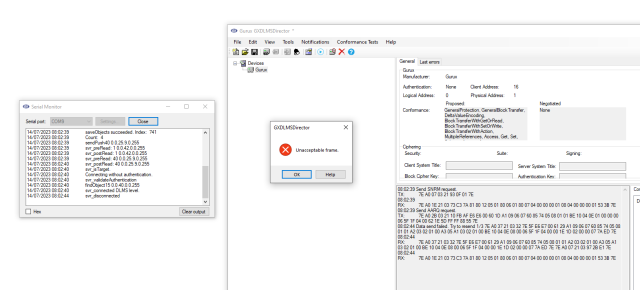
8. At this point I see a flurry of data, but then GXDLMSDirector pops up a dialog "Unacceptable Frame". Can anyone let me know why this is please?
the output in the main GXDLMSDirector window is:
----------------------------------------
07:48:38 Send SNRM request.
TX: 7E A0 07 03 21 93 0F 01 7E
07:48:43 Data send failed. Try to resend 1/3 7E A0 7E A0 2F 81 01 03 6A 65 E6 E7 00 0F C0 00 00 00 00 02 02 09 11 47 52 58 30 30 30 30 30 30 30 30 30 30 33 30 33 00 09 06 00 00 19 09 00 FF 66 E4 7E 7E A0 1E 21 03 73 C3 7A 81 80 12 05 01 80 06 01 80 07 04 00 00 00 01 08 04 00 00 00 01 53 3B 7E
07:48:48 Data send failed. Try to resend 2/3 7E A0 7E A0 2F 81 01 03 6A 65 E6 E7 00 0F C0 00 00 00 00 02 02 09 11 47 52 58 30 30 30 30 30 30 30 30 30 30 33 30 33 00 09 06 00 00 19 09 00 FF 66 E4 7E 7E A0 1E 21 03 73 C3 7A 81 80 12 05 01 80 06 01 80 07 04 00 00 00 01 08 04 00 00 00 01 53 3B 7E 7E A0 1E 21 03 73 C3 7A 81 80 12 05 01 80 06 01 80 07 04 00 00 00 01 08 04 00 00 00 01 53 3B 7E
07:48:49
RX: 7E A0 1E 21 03 73 C3 7A 81 80 12 05 01 80 06 01 80 07 04 00 00 00 01 08 04 00 00 00 01 53 3B 7E 7E A0 1E 21 03 73 C3 7A 81 80 12 05 01 80 06 01 80 07 04 00 00 00 01 08 04 00 00 00 01 53 3B 7E 7E A0 1E 21 03 73 C3 7A 81 80 12 05 01 80 06 01 80 07 04 00 00 00 01 08 04 00 00 00 01 53 3B 7E
07:48:49 Send AARQ request.
TX: 7E A0 2B 03 21 10 FB AF E6 E6 00 60 1D A1 09 06 07 60 85 74 05 08 01 01 BE 10 04 0E 01 00 00 00 06 5F 1F 04 00 62 1E 5D FF FF 88 55 7E
07:48:54 Data send failed. Try to resend 1/3 7E A0 37 21 03 32 7E 5F E6 E7 00 61 29 A1 09 06 07 60 85 74 05 08 01 01 A2 03 02 01 00 A3 05 A1 03 02 01 00 BE 10 04 0E 08 00 06 5F 1F 04 00 00 1E 1D 02 00 00 07 7A ED 7E
07:48:54
RX: 7E A0 37 21 03 32 7E 5F E6 E7 00 61 29 A1 09 06 07 60 85 74 05 08 01 01 A2 03 02 01 00 A3 05 A1 03 02 01 00 BE 10 04 0E 08 00 06 5F 1F 04 00 00 1E 1D 02 00 00 07 7A ED 7E 7E A0 07 21 03 97 2B E1 7E
07:48:54
RX: 7E A0 1E 21 03 73 C3 7A 81 80 12 05 01 80 06 01 80 07 04 00 00 00 01 08 04 00 00 00 01 53 3B 7E
----------------------------------------
The output in Serial Monitor for Serial1 is:
----------------------------------------
14/07/2023 07:48:38 Meter started.
14/07/2023 07:48:38 Communication speed 9600
14/07/2023 07:48:38 Test mode Is ON.
14/07/2023 07:48:38 LLS password: Gurux
14/07/2023 07:48:38 HLS password: Gurux
14/07/2023 07:48:38 saveObjects succeeded. Index: 741
14/07/2023 07:48:38 Count: 4
14/07/2023 07:48:38 saveObjects succeeded. Index: 741
14/07/2023 07:48:38 Count: 4
14/07/2023 07:48:38 EEPROM size 4096
14/07/2023 07:48:38 Server started.
14/07/2023 07:48:38 svr_preAction: 40 0.0.25.9.0.255
14/07/2023 07:48:38 saveObjects succeeded. Index: 741
14/07/2023 07:48:38 Count: 4
14/07/2023 07:48:38 saveObjects succeeded. Index: 741
14/07/2023 07:48:39 Count: 4
14/07/2023 07:48:39 sendPush40 0.0.25.9.0.255
14/07/2023 07:48:39 svr_preRead: 1 0.0.42.0.0.255
14/07/2023 07:48:39 svr_postRead: 1 0.0.42.0.0.255
14/07/2023 07:48:39 svr_preRead: 40 0.0.25.9.0.255
14/07/2023 07:48:39 svr_postRead: 40 0.0.25.9.0.255
14/07/2023 07:48:39 svr_isTarget.
14/07/2023 07:48:39 Connecting without authentication.
14/07/2023 07:48:43 svr_isTarget.
14/07/2023 07:48:43 Connecting without authentication.
14/07/2023 07:48:48 svr_isTarget.
14/07/2023 07:48:49 Connecting without authentication.
14/07/2023 07:48:49 svr_validateAuthentication
14/07/2023 07:48:49 findObject15 0.0.40.0.0.255
14/07/2023 07:48:49 svr_connected DLMS level.
14/07/2023 07:48:54 svr_disconnected
----------------------------------------
Have tried this multiple times today and yesterday, but always get the same problem.
Any help and suggestions appreciated please, as I'm very keen to try out the Arduino server.
Cheers, Rich.
I've still not been able to…
I've still not been able to resolve this issue. Is the current version of the Arduino server code working for others?
Hi All. For anyone else…
Hi All.
For anyone else fighting with the same issues I was, the current version of the Arduino server example does not seem to work - at least I failed to get it working on an Arduino Mega and a NodeMCU, both exhibit the same issues as per my first post from 14th July.
Yesterday I tried checking out the code as of commit c65175efc8917f0ee3a7eb340ac4e7672d9b9846 from 14th December 2022, and that works great on Arduino Mega. So a commit made after 14th Dec 2022 seems to have broken something.
Cheers, Rich.
Hi Rich, I'm sorry for the…
Hi Rich,
I'm sorry for the very slow reply. You are right and this is now fixed.
BR,
Mikko
Hi Mikko Thanks for the…
Hi Mikko
Thanks for the reply. I've tried latest version today (hash: 8db679df5972cc660f9a9f83fb6ff656b810ec53, dated 05-09-2023 13:42:45) but after having copied the updated src and include directories to the Arduino server example, I now get the following compilation errors:
C:\Users\...\DLMS\Gurux_Latest_Version\GuruxDLMS.c\Arduino_IDE\server\src\server.c: In function 'svr_handleRequest4':
C:\Users\...\DLMS\Gurux_Latest_Version\GuruxDLMS.c\Arduino_IDE\server\src\server.c:3447:40: error: 'dlmsServerSettings {aka struct <anonymous>}' has no member named 'localPortSetup'
if (baudrate > settings->localPortSetup->proposedBaudrate)
^~
C:\Users\...\DLMS\Gurux_Latest_Version\GuruxDLMS.c\Arduino_IDE\server\src\server.c:3449:40: error: 'dlmsServerSettings {aka struct <anonymous>}' has no member named 'localPortSetup'
baudrate = settings->localPortSetup->proposedBaudrate;
^~
C:\Users\...\DLMS\Gurux_Latest_Version\GuruxDLMS.c\Arduino_IDE\server\src\server.c:3476:72: error: 'dlmsServerSettings {aka struct <anonymous>}' has no member named 'localPortSetup'
if (bb_size(&meterAddress) != 0 && bb_compare(&settings->localPortSetup->deviceAddress, meterAddress.data, meterAddress.size) != 0)
^~
C:\Users\...\DLMS\Gurux_Latest_Version\GuruxDLMS.c\Arduino_IDE\server\src\server.c:3487:58: error: 'dlmsServerSettings {aka struct <anonymous>}' has no member named 'localPortSetup'
bb_setUInt8(sr->reply, '0' + settings->localPortSetup->proposedBaudrate) != 0 ||
^~
C:\Users\...\DLMS\Gurux_Latest_Version\GuruxDLMS.c\Arduino_IDE\server\src\server.c:3489:47: error: 'dlmsServerSettings {aka struct <anonymous>}' has no member named 'localPortSetup'
bb_set(sr->reply, settings->localPortSetup->deviceAddress.data, settings->localPortSetup->deviceAddress.size) != 0 ||
^~
C:\Users\...\DLMS\Gurux_Latest_Version\GuruxDLMS.c\Arduino_IDE\server\src\server.c:3489:93: error: 'dlmsServerSettings {aka struct <anonymous>}' has no member named 'localPortSetup'
bb_set(sr->reply, settings->localPortSetup->deviceAddress.data, settings->localPortSetup->deviceAddress.size) != 0 ||
^~
exit status 1
Compilation error: 'dlmsServerSettings {aka struct <anonymous>}' has no member named 'localPortSetup'
Cheers, Rich,
Hi Rich. This example does…
Hi Rich.
This example does not use an optical port and it was ignored. This is not fixed. Get the latest version from the development and it'll start to work after you update it,
BR,
Mikko