
Hello,
I downloaded the code from Github . https://github.com/Gurux/Gurux.DLMS.Net .
now i want to edit my Authentication values in the code.
MY AUTHENTICATION VALUES ARE :
Interface = HDLC
Authentication = MR
password = lnt1
so in the code i find a line Client.init(true, 16, 1, DLMS_AUTHENTICATION_NONE, NULL, DLMS_INTERFACE_TYPE_HDLC);
i want to know what values should i use there so it will connect to my meter .
i hope i will get a reply.
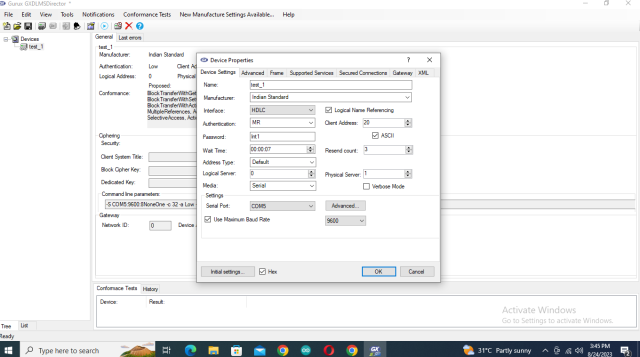
i went through the code,…
i went through the code,
please check if this is correct
Client.init(true, 16, 1, DLMS_AUTHENTICATION_LOW, "lnt1", DLMS_INTERFACE_TYPE_HDLC);
after making that change and…
after making that change and i uploaded the code to ESP32 .
my ESP32 got crashed.
Guru Meditation Error: Core 1 panic'ed (StoreProhibited). Exception was unhandled.
Core 1 register dump:
PC : 0x400e32f8 PS : 0x00060730 A0 : 0x800e2c68 A1 : 0x3ffb1f00
A2 : 0x3ffbdbd0 A3 : 0x0000000a A4 : 0x3ffbdbd0 A5 : 0x00000009
A6 : 0x0000000a A7 : 0x00000004 A8 : 0x800e3cf1 A9 : 0x3ffb1ee0
A10 : 0x3ffbdbd0 A11 : 0x400e352c A12 : 0x00000000 A13 : 0x00000000
A14 : 0x00000000 A15 : 0x00000000 SAR : 0x00000016 EXCCAUSE: 0x0000001d
EXCVADDR: 0x800e2c88 LBEG : 0x4000c2e0 LEND : 0x4000c2f6 LCOUNT : 0x00000000
ELF file SHA256: 0000000000000000
Backtrace: 0x400e32f8:0x3ffb1f00 0x400e2c65:0x3ffb1f40 0x400d13c8:0x3ffb1f80 0x400e3206:0x3ffb1fb0 0x40086246:0x3ffb1fd0
Rebooting...
this is what i got in the serial monitor.
Hi, The correct settings are…
Hi,
The correct settings are:
Client.init(true, 32, 1, DLMS_AUTHENTICATION_LOW, "lnt1", DLMS_INTERFACE_TYPE_HDLC);
Please, if you are using ANSI C, create a new topic if you have a new question.
BR,
Mikko
thanks for response . i will…
thanks for response .
i will let you know the status after implimenting the changes.
Hi, As you said i used the…
Hi,
As you said i used the settings mentioned.
Client.init(true, 32, 1, DLMS_AUTHENTICATION_LOW, "lnt1", DLMS_INTERFACE_TYPE_HDLC);
the error i got is
com_initializeConnection failed
Hi, Try to connect with…
Hi,
Try to connect with public client using settings like this:
Client.init(true, 15, 1, DLMS_AUTHENTICATION_NONE, NULL, DLMS_INTERFACE_TYPE_HDLC);
I believe it will work.
Are you using a ciphered connection with GXDLMSDirector? You can see that from the secured connections tab.
BR,
Mikko