Before commenting read Forum rules
Don't comment the topic if you have a new question.
You can create a new topic selecting correct category from Gurux Forum and then create a new topic selecting "New Topic" from the top left.

Before commenting read Forum rules
Don't comment the topic if you have a new question.
You can create a new topic selecting correct category from Gurux Forum and then create a new topic selecting "New Topic" from the top left.
Hello everyone
Currently i am working on DLMS Smart Meter , here I have Elster Meter and i am trying to connect but it showing me same error every time.
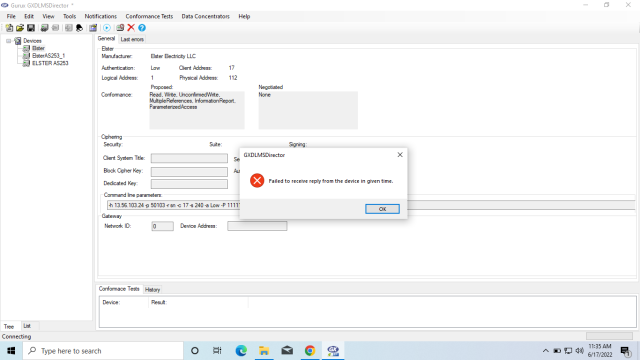
well it was working perfectly fine before one month but i moved on another project and now it showing me "Failed to receive reply from the device in given time" every time.
One more very interesting issue is ,i tried to connect with GURUX software but without USB connection with the meter i mean without any connection with the meter and i click on Connect button on GURUX software and after 3 4 seconds it showing same error "Failed to receive reply from the device in given time".
so with connection or without physical connection with meter i am receiving same error.
Parameter and everything i am using same that i was using before.
Please check and guide me.
Thanks
Muhammad Nouman
Hi,
Hi,
"Failed to receive a reply from the device in given time" means that client didn't receive any reply from the meter. That also happens if there is no connected meter.
One of your settings is wrong or the Elster meter doesn't support DLMS. Is there a DLMS label on the cover of the meter?
BR,
Mikko
Yes our meter support DLMS
Yes our meter support DLMS and also you can see in below attached picture.
Thank you
I am using same meter
I am using same meter settings that i tried before and on that time i was connected and successfully getting all the meter readings.
Please find below attached image.
Hi,
Hi,
Then the problem is in settings.
Check this video:
https://youtu.be/BeaWKmyMwuE
I hope it will help you to find the correct settings. Check especially the baudrate. That can be anything.
BR,
Mikko
is Host Address matters ?
is Host Address matters ?
if my host Address not working then it can be an issue ?
Hi,
Hi,
It might be the server address, especially if you are using the RS-485 bus. Usually, it's client address or wrong serial port settings.
BR,
Mikko
Hi,
Hi,
Check your cable if this is the same meter that you were using before.
BR,
Mikko
How we can Change default
How we can Change default port ?
COM3 and connected is COM1
COM3 and connected is COM1
03:16:57.297 Info Opening
03:16:57.297 Info Opening
03:16:57.297 Info Serial Port Settings: Port Name: COM1 Baud Rate: 9600 Data Bits: 8 Parity: None Stop Bits: One Flow Control: None Eop: None
i think GURUX is connected
i think GURUX is connected with COM1 and in my laptop there is no COM1 as i understand.
Please guide me if i am right.
Hello Mikko Kurunsaari
Hello Mikko Kurunsaari
finally i solved my errors ,Really Thank you so much for your support.
Thank you
Hi,
Hi,
I'm glad this works.
BR,
Mikko
Hello Mikko Kurunsaari
Hello Mikko Kurunsaari
last time i solved and was getting all values perfectly now i don't know why again i am getting same error.
my settings are still same.
Failed to receive reply from the device in given time
please check if you can guide me
Hi,
Hi,
Check your serial port settings and cable. I believe that the reason is one of those.
BR,
Mikko