Before commenting read Forum rules
Don't comment the topic if you have a new question.
You can create a new topic selecting correct category from Gurux Forum and then create a new topic selecting "New Topic" from the top left.

Before commenting read Forum rules
Don't comment the topic if you have a new question.
You can create a new topic selecting correct category from Gurux Forum and then create a new topic selecting "New Topic" from the top left.
Hello. My name is Evgen. I can't connect in Gurux GXDLMSDirector to ACE6000 via RS485 (after press "Connect" get "Fail to receiver reply from the device in given time"). For serial port i have 9600 8n1. I try with Authentication None and Low (with password ABCDEFGH) and get same connection error. In serial mort monitoring program i saw that data sent to ace6000 but nothing received from ace6000. Anybody can help me to solve this problem?
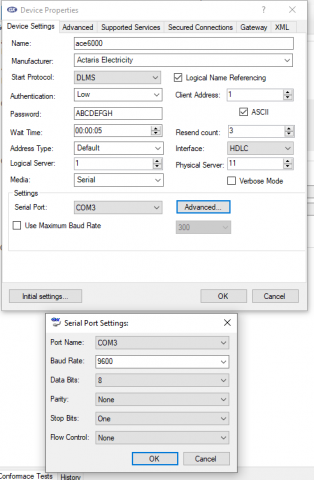
Hi,
Hi,
Check your baud rates. Meter can use some other baud-rate. Ex. 4800.
Then check that there is a DLMS label on your meter. There are some older models from LS 7000 and ACE 6000 that are not supporting DLMS. Your meter might support only IEC870-5 and in that case you can't read it with DLMS.
BR,
Mikko
Hi,
Hi,
i tried 2400, 4800, 9600 and 19200 baud-rate. I tried to connect to both of 2 ports RS485 (on this meter 2 ports). This meter have DLMS label. I two times make connection cable (from RJ45 contact 4,5 to RS485 contact A , and from RJ45 contact 2,7 to PS485 contact B). What else can I try?
Hi,
Hi,
Your settings are correct, but I just remember that there are ACE6000 meters that require that server address size is 4 bytes. Try this: Change "Server address size" to 4 like picture below.
BR,
Mikko
Hi,
Hi,
I set server address size to 4 - get nothing (connection error). Also I find information that in some field I must enter last 4 digits of serial number (in HEX mode). In "Client address" I can't set it ( FF hex - max ), in "Physical address" - also get nothing - same connection error. What else can I try?
Hi,
Hi,
Our clients are reading directly without serial number addressing, but you can try.
Select Gurux as meter manufacturer and select "Serial number" to address Type.
Then give the last four digits, but don't give them in hex. Then try to make the connection.
If that doesn't work, try to set 7F to the physical server address. It's a broadcast address, but I don't know is your meter supporting it.
BR,
Mikko
I just happend to read
I just happend to read ACE6000 yesterday via optical probe,
Try this setting:
Start Protocal : IEC
Authentication : Low
Password : ABCDEFGH
Client Add : 1
Logical Server : 1
Physical Server : 11
Baudrate : 300:7 Even 1
Hi,
Hi,
I can't select "serial number" in Address Type, only "Default" in list.
I try to set 7F and last four digits of serial as physical server address - no result (only connection error)
Hi,
Hi,
I can't use optical probe, port is sealed. I try to use your settings ( IEC, 7Even1 with speed up to 9600) for serial port and this don't solve a problem with connection
Hi,
Hi,
For RS-232 or RS-285 connections, settings are always 8None1. Only Baudrate changes.
I believe that the problem is the wrong baud rate or your meter is using other server addresses.
BR,
Mikko