Before commenting read Forum rules
Don't comment the topic if you have a new question.
You can create a new topic selecting correct category from Gurux Forum and then create a new topic selecting "New Topic" from the top left.

Before commenting read Forum rules
Don't comment the topic if you have a new question.
You can create a new topic selecting correct category from Gurux Forum and then create a new topic selecting "New Topic" from the top left.
Hi again!
I'm stuck with setting up ActivityCalendar. My question has two parts.
1. How can I change the ActivityCalendar with GuruX DLMSDirector? I think - step by step. On the Images is current settings of meter's ActivityCalendar. How should I add new time point, that meter change it's tariff? What kind of a scripts are written in existing points?
2. Same questions, but with python library. I think, if I'll understand how can i change this object with Director, i can figure it out on my own, but maybe here's features, that is not so transparent at first view.
Thanks in advance for your answer!
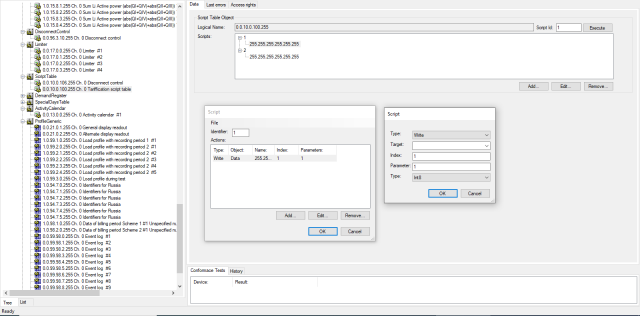
Second image
Second image
Hi,
Hi,
First, you need to add day profile to passive table. Add day and then add an action(s) to that day. Then add week profile table. Give name to that week and set day id to week days when you want to execute the script.
Then create a season profile. Give name to that profile and set execution time.
After you have written that to the meter you can activate it.
BR,
Mikko
Thanks for answer, but it's
Thanks for answer, but it's still not clear. My main question is linking "scripts" and "action" to day. As I understood, when action creating you can set "Selector" field, which is identifier of script in the corresponding table. Now there is two scripts, as you can see on the first image. I need to add new script, and here I'm stuck. I need to turn meter to the third tariff with this script. Time is managed by ActivityCalendar, but what should i set in script's parameters?
Also, how should I "activate"
Also, how should I "activate" passive table with python?
Hi,
Hi,
We'll add activatePassiveCalendar method to GXDLMSActivityCalendar tomorrow.
In the mean time you can call :
ac = GXDLMSActivityCalendar(...)
cl.method(ac, 1, int(0), DataType.INT8)
BR,
Mikko
Good, thank you, but what
Good, thank you, but what about scripts?
Hi,
Hi,
When you add GXDLMSScriptAction you set script to target. Like this:
dpa = GXDLMSDayProfileAction()
dpa.startTime = #Time then scrip is executed.
dpa.scriptLogicalName = #OBIS code of executed script.
dpa.scriptSelector = #Executed script ID.
BR,
Mikko
Yes, that's clear. Problems
Yes, that's clear. Problems are elsewhere.
Suppose I want to add an action into current day profile. This action should turn on the third tariff. I set startTime = 23:30:00, scriptLogicalName=ln of Tarrification script Table (Image 2) and set the scriptSelector to 3. Now I need to add new script in Tariffication Script Table with the id=3. But i can't do this. I adding new script, set it identifier 3, try to add an action and stuck on field Target. Existing scripts in this table has an empty target, but for me it makes no sense! Can you please explain me what should I do to create new script, that will be change the meter's tariff to 3?
Hi,
Hi,
Open Script table object 0.0.10.0.100.255. Read all scripts. You can see all scripts that you can invoke.
If Add button is enabled, you can add new Tariffication Scripts.
In the Activity calendar, you can define what script you will call. If your target is empty, I believe that the Activity calendar is not calling any script. This might be an accident or your meter is configured wrong.
If you want to change meters tariff #3, you add new a new action to day profile. Set start time, target script, and set #3 to the selector.
BR,
Mikko
Ok, I will try this. Thank
Ok, I will try this. Thank you!