Before commenting read Forum rules
Don't comment the topic if you have a new question.
You can create a new topic selecting correct category from Gurux Forum and then create a new topic selecting "New Topic" from the top left.

Before commenting read Forum rules
Don't comment the topic if you have a new question.
You can create a new topic selecting correct category from Gurux Forum and then create a new topic selecting "New Topic" from the top left.
The code which is available
The code which is available in github is all about socket programming for gurux dlms python framework.
I want to know whether there is any source code for serial port programming for gurux dlms python framework
Hi,
Hi,
I believe that your python version is wrong. Try to run this as "python3 main.py".
Support for the serial port is added later.
BR,
Mikko
okay by what time serial port
okay by what time serial port code will be added
Hi,
Hi,
It's in the test phase. We'll release it in August.
BR,
Mikko
After compiling main file we
After compiling main file we are getting like this. what we need to do next. For serial port what we need to give as command line arguments.
thanks
Hi,
Hi,
Python does not support serial port at the moment.
BR,
Mikko
Hi Mikko,
Hi Mikko,
U said that python framework for serial port will be released in august.
By what date it will be release?
Thanks
Hi,
Hi,
We are testing it at the moment. We'll try to release it as soon as possible. I can't give any exact date.
BR,
Mikko
I'm trying to connect via
I'm trying to connect via serial port but im getting errors.
why, it wont work for serial port now??
Thanks
Hi,
Hi,
Serial port implementation for Python is not released yet. Only TCP/IP connection is released.
BR,
Mikko
Hi Mikko,
Hi Mikko,
Is python code ready for serial port?
Is it ready or still work in progress?
Thanks
Hi,
Hi,
We released the first version last Friday. You can communicate over the serial port, but we are making a few changes so communication is possible using an optical head (probe). This version is released during this week.
BR,
Mikko
okay thanks Mikko
okay thanks Mikko
Hi Mikko,
Hi Mikko,
Recently you uploaded code for serial port communication.
how to run that Gurux.Serial.python-master?
I mean which file we have to run.
Thanks waiting for ur fast reply
Hi,
Hi,
You don't run gurux-serial. You run it like this:
python Gurux.DLMS.Client.Example.python -s "SERIAL_PORT_TO_USE"
You need to update the serial port to correct one. We'll make a video tomorrow.
BR,
Mikko
Hi,
Hi,
we run the code like as u said but im getting this error.
please check it once.
And when your going to upload a video of this?
Thanks
HI,
HI,
run this:
pip install --upgrade gurux-serial
pip install --upgrade gurux-dlms
We are working with the video at the moment.
BR,
Mikko
Hi Mikko
Hi Mikko
Even though we gave correct port number we are getting this error.
Hi,
Hi,
You need to change "UPDATE CORRECT PORT" to "COM1" or "Com3" in the example.py.
BR,
Mikko
Hi,
Hi,
You should check this video.
https://youtu.be/OcmYvcsgjz4
BR,
Mikko
Hi Mikko,
Hi Mikko,
we run the code like as u explain in the video but we are getting like this.
we checked from meter side also but we are able to read the values in GXDLMSDIRECTOR successfully
Thanks
Hi,
Hi,
What serial port you are using? Is that connected to the USB port? Can you give link to the manufacturer page?
BR,
Mikko
how can we give a link to
how can we give a link to manufacturer page?
please can u explain?
Hi,
Hi,
What is the model and manufacturer of your serial port?
BR,
Mikko
I'm using RS232 serial port
I'm using RS232 serial port and DB9 pin
Hi,
Hi,
Yes, but I need information from the manufacturer and model of the serial port.
Is that integrated to the PC or is it USB port?
BR,
Mikko
It is a TriVector meter and I
It is a TriVector meter and I'm using USB port to connect to my PC.
Hi,
Hi,
What is the manufacturer and model of the USB port?
BR,
Mikko
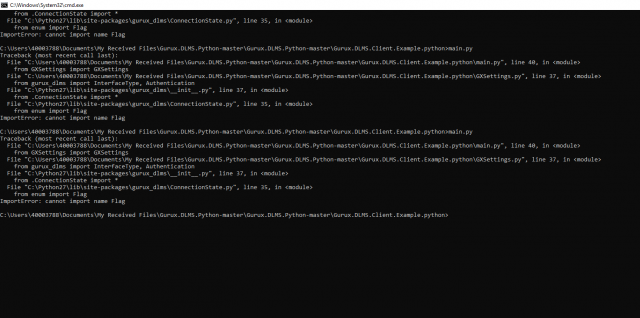
I have the same error:
I have the same error:
My output:
Available ports:
Traceback (most recent call last):
File "test.py", line 97, in <module>
sampleclient()
File "test.py", line 13, in __init__
print(str(GXSerial.getPortNames()))
File "C:\Python27\lib\site-packages\gurux_serial\GXSerial.py", line 148, in getPortNames
return cls.__initialize().getPortNames()
File "C:\Python27\lib\site-packages\gurux_serial\_handlers\GXWindowsHandler.py", line 206, in getPortNames
raise Exception('Failed to get port names: {!r}'.format(ctypes.WinError(ret)))
Exception: Failed to get port names: WindowsError(2, 'The system cannot find the file specified.')
I'm running the example code from 'github's readme' page.
I'm using the usb to rs232 converter (based on ftdi chip) (it's id is FTDIBUS\\VID_0403+PID_6001+A5057FY9A\\0000)
Regards
pafcioz
I don't know exactly maybe
I don't know exactly maybe try with python 3
Hi pafcioz,
Hi pafcioz,
Please, if you have a new question, create a new topic.
This is not the same error. What version from Windows you are using? We might know the reason for this.
BR,
Mikko
Hi,
Hi,
There is a new version (1.0.12) from gurux-serial where ASCII and UNICODE support is improved.
Let me know if you have problems.
BR,
Mikko
Hi Mikko,
Hi Mikko,
While running the code we are getting the error as below.
please check the picture what i send
Thanks
After reading it is
After reading it is successfully disconnected but still it is in waiting stage and it is not coming back to console(not terminating).
please check the picture what i send.
Thanks
Hi,
Hi,
Please, don't send pics. It's hard to get data from there. Paste received bytes and I'll check it. Don't paste all data, just failed one and.
updateAuthenticationMechanismName is fixed and a new version (1.0.17) is released. It'll fix the first image issue.
Can you run the app with -t Verbose parameter and send DisconnectRequest data. I need to check why meter is no reply.
BR,
Mikko
We tried with updated code
We tried with updated code but we are getting the same error.
Hi,
Hi,
Did you run pip install --upgrade gurux-dlms? jointIsoCtt is fixed and it succeeds.
BR,
Mikko
In my case upgrading library
In my case upgrading the library to 1.0.12 helped.
Yes that problem is sorted
Yes that problem is sorted out now.
Only problem is now after reading data it is showing disconnected request then the console is not coming back.
Thanks
Hi,
Hi,
Can you run the app with "-t Verbose" parameter and send DisconnectRequest data. I need to check why the meter is no reply.
BR,
Mikko
Hi Mikko
Hi Mikko
Like U said in the video if we are running the code we are getting all values.
But we want individual values like if we send particular obs code we have to get that particular values.
We tried to run with -g while running but we are facing issues like
C:\Users\test.EMMYS1546\Desktop\Gurux.DLMS.Python-master\Gurux.DLMS.Client.Example.python>main.py -S COM3 -g \"0.0.1.0.0.255:1\"
Traceback (most recent call last):
File "C:\Users\test.EMMYS1546\Desktop\Gurux.DLMS.Python-master\Gurux.DLMS.Client.Example.python\main.py", line 53, in main
ret = settings.getParameters(args)
File "C:\Users\test.EMMYS1546\Desktop\Gurux.DLMS.Python-master\Gurux.DLMS.Client.Example.python\GXSettings.py", line 170, in getParameters
raise ValueError("Invalid Logical name or attribute index.")
ValueError: Invalid Logical name or attribute index.
Ended. Press any key to continue.
Thanks
Hi,
Hi,
Get the latest version from GitHub. This is fixed.
BR,
Mikko
Hi Mikko,
Hi Mikko,
We are getting values for the selected objects, But if we want all attributes of a single OBS code then how to do it.
Thanks,
Ram.
Hi,
Hi,
You need to loop all object attributes and read them all. Check client example it does what you require.
BR,
Mikko
Hi Mikko,
Hi Mikko,
We didn't find anything in client example regarding loop of object attributes. Can you tell the exact file location where it is.
Thanks and Regards,
Ram.
How to get all the OBIS code
How to get all the OBIS code that all present in the meter along with its attributes??
Like:
<Data Obis="0.0.1.0.0.255" IC="8" MethodID="0" Action="Get" Attributes="1,2" Version="0" />
Thanks
Hi Ram,
Hi Ram,
Check GetReadOut method. It reads association view from the meter and then reads all attributes for each object.
Association view described what kind of functionality meter can offer.
BR,
Mikko
Like,if I gave something OBIS
Like,if I gave something OBIS-0.0.1.0.0.255 I want to get all the values at a time.
Is it possible?If possible How?
Thanks
Hi,
Hi,
No. You can't get all values reading one OBIS code. You need to read each object separately.
BR,
Mikko
I want to get all the values
I want to get all the values for given one specific obis code and u said that there is a for loop in client example where is that for loop in our code? I mean in which file/folder.
Thanks