Before commenting read Forum rules
Don't comment the topic if you have a new question.
You can create a new topic selecting correct category from Gurux Forum and then create a new topic selecting "New Topic" from the top left.

Before commenting read Forum rules
Don't comment the topic if you have a new question.
You can create a new topic selecting correct category from Gurux Forum and then create a new topic selecting "New Topic" from the top left.
Reading meter info from SECURE Premier 300 meter
Doing this using serial port on meter. Using RS232 over RJ11 port I am not able to connect to meter.
Refresh button is not active. Connections pic is attached. Am I doing it the right way GURUX.
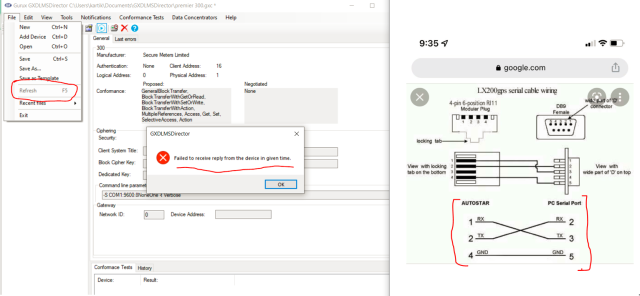
Connection of RJ11 cable to
Connection of RJ11 cable to RS232(DB9) to USB converter
Hi,
Hi,
The meter doesn't reply because of:
1. Wiring is wrong.
2. Your baud rate is wrong.
Check those. You can ask for the correct baud rate from the meter vendor or meter manual.
BR,
Mikko
This is the meter RJ11 pin
This is the meter RJ11 pin definition received from the manufacturer and now done the handshaking on the DB9 connector, still after connections to the meter, setting parameters (Baud rate - 9600 , Parity - None, stop bit -1, Data bits – 8 , authentication password – ABCD0001) and when I have open the utility still "refresh" button is inactive.
Regards,
Kartikey
Do I have to add OBIS codes
Do I have to add OBIS codes in the Tools section for secure meters Ltd.
Hi,
Hi,
All objects are read after the connection is established for the meter. You don't need to add anything.
BR,
Mikko
Hi,
Hi,
You need to press Connect to establish the connection to the meter. Refresh-button is activated after the connection is established.
BR,
Mikko
Hi Mikko,
Hi Mikko,
I am not able to establish the connection on the meter. I have the Secure Premier 300 3phase energy meter. I am taking CRO snapshot of Tx and Rx pin on the meter RJ11 port after I press Connect and it transmits some packets, and after that it shows "Disconnect Mode" OR "Invalid Header Checksum". Both screenshot attached
I am taking the Client Address(0x14 or 20), Logical(0) and Server Address(1), Authentication- LOW (ABCD0001).
So why Disconnect mode is showing. Can you please explain.
Please suggest.
Regards,
Kartikey
Last Frame is THIS:
Last Frame is THIS:
GXDLMSDirector 8.1.2109.3001
Log created 19:39:32
19:42:39 Initializing serial connection.
19:42:40 Send SNRM request.
7E A0 07 03 41 93 5A 64 7E
19:42:40
7E A0 20 41 03 73 3E 9D 01 00 00 05 02 02 00 06 02 02 00 06 00 00 00 00 01 08 04 00 00 00 01 4F EF 7E
System.Exception: Invalid data checksum.
at GXDLMSDirector.GXDLMSCommunicator.InitializeConnection(Boolean force)
at GXDLMSDirector.GXDLMSDevice.InitializeConnection()
at GXDLMSDirector.MainForm.Connect(Object sender, GXAsyncWork work, Object[] parameters)
19:43:35 Initializing serial connection.
19:43:36 Send SNRM request.
7E A0 07 03 41 93 5A 64 7E
19:43:41 Data send failed. Try to resend 1/3
Data send failed. Try to resend 1/3
19:43:46 Data send failed. Try to resend 1/3
7E A0 07 03 41 93 5A 64 7E
Data send failed. Try to resend 2/3
19:43:51 Data send failed. Try to resend 2/3
7E A0 07 03 41 93 5A 64 7E
Data send failed. Try to resend 3/3
19:43:56 Data send failed. Try to resend 3/3
7E A0 07 03 41 93 5A 64 7E
19:44:01 Failed to receive reply from the device in given time.
7E 00 20 41 03 73 3E 9D 81 80 00 04 00 00 00 06 02 02 00 07 04 00 00 00 01 08 04 00 00 00 01 6F CE 7C 7E A0 20 41 03 73 3E 1D 00 80 14 05 02 02 00 06 00 00 00 07 04 00 00 00 01 08 00 00 00 00 01 6F EF 7E 7E A0 20 41 03 73 3E 9D 81 00 00 00 02 02 00 06 02 02 00 06 00 00 00 00 01 08 04 00 00 00 01 6F CE 7C 7E A0 20 41 03 73 3E 1D 00 80 14 05 02 02 00 06 02 02 00 06 04 00 00 00 01 08 00 00 00 00 01 6F EF 7E 7E
19:44:01
7E 00 20 41 03 73 3E 9D 81 80 00 04 00 00 00 06 02 02 00 07 04 00 00 00 01 08 04 00 00 00 01 6F CE 7C 7E A0 20 41 03 73 3E 1D 00 80 14 05 02 02 00 06 00 00 00 07 04 00 00 00 01 08 00 00 00 00 01 6F EF 7E 7E A0 20 41 03 73 3E 9D 81 00 00 00 02 02 00 06 02 02 00 06 00 00 00 00 01 08 04 00 00 00 01 6F CE 7C 7E A0 20 41 03 73 3E 1D 00 80 14 05 02 02 00 06 02 02 00 06 04 00 00 00 01 08 00 00 00 00 01 6F EF 7E 7E
19:44:01 Disconnect request
19:44:01 Send Disconnect request.
7E A0 07 03 41 53 56 A2 7E
Data send failed. Try to resend 1/3
19:44:07 Data send failed. Try to resend 1/3
7E A0 07 03 41 53 56 A2 7E
Data send failed. Try to resend 2/3
19:44:12 Data send failed. Try to resend 2/3
7E A0 07 03 41 53 56 A2 7E
19:44:12
A0 20 41 03 73 3E 9D 81 00 00 05 02 02 00 06 02 02 00 07 00 00 00 00 01 08 04 00 00 00 01 4F CE 7C 7E A0 20 01 02 62 3C 9D 81 80 14 05 02 02 00 04 00 02 00 07 04 00 00 00 01 00 00 00 00 00 01 6F EF 7E 7E A0 07 01 02 1E 26 EC 7E 7E A0 07 41 03 1E 04 C8 7E
System.Exception: Invalid header checksum.
at Gurux.DLMS.GXDLMS.GetHdlcData(Boolean server, GXDLMSSettings settings, GXByteBuffer reply, GXReplyData data, GXReplyData notify)
at Gurux.DLMS.GXDLMS.GetHdlcData(Boolean server, GXDLMSSettings settings, GXByteBuffer reply, GXReplyData data, GXReplyData notify)
at Gurux.DLMS.GXDLMS.GetHdlcData(Boolean server, GXDLMSSettings settings, GXByteBuffer reply, GXReplyData data, GXReplyData notify)
at Gurux.DLMS.GXDLMS.GetData(GXDLMSSettings settings, GXByteBuffer reply, GXReplyData data, GXReplyData notify)
at Gurux.DLMS.GXDLMSClient.GetData(GXByteBuffer reply, GXReplyData data, GXReplyData notify)
at GXDLMSDirector.GXDLMSCommunicator.ReadDLMSPacket(Byte[] data, Int32 tryCount, GXReplyData reply)
at GXDLMSDirector.GXDLMSCommunicator.ReadDataBlock(Byte[] data, String text, Int32 multiplier, Int32 tryCount, GXReplyData reply)
at GXDLMSDirector.GXDLMSCommunicator.InitializeConnection(Boolean force)
at GXDLMSDirector.GXDLMSDevice.InitializeConnection()
at GXDLMSDirector.MainForm.Connect(Object sender, GXAsyncWork work, Object[] parameters)
Hi,
Hi,
The meter sends invalid data. One byte is missing. I know that our clients are reading SECURE Premier 300 meters. You need to ask if there is a firmware update available for your meter.
You can try this: Select "Frame" tab and change payload size from 128 to 512. Then try to connect again
BR,
Mikko
Hello, A question. Can I use…
Hello,
A question. Can I use RS485 to read from the meter using the RS485 extension for Secure Premier 300?
What is the default address of the meter?
Can you share the Modbus address mapping?