Before commenting read Forum rules
Don't comment the topic if you have a new question.
You can create a new topic selecting correct category from Gurux Forum and then create a new topic selecting "New Topic" from the top left.

Before commenting read Forum rules
Don't comment the topic if you have a new question.
You can create a new topic selecting correct category from Gurux Forum and then create a new topic selecting "New Topic" from the top left.
Hi Mikko,
I'm trying to write data to meter ELMEASURE SM 5121 from the java library.
I am connected to the the meter in the US association mode (which has write access), I am able to read data but I get the following error for any object I try to write:
gurux.dlms.GXDLMSException: Access Error : Device reports Read-Write denied.
at com.leanovate.DLMSDriver.GXDLMSReader.readDLMSPacket(GXDLMSReader.java:1054)
at com.leanovate.DLMSDriver.GXDLMSReader.readDLMSPacket(GXDLMSReader.java:893)
at com.leanovate.DLMSDriver.GXDLMSReader.writeObject(GXDLMSReader.java:716)
at com.leanovate.DLMSDriver.point.BDLMSDriverProxyExt.write(BDLMSDriverProxyExt.java:577)
at javax.baja.driver.point.Tuning.write(Tuning.java:346)
where GXDLMSReader.java:1054 is a call to GXDLMSClient.getData.
I get the same error when I try to write to the clock object from the GXDirector (attached WriteError1.png).
Also, how to confirm write on object 1.0.0.8.0.255 (which the demand integration period), pressing enter brings a yellow warning value changed icon, but write is not sent in the Tx/Rx window (attached WriteError2.png). How to confirm write to object. (1.0.0.8.0.255 has read/write access)?
Thank you so much!!
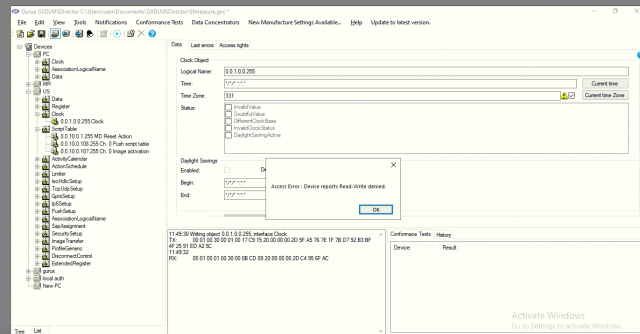
2nd image.
2nd image.
Hi Mithun,
Hi Mithun,
You can verify the access right if you press "Refresh" from "File" menu. It will read association view and updates access rights. Your timezone value 331 is wrong. Correct that first.
I believe that your meter is using Indian standards.
If you want to write the time, you need to check "Use UTC time zone, not standard" from the meter settings. Without that the time is not correct.
BR,
Mikko
Hi Mikko,
Hi Mikko,
I did not confirm the timezone as 331, but clicked current timezone and selected okay when the dialog box opened for "Are you sure you want to set time zone of the PC to the meter?", that's when the error happened. The 331 was an experiment I was trying to see if I can write, but could not figure out how to confirm the write so left it at 331 itself.
I clicked current time zone button now without changing to 331, it is now 330, but still the same error persists (attached WriteError3.png).
The access rights for object 1.0.0.8.0.255 (which the demand integration period) is Read/Write for the value attribute (attached WriteError4.png).
WriteError4.png
WriteError4.png
Hi Mithun,
Hi Mithun,
Please, don't add images, they are compressed and hard to read.
What is the value if you read the time zone from the meter? Have you checked "Use UTC time zone, not standard"? If I can see the bytes correctly, you haven't check it.
BR,
Mikko
Hi Mikko,
Hi Mikko,
Ther's a checkbox that if I deselect, the "Current time zone" button disables and if I select the button reenables.
After deselection I get the "value changed" icon beside the checkbox, but I don't know how to confirm/ok the write. Pressing enter is not working.
If I do select the checkbox and click the "Current time zone button", I get the same error of "Access Error: Device reports Read-Write denied."
Hi Mithun,
Hi Mithun,
You need to select device and then "View" and "Properties". Select "Advanced" tab and check "Use UTC time zone, not standard. Indian meters are using time deviation a different than DLMS standard defines.
You can get more info from here:
http://www.gurux.fi/Gurux.DLMS.Objects.GXDLMSClock#deviation
BR,
Mikko
Hi Mikko,
Hi Mikko,
The "Use UTC time zone, not standard" is checked in the device properties.
My main concern is I'm not able to write to object 1.0.0.8.0.255 (which the demand integration period).
I keep getting the error "Access Error: Device reports Read-Write denied" from both the java library and GXDirector.
Since US is High authentication, could there be any other reason for this error?
Sorry for so many messages, and thank you so much for taking the time!! :))
Hi Mithun,
Hi Mithun,
Have you pressed the write button after you did change the value? It's on the right side of the Read button.
BR,
Mikko
Hi Mikko,
Hi Mikko,
That worked on GXDirector!! Thank you!
Here's the bytes exchange:
18:20:52 Writing object 1.0.0.8.0.255, interface Data 1800 -> 900
TX: 00 01 00 30 00 01 00 17 C9 15 20 00 00 01 97 0D A3 E2 ED D4 C6 D3 E7 94 D1 70 A4 05 F1 5D 63
18:20:53
RX: 00 01 00 01 00 30 00 0B CD 09 20 00 00 01 74 A7 78 1C 84
18:20:53 Reading object 1.0.0.8.0.255, interface Data
TX: 00 01 00 30 00 01 00 14 C8 12 20 00 00 01 98 BA A0 E4 56 39 58 A5 95 B8 81 26 8C A5
18:20:54
RX: 00 01 00 01 00 30 00 0E CC 0C 20 00 00 01 75 D7 03 66 38 B0 EB 52
However it not working for me from the java code , here's the bytes:
TX > 00 01 00 30 00 01 00 19 C9 17 20 00 00 03 CA 73 32 1B 7D 58 61 60 9E 4C 87 03 CA 94 BF A3 47 7D 64
RX < 00 01 00 01 00 30 00 0B CD 09 20 00 00 03 A9 09 62 E8 24
gurux.dlms.GXDLMSException: Access Error : Device reports Read-Write denied.
at com.leanovate.DLMSDriver.GXDLMSReader.readDLMSPacket(GXDLMSReader.java:1063)
at com.leanovate.DLMSDriver.GXDLMSReader.readDLMSPacket(GXDLMSReader.java:919)
at com.leanovate.DLMSDriver.GXDLMSReader.writeObject(GXDLMSReader.java:742)
at com.leanovate.DLMSDriver.point.BDLMSDriverProxyExt.write(BDLMSDriverProxyExt.java:584)
at javax.baja.driver.point.Tuning.write(Tuning.java:346)
Is there something I'm doing wrong in the code? Here's the simplified code:
int attributeIndex = 2;
String obis = "1.0.0.8.0.255";
GXDLMSData prt = new GXDLMSData(obis);
prt.setValue("900");
prt.setDataType(attributePos, DataType.STRING);
GXDLMSReader.writeObject(prt, attributeIndex);
What am I doing wrong compared to GXDirector?
Thank you so much!
Hi Mithun,
Hi Mithun,
Your data is encrypted, so I can't read it, but your data type is wrong. It should be UInt16 and not a string.
BR,
Mikko
Hi MIkko,
Hi MIkko,
Setting datatype to UInt16 worked!!!
Thank you so much!!