Before commenting read Forum rules
Don't comment the topic if you have a new question.
You can create a new topic selecting correct category from Gurux Forum and then create a new topic selecting "New Topic" from the top left.

Before commenting read Forum rules
Don't comment the topic if you have a new question.
You can create a new topic selecting correct category from Gurux Forum and then create a new topic selecting "New Topic" from the top left.
hello, i have tried Gurux with holley ddsd285 and some other types and still facing the same errors when trying to edit access to read or write, kindly check the images below.
and also when requesting a reset process for a value i'm getting : Access error : Device reports a hardware fault with the yellow caution of : Device reports a undefined object.
everything else is working fine, but i still can't write even when connecting in low authentication mode with 00000000 as pwd.
i'm using a serial connection, please advise.
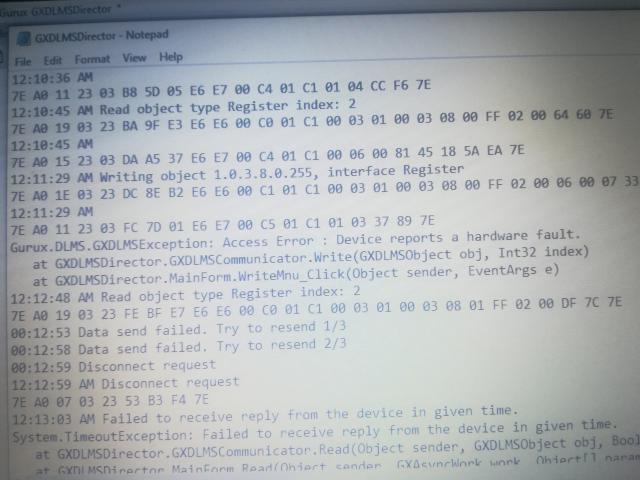
sorry didn't know how to
sorry didn't know how to upload all images in one post
final error
final error
Hi Hermes,
Hi Hermes,
Please, don't paste images. They don't give me any more info. Are you sure that you can write a register value? What is access right level when you read the association view? Have you change the access level by your self?
BR,
Mikko
no i can't write all
no i can't write all registers only some of them with the read/write access level.. the error appears when the values are in no access level, and when i've tried to change the access level i receive the other error.
now my problems doubled, i have changed the secret for the low level authentication from eight zero's to 12345 and i pressed update and it was accepted and the ASCII check box was true checked, but i can't login now with the updated password.
Dear i have to reset these 13 Chinese holley meters, and no body is responding from the company's website, this is my goal if you recommend another easy way or another higher access login.
Thanks and i'm sorry i'll stick to text
Hi,
Hi,
Support from meter manufacturers is a joke. Try to use 8 chars in password, not more, not less. :-)
Undefined object means that that object don't exist in the meter. I don't know if that is the real reason.
Can you add read and write log to here? Don't add anything else. I can check them.
BR,
Mikko
Thanks Sir,
Thanks Sir,
After fail to login in low authentication as client address "11", I'm trying now to login as client address 12 or 13, but i'm receiving an unknown error, used the common passwords ABCD0000 and others;
i can access the none security login as client address "10" but you know i need more access.
here is the log to that unknown error, Thanks
17:27:27 Initializing serial connection.
5:27:29 PM Send SNRM request.
7E A0 07 03 25 93 6F 66 7E
5:27:29 PM
7E A0 1E 25 03 73 A2 19 81 80 12 05 01 80 06 01 80 07 04 00 00 00 01 08 04 00 00 00 01 53 3B 7E
17:27:29 Parsing UA reply succeeded.
5:27:29 PM Send AARQ request.
7E A0 4C 03 25 10 5E 06 E6 E6 00 60 3E A1 09 06 07 60 85 74 05 08 01 01 8A 02 07 80 8B 07 60 85 74 05 08 02 02 AC 12 80 10 4A 5E 58 13 0C 72 3D 76 2C 1B 26 61 53 63 53 5F BE 10 04 0E 01 00 00 00 06 5F 1F 04 00 00 1E 1D FF FF E0 44 7E
5:27:29 PM
7E A0 58 25 03 30 10 34 E6 E7 00 61 4A A1 09 06 07 60 85 74 05 08 01 01 A2 03 02 01 00 A3 05 A1 03 02 01 00 88 02 07 80 89 07 60 85 74 05 08 02 02 AA 12 80 10 66 F5 30 B0 84 1A 78 9F 51 4B 93 BB C9 97 BD 0E BE 10 04 0E 08 00 06 5F 1F 04 00 00 18 1D 00 F0 00 07 A1 89 7E
17:27:29 Parsing AARE reply succeeded.
5:27:29 PM Authenticating.
7E A0 2B 03 25 32 8B CA E6 E6 00 C3 01 C1 00 0F 00 00 28 00 00 FF 01 01 09 10 CA B1 93 9B 10 D7 9E 54 BF F1 B5 AA A4 9F D5 3F C7 5B 7E
5:27:29 PM
7E A0 10 25 03 52 6B 87 E6 E7 00 C7 01 C1 FF 5E BF 7E
Gurux.DLMS.GXDLMSException: Unknown Error.
at GXDLMSDirector.GXDLMSDevice.InitializeConnection()
at GXDLMSDirector.MainForm.Connect(Object sender, GXAsyncWork work, Object[] parameters)
is there anyway else to recover the factory settings for this device ?
Hi,
Hi,
Do you have any documentation, etc? Only the meter manufacturer can help you with this because values might be anything.
I just check that we have read other model from Holley and default password was 00000000 as you said before. Client address was 0x11. Change authentication level to Low. Now you are using High.
BR,
Mikko
Hi Hermes,
Hi Hermes,
May I know what is your DDSD285 settings and device properties in Director. I try to connect with my DDSD285 but failed to get connection. Hope you can help since I am new in this field. I have tried Holley DTSD but couldnt figure out with DDSD285
Hello Hermes have you managed
Hello Hermes have you managed to read and write to this meter? I can connect but cannot changed even clock. I get same error as you do. Is authendication codes you mention correct? I will appreciate any help.