
Dear Mikko,
We are currently using the Gurux.DLMS (C Language) library for meter testing. After configuring the DLMS client and attempting to read from the meter, we are encountering a "not enough memory" issue.
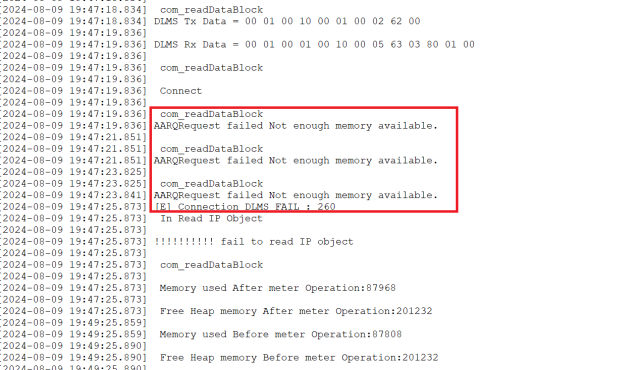
I've attached a screenshot for your reference. Could you please review it and provide your suggestions on how to resolve this issue?
Hi, The meter is returning…
Hi,
The meter is returning invalid data. Please, don't add screenshots. They don't tell anything. Plain text is better.
If you add send and reply messages as a hex string, I can check what is wrong.
BR,
Mikko
Dear Mikko, As requested,…
Dear Mikko,
As requested, Please find below payload details.
Apart from that, We are able to read 3 to 4 times, then this issue arise.
TX : 00 01 00 10 00 01 00 1F 60 1D A1 09 06 07 60 85 74 05 08 01 01 BE 10 04 0E 01 00 00 00 06 5F 1F 04 00 40 1E 1D FF FF
RX : 00 01 00 01 00 10 00 2B 61 29 A1 09 06 07 60 85 74 05 08 01 01 A2 03 02 01 00 A3 05 A1 03 02 01 00 BE 10 04 0E 08 00 06 5F 1F 04 00 00 00 10 02 26 00 07
Tx Data = 00 01 00 10 00 01 00 0D C0 01 C1 00 01 00 00 2B 01 02 FF 02 00
Rx Data = 00 01 00 01 00 10 00 09 C4 01 C1 00 06 00 00 00 00
Tx Data = 00 01 00 10 00 01 00 02 62 00
Rx Data = 00 01 00 01 00 10 00 05 63 03 80 01 00
com_readDataBlock
Connect
com_readDataBlock
AARQRequest failed Not enough memory available.
com_readDataBlock
AARQRequest failed Not enough memory available.
com_readDataBlock
AARQRequest failed Not enough memory available.
Hi, You will not receive a…
Hi,
You will not receive a reply from the meter when the new connection is established.
Check why that is happening.
You can use following arguments with client example.
-h YOUR_IP_ADDRESS -p YOUR_IP_PORT_NO -i WRAPPER -t Verbose
BR,
Mikko
Mikko, Understood, we will…
Mikko,
Understood, we will check and update you.
In the meantime, could you please suggest the sequence we should follow to read the Instant profile data from the meter? For example: Connect, AARQ, Read invocation counter, Disconnect, Meter Read association, etc.
Additionally, please advise where we should clear the connection object.
We've successfully read the invocation counter every 1 minute for up to 24 hours, but we're encountering a "Not Enough Memory" issue when attempting to read the Instant profile data along with Invocation counter.
Hi, This is the sequence If…
Hi,
This is the sequence If you are connecting using secured connection, but you don't need to read association. It's faster if you just add the Instant Profile manually and read it.
In the hex log that you shared you are not using secured connection and you don't need to read the invocation counter.
BR,
Mikko
Dear Mikko, As meter is…
Dear Mikko,
As meter is responding only after with new invocation counter, We have to read that.
Apart from that,
We are using the Gurux.DLMS library (C Language) as a client on one of our devices to periodically read data (via UART) from a smart meter. However, after successfully reading the Instant Profile data 6 to 7 times, we encounter a "Not Enough Memory" issue, causing the application to crash and the device to reboot.
Device Configuration Details:
RTOS based Controller
RAM: 256 KB
Flash: 1024 KB
Binary Size (DLMS Library + User App): 704 KB
Our sequence for reading data (WRAPPER Interface) from the meter is as follows:
Public client association AARQ
Read Meter Reader Invocation Counter
Disconnect
Meter Read Association AARQ
Read Instant Profile Data (Profile Generic, 2nd and 3rd attributes)
Disconnect
When memory issue occurs, we observe the following behavior:
Public client association AARQ
Read Meter Reader Invocation Counter
Disconnect
Meter Read Association AARQ - At this step, we encounter the "Not Enough Memory" issue, and the payload generation fails. In this step, the meter is not in the picture.
It appears that the issue might be related to improper memory management or object clearing in the code.
Could you please suggest how we can address this issue, or provide some steps to read the data from the meter without running into this problem?
Hi, From the hex log that…
Hi,
From the hex log that you shared, it looks like a meter issue.
The meter doesn't send a reply to the AARQ message and Not Enough Memory is sent because of that.
You can verify this with ANSI C example using the arguments that I shared. I believe that after you have establish the connection to the meter multiple times, you can get the same error.
Occasionally it can happen that the meter is not able to respond for the client. You need to wait e.g. 30 seconds and try to establish the connection again.
BR,
Mikko