
Hi,
Currently I am using DLMS simulator to act as meter for my dvelopment.
Below is the setup used
1. Created .xml file from meter using Manufacturer: Indian Standard, Authentication: PC
DLSM Simulator <----> DLMS Director
Media: Net (localhost), Interface: Wrapper - Working
2. Created .xml file from meter using Manufacturer: Indian Standard, Authentication: MR
DLSM Simulator <----> DLMS Director
Media: Net (localhost), Interface: Wrapper - Not Working
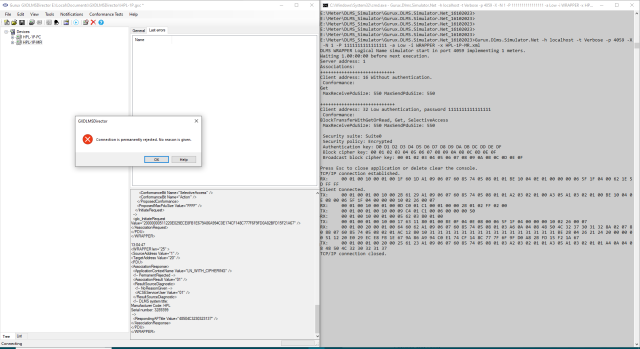
It shows No reason is given.
Can you please help to indetify the root cause?
I have attached Screenshot for your reference.
Thanks,
Jigar
You find logs of DLMS…
You can find logs of DLMS Director, DLMS Simulator as below for your reference.
-----------------------------------------------------------------------------------------------------------------------------------------------------------------------------------
DLMS Director Logs
-----------------------------------------------------------------------------------------------------------------------------------------------------------------------------------
13:04:47
<WRAPPER len="1F" >
<SourceAddress Value="10" />
<TargetAddress Value="1" />
<PDU>
<AssociationRequest>
<ApplicationContextName Value="LN" />
<InitiateRequest>
<ProposedDlmsVersionNumber Value="06" />
<ProposedConformance>
<ConformanceBit Name="GeneralProtection" />
<ConformanceBit Name="GeneralBlockTransfer" />
<ConformanceBit Name="DeltaValueEncoding" />
<ConformanceBit Name="BlockTransferWithGetOrRead" />
<ConformanceBit Name="BlockTransferWithSetOrWrite" />
<ConformanceBit Name="BlockTransferWithAction" />
<ConformanceBit Name="MultipleReferences" />
<ConformanceBit Name="Access" />
<ConformanceBit Name="Get" />
<ConformanceBit Name="Set" />
<ConformanceBit Name="SelectiveAccess" />
<ConformanceBit Name="Action" />
</ProposedConformance>
<ProposedMaxPduSize Value="FFFF" />
</InitiateRequest>
</AssociationRequest>
</PDU>
</WRAPPER>
13:04:47
<WRAPPER len="2B" >
<SourceAddress Value="1" />
<TargetAddress Value="10" />
<PDU>
<AssociationResponse>
<ApplicationContextName Value="LN" />
<AssociationResult Value="00" />
<ResultSourceDiagnostic>
<ACSEServiceUser Value="00" />
</ResultSourceDiagnostic>
<InitiateResponse>
<NegotiatedDlmsVersionNumber Value="06" />
<NegotiatedConformance>
<ConformanceBit Name="Get" />
</NegotiatedConformance>
<NegotiatedMaxPduSize Value="0226" />
<VaaName Value="0007" />
</InitiateResponse>
</AssociationResponse>
</PDU>
</WRAPPER>
13:04:47
<WRAPPER len="9" >
<SourceAddress Value="1" />
<TargetAddress Value="10" />
<PDU>
<GetResponse>
<GetResponseNormal>
<!-- Priority: High, ServiceClass: Confirmed, Invoke ID: 1 -->
<InvokeIdAndPriority Value="C1" />
<Result>
<Data>
<UInt32 Value="00000050" />
</Data>
</Result>
</GetResponseNormal>
</GetResponse>
</PDU>
</WRAPPER>
13:04:47
<WRAPPER len="5" >
<SourceAddress Value="10" />
<TargetAddress Value="1" />
<PDU>
<ReleaseRequest>
<Reason Value="Normal" />
</ReleaseRequest>
</PDU>
</WRAPPER>
13:04:47
<WRAPPER len="17" >
<SourceAddress Value="1" />
<TargetAddress Value="10" />
<PDU>
<ReleaseResponse>
<Reason Value="Normal" />
<InitiateResponse>
<NegotiatedDlmsVersionNumber Value="06" />
<ProposedConformance>
<ConformanceBit Name="Get" />
</NegotiatedConformance>
<NegotiatedMaxPduSize Value="0226" />
<VaaName Value="0007" />
</InitiateResponse>
</ReleaseResponse>
</PDU>
</WRAPPER>
13:04:47
<WRAPPER len="1F" >
<SourceAddress Value="20" />
<TargetAddress Value="1" />
<PDU>
<AssociationRequest>
<ApplicationContextName Value="LN_WITH_CIPHERING" />
<CallingAPTitle Value="48504C3237303132" />
<SenderACSERequirements Value="1" />
<MechanismName Value="Low" />
<CallingAuthentication Value="31313131313131313131313131313131" />
<!-- Decrypted data:
Security: Encryption
Invocation Counter: 81
<InitiateRequest>
<DedicatedKey Value="31323334414243443132333441424344" />
<ProposedDlmsVersionNumber Value="06" />
<ProposedConformance>
<ConformanceBit Name="GeneralProtection" />
<ConformanceBit Name="GeneralBlockTransfer" />
<ConformanceBit Name="DeltaValueEncoding" />
<ConformanceBit Name="BlockTransferWithGetOrRead" />
<ConformanceBit Name="BlockTransferWithSetOrWrite" />
<ConformanceBit Name="BlockTransferWithAction" />
<ConformanceBit Name="MultipleReferences" />
<ConformanceBit Name="Access" />
<ConformanceBit Name="Get" />
<ConformanceBit Name="Set" />
<ConformanceBit Name="SelectiveAccess" />
<ConformanceBit Name="Action" />
</ProposedConformance>
<ProposedMaxPduSize Value="FFFF" />
</InitiateRequest>
-->
<glo_InitiateRequest Value="20000000511220E029ECE8FB1E679A86A994C0E174CF148C777F6F9FD0A82BFD15F21A67" />
</AssociationRequest>
</PDU>
</WRAPPER>
13:04:47
<WRAPPER len="25" >
<SourceAddress Value="1" />
<TargetAddress Value="20" />
<PDU>
<AssociationResponse>
<ApplicationContextName Value="LN_WITH_CIPHERING" />
<!-- PermanentRejected -->
<AssociationResult Value="01" />
<ResultSourceDiagnostic>
<!-- NoReasonGiven -->
<ACSEServiceUser Value="01" />
</ResultSourceDiagnostic>
<!-- DLMS system title:
Manufacturer Code: HPL
Serial number: 3289399
-->
<RespondingAPTitle Value="48504C3230323137" />
</AssociationResponse>
</PDU>
</WRAPPER>
-----------------------------------------------------------------------------------------------------------------------------------------------------------------------------------
Simulator logs
-----------------------------------------------------------------------------------------------------------------------------------------------------------------------------------
E:\Meter\DLMS_Simulator\Gurux.DLMS.Simulator.Net_16102023>Gurux.Dlms.Simulator.Net -h localhost -t Verbose -p 4059 -X -N 1 -P 1111111111111111 -a Low -i WRAPPER -x HPL-1P-MR.xml
DLMS WRAPPER Logical Name simulator start in port 4059 implementing 1 meters.
Waiting 1.00:00:00 before next execution.
Server address: 1
Associations:
++++++++++++++++++++++++++++
Client address: 16 Without authentication.
Conformance:
Get
MaxReceivePduSize: 550 MaxSendPduSize: 550
++++++++++++++++++++++++++++
Client address: 32 Low authentication, password 1111111111111111
Conformance:
BlockTransferWithGetOrRead, Get, SelectiveAccess
MaxReceivePduSize: 550 MaxSendPduSize: 550
Security suite: Suite0
Security policy: Encrypted
Authentication key: D0 D1 D2 D3 D4 D5 D6 D7 D8 D9 DA DB DC DD DE DF
Block cipher key: 00 01 02 03 04 05 06 07 08 09 0A 0B 0C 0D 0E 0F
Broadcast block cipher key: 00 01 02 03 04 05 06 07 08 09 0A 0B 0C 0D 0E 0F
Press Esc to close application or delete clear the console.
TCP/IP connection established.
RX: 00 01 00 10 00 01 00 1F 60 1D A1 09 06 07 60 85 74 05 08 01 01 BE 10 04 0E 01 00 00 00 06 5F 1F 04 00 62 1E 5D FF FF
Client Connected.
TX: 00 01 00 01 00 10 00 2B 61 29 A1 09 06 07 60 85 74 05 08 01 01 A2 03 02 01 00 A3 05 A1 03 02 01 00 BE 10 04 0E 08 00 06 5F 1F 04 00 00 00 10 02 26 00 07
RX: 00 01 00 10 00 01 00 0D C0 01 C1 00 01 00 00 2B 01 02 FF 02 00
TX: 00 01 00 01 00 10 00 09 C4 01 C1 00 06 00 00 00 50
RX: 00 01 00 10 00 01 00 05 62 03 80 01 00
TX: 00 01 00 01 00 10 00 17 63 11 80 01 00 BE 0F 04 0E 08 00 06 5F 1F 04 00 00 00 10 02 26 00 07
RX: 00 01 00 20 00 01 00 64 60 62 A1 09 06 07 60 85 74 05 08 01 03 A6 0A 04 08 48 50 4C 32 37 30 31 32 8A 02 07 80 8B 07 60 85 74 05 08 02 01 AC 12 80 10 31 31 31 31 31 31 31 31 31 31 31 31 31 31 31 31 BE 28 04 26 21 24 20 00 00 00 51 12 20 E0 29 EC E8 FB 1E 67 9A 86 A9 94 C0 E1 74 CF 14 8C 77 7F 6F 9F D0 A8 2B FD 15 F2 1A 67
TX: 00 01 00 01 00 20 00 25 61 23 A1 09 06 07 60 85 74 05 08 01 03 A2 03 02 01 01 A3 05 A1 03 02 01 01 A4 0A 04 08 48 50 4C 32 30 32 31 37
TCP/IP connection closed.
Hi, Can you send this…
Hi,
Can you send this simulator template to me by email so I can check what might be the reason for this?
You can find my email address information from here:
https://www.gurux.fi/AboutUs
BR,
Mikko
Hi, I have sent you the .xml…
Hi,
I have sent you the .xml files that are used in DLMS Simulator.
Email Subject as "Query: DLMS Simulator Not working for MR"
Thanks,
Jigar
Hi, You must set the…
Hi,
You must set the password because the simulator doesn't know it. That can't be read from the meter.
Gurux.DLMS.Simulator.Net.exe -h localhost -p 4061 -N 1 -t Verbose -x HPL-1P-MR.xml -P 1111111111111111
Client settings:
-h localhost -p 4061 -c 32 -a Low -P 1111111111111111 -C AuthenticationEncryption -v 0.0.43.1.2.255 -t Verbose
I was able to read the template with those settings.
BR,
Mikko
Hi, I have tried the same…
Hi,
I have tried the same setup with password earlier also but it is not working with MR association.
Attached highlighted Image once again for your reference.
Have you tried with Gurux Director? If yes can you send me your logs for my reference.
I have also tried with command line Gurux Director but it is also not working.
Thanks
Jigar
Hi, Did you get chance to…
Hi,
Did you get chance to look into the issue?
Thanks
Jigar
Hi, Yes, I have and it…
Hi,
Yes, I have and it worked without problems. Have you started the simulator and example client with the parameters I showed above?
BR,
Mikko
Hi, Yes I have tried with…
Hi,
Yes I have tried with same paramters suggested by you but its not working. Please find attached Image for your reference.
I have tried to get data with Director from Simulator as shown in above image but its not working. Can you try the same setup from your side?
Association: MR, Frames: Wrapper, Interface: Localhost.
Thanks,
Jigar
Hi, Please, don't add pics…
Hi,
Please, don't add pics. Bytes are hard to read from it.
Have you used command line parameters that I used here?
https://www.gurux.fi/comment/26989#comment-26989
Get the latest version from the simulator so we are using the same version.
BR,
Mikko