
I am using python main.py -S /dev/ttyACM0 -a NONE to acquire data using gurux python. I am getting limited outputs, all class 1 data(Serial number, time etc). The voltage, current etc, which are class 3, are not accessible using this. We are getting these data using DLMS Client GUI but not getting using Gurux python package. How should I modify my command to get that using Gurux Python?
Attaching my app output image with this for your reference. Even if I use python main.py -S /dev/ttyACM0 -a NONE -g "OBIS CODE for parameter" I am getting "Unknown logical name" error.
Also I am using
python main.py -S /dev/ttyACM0 -a Low -C Authentication -A D0D1D2D3D4D5D6D7D8D9DADBDCDDDEDF -P 6566676869707172 -B 000102030405060708090A0B0C0D0E0F
which is showing
gurux_dlms version: 1.0.142
gurux_net version: 1.0.19
gurux_serial version: 1.0.20
Authentication: Authentication.LOW
ClientAddress: 0x10
ServerAddress: 0x1
None
Standard: Standard.DLMS
Security: Security.AUTHENTICATION
System title: 41 42 43 44 45 46 47 48
Authentication key: D0 D1 D2 D3 D4 D5 D6 D7 D8 D9 DA DB DC DD DE DF
Block cipher key: 00 01 02 03 04 05 06 07 08 09 0A 0B 0C 0D 0E 0F
DisconnectRequest
[ ERRRO ] Connection is permanently rejected
No reason is given.
Ended. Press any key to continue.
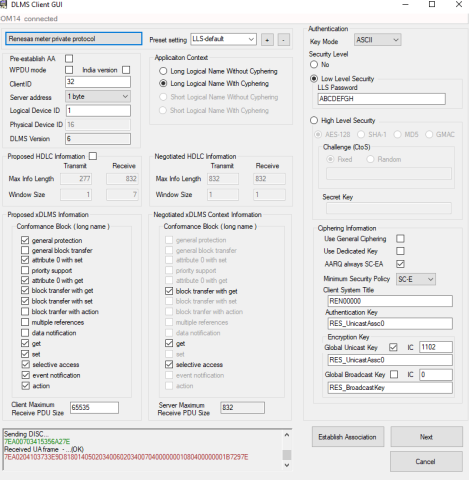
Hi, Unknown logical name is…
Hi,
Unknown logical name is coming because logical name is invalid. You need to replaca "OBIS CODE for parameter" with the logical name and attribute index. For example "0.0.1.0.0.255:2"
Your block cipher keys are different than in your picture. You need to change -A and -B arguments to use correct keys. If the password is RES_UnicastAssoc then the -A and -B argument is 5245535F556E69636173744173736F63
BR,
Mikko
I am facing the same problem…
I am facing the same problem. Getting the following error...
Traceback (most recent call last):
File "C:\pythoncodes\Gurux.DLMS.Python-master\Gurux.DLMS.Client.Example.python\main.py", line 108, in main
raise Exception("Unknown logical name:" + k)
Exception: Unknown logical name:1.0.1.8.1.255
Ended
Hi, You need also to add the…
Hi,
You need also to add the following arguments:
-c 32 -P ABCDEFGH.
You need also to change the authentication (-A) and block cipher (-B) keys to the correct ones.
So the command line should look something like:
python main.py -S /dev/ttyACM0 -c 32 -a Low -P ABCDEFGH
-C Authentication -A D0D1D2D3D4D5D6D7D8D9DADBDCDDDEDF -P 6566676869707172 -B 000102030405060708090A0B0C0D0E0F
BR,
Mikko