Before commenting read Forum rules
Don't comment the topic if you have a new question.
You can create a new topic selecting correct category from Gurux Forum and then create a new topic selecting "New Topic" from the top left.

Before commenting read Forum rules
Don't comment the topic if you have a new question.
You can create a new topic selecting correct category from Gurux Forum and then create a new topic selecting "New Topic" from the top left.
I am currently working with VisualBasic.Net and at the method:
ReadDLMSPacket(data as Byte(),ByRef reply as GxReplyData) I can´t go further than:
succeeded = _Media.Receive(p)
If Not succeeded Then
Throw New Exception("Failed to receive reply from the device in given time.")
The variable succeded is always false.
I am with a DDZ1513 Inhemeter.
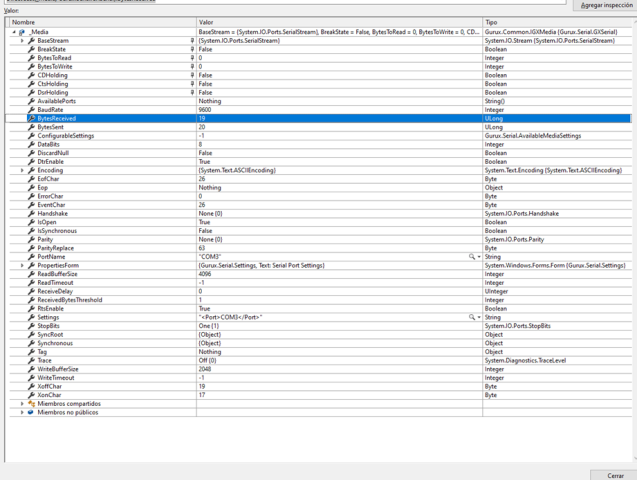
I uploaded a picture of the variable 'Media'
This is 'Client'
This is 'Client'
This is 'p'
This is 'p'
Hi,
Hi,
Your meter doesn't reply. I believe that one of your settings is different from what the meter expects. Try to read your meter with GXDLMSDirector first. It will help you to find the correct settings.
Check also your serial port settings.
BR,
Mikko
It actually reply. I check
It actually reply. I check the sniffer comunication and it does responde to the "/?!" firm.
Where is breaking is after InitializeOpticalHead(). When the program goes into SNRMRequest()
then to ReadDataBlock(data, reply) then finally to ReadDLMSPacket(data, reply)
Hi,
Hi,
The End of Packet char is 0x7E and you try to communicate with IEC 62056-21. You need to change the Eop to (byte) 0x0A. 0x7E is not sent and the received data is never handled.
BR,
Mikko
So I change the EOP as you
So I change the EOP as you suggested but meter still doesnt reply
public void ReadDLMSPacket(byte[] data, GXReplyData reply)
{
if (data == null && !reply.IsStreaming())
{
return;
}
GXReplyData notify = new GXReplyData();
reply.Error = 0;
//object eop = (byte)0x7E;
object eop = (byte)0x0A; <===================
This is what i have so far in the console
IEC Sending:/?!
IEC received: /IHM5\2Inhe Meter
BaudRate is : 9600
Moving to mode E.
Send SNRM request.7E A0 07 03 05 93 5C 45 7E
TX: 11:34:50 a. m. 7EA0070305935C457E
Hi,
Hi,
When you communicate using IEC 62056-21 eop is 0xA. You need to set EOP to 0x7E when you start to communicate with DLMS.
You can check how to do this from the client example.
https://github.com/Gurux/Gurux.DLMS.Net/tree/master/Gurux.DLMS.Client.E…
BR,
Mikko