Before commenting read Forum rules
Don't comment the topic if you have a new question.
You can create a new topic selecting correct category from Gurux Forum and then create a new topic selecting "New Topic" from the top left.

Before commenting read Forum rules
Don't comment the topic if you have a new question.
You can create a new topic selecting correct category from Gurux Forum and then create a new topic selecting "New Topic" from the top left.
Hi there,
I am trying to decode a message pushed from the meter, using Python library. I have all the correct security keys and able to decrypt the message. But Python API returns the incomplete result, compare to DLMSDirector.
Here is the structure of the PUSH message, and what we are expecting to get:
Meter PUSH Setup for "0.0.25.9.0.255"
"0.0.96.1.2.255:2": "Device ID",
"0.0.25.9.0.255:1": "Instant Push Setup",
"0.0.1.0.0.255:2" : "Clock",
"1.0.12.7.0.255:2": "Voltage",
"1.0.11.7.0.255:2": "Phase Current",
"1.0.1.8.0.255:2" : "Cum. Energy-Wh(Imp)",
"1.0.1.6.0.255:2" : "MD-W(Imp)",
"1.0.9.6.0.255:2" : "MD-VA(Imp)",
"0.0.94.91.0.255:2": "Cumulative Tamper Count",
"0.0.0.1.0.255:2" : "Cum. Billing Count",
"1.0.2.8.0.255:2" : "Cum. Energy-Wh(Exp)",
"0.0.96.3.10.255:2": "Load Limit Function Status",
"0.0.17.0.0.255:3" : "Load Limit Value (kW)",
Here is my simple script (BLOCK_KEY is substituted with the correct one, of course ):
-------------------------------
from gurux_dlms import *
encrypted_data = "0001000100400072DB0842454530303036396720000081E6517113802D16E383848E9F5EF13B4785C2B283A3D22BC72D3C867766E49B861748F9D53F32F5B5F86732F68DBCC46992901E757927C82A23DA29D7FE14B1975D8126BB9237BA16D0754686FE1B65BFD32E10BB62091BD1A76DD35D1052598D283792"
t = GXDLMSTranslator(TranslatorOutputType.SIMPLE_XML)
t.comments = True
t.blockCipherKey = GXByteBuffer.hexToBytes(<BLOCK_KEY>)
xml = t.messageToXml(encrypted_data)
print(XML)
And here is the result:
------------------------------
<WRAPPER len="7A" >
<TargetAddress Value="1" />
<SourceAddress Value="40" />
<PDU>
<!--
IDIS system title:
Manufacturer Code: BEESerial number: 00069-->
<!--Decrypt data: 0F D0 00 34 B5 0C 07 E6 06 19 06 15 0A 06 FF 01 4A 00 02 0D 0A 09 42 45 45 34 30 30 30 36 39 09 06 00 00 19 09 00 FF 09 0C 07 E6 06 19 06 15 0A 06 FF 01 4A 00 17 43 74 DE B8 17 00 00 00 00 17 47 2F 61 00 17 00 00 00 00 17 00 00 00 00 12 00 1B 06 00 00 00 0A 17 42 40 00 00 03 01 06 00 00 42 68
<DataNotification>
<LongInvokeIdAndPriority Value="D00034B5" />
<!--06/26/22 03:40:06-->
<DateTime Value="07E6061906150A06FF014A00" />
<NotificationBody>
<DataValue>
<Structure Qty="0D" >
<String Value="" />
<!--0.0.25.9.0.255-->
<OctetString Value="0000190900FF" />
<OctetString Value="07E6061906150A06FF014A00" />
<!--244.87-->
<Float32 Value="DE7443000000" />
<!--0.00-->
<Float32 Value="000000000000" />
<!--44897.00-->
<Float32 Value="612F47000000" />
<!--0.00-->
<Float32 Value="000000000000" />
<!--0.00-->
<Float32 Value="000000000000" />
<UInt16 Value="001B" />
<UInt32 Value="0000000A" />
<!--48.00-->
<Float32 Value="004042000000" />
<Boolean Value="True" />
<UInt32 Value="00004268" />
</Structure>
</DataValue>
</NotificationBody>
</DataNotification>
-->
<GeneralGloCiphering>
<SystemTitle Value="4245453030303639" />
<CipheredService Value="20000081E6517113802D16E383848E9F5EF13B4785C2B283A3D22BC72D3C867766E49B861748F9D53F32F5B5F86732F68DBCC46992901E757927C82A23DA29D7FE14B1975D8126BB9237BA16D0754686FE1B65BFD32E10BB62091BD1A76DD35D1052598D283792" />
</GeneralGloCiphering>
</PDU>
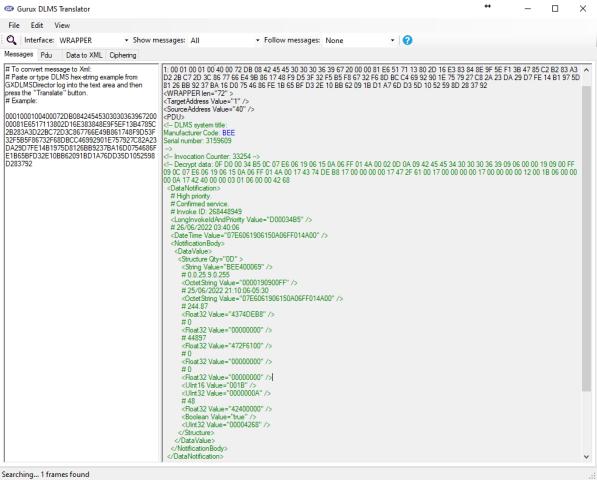
But I have also tried to use DLMSTranslater tool from DLMSDirector. The screenshot is attached.
Here is the XML output from the translator:
----------------------------------------
<WRAPPER len="72" >
<TargetAddress Value="1" />
<SourceAddress Value="40" />
<PDU>
<!-- DLMS system title:
Manufacturer Code: BEE
Serial number: 3159609
-->
<!-- Invocation Counter: 33254 -->
<!-- Decrypt data: 0F D0 00 34 B5 0C 07 E6 06 19 06 15 0A 06 FF 01 4A 00 02 0D 0A 09 42 45 45 34 30 30 30 36 39 09 06 00 00 19 09 00 FF 09 0C 07 E6 06 19 06 15 0A 06 FF 01 4A 00 17 43 74 DE B8 17 00 00 00 00 17 47 2F 61 00 17 00 00 00 00 17 00 00 00 00 12 00 1B 06 00 00 00 0A 17 42 40 00 00 03 01 06 00 00 42 68
<DataNotification>
# High priority.
# Confirmed service.
# Invoke ID: 268448949
<LongInvokeIdAndPriority Value="D00034B5" />
# 26/06/2022 03:40:06
<DateTime Value="07E6061906150A06FF014A00" />
<NotificationBody>
<DataValue>
<Structure Qty="0D" >
<String Value="BEE400069" />
# 0.0.25.9.0.255
<OctetString Value="0000190900FF" />
# 25/06/2022 21:10:06-05:30
<OctetString Value="07E6061906150A06FF014A00" />
# 244.87
<Float32 Value="4374DEB8" />
# 0
<Float32 Value="00000000" />
# 44897
<Float32 Value="472F6100" />
# 0
<Float32 Value="00000000" />
# 0
<Float32 Value="00000000" />
<UInt16 Value="001B" />
<UInt32 Value="0000000A" />
# 48
<Float32 Value="42400000" />
<Boolean Value="true" />
<UInt32 Value="00004268" />
</Structure>
</DataValue>
</NotificationBody>
</DataNotification>
-->
<GeneralGloCiphering>
<SystemTitle Value="4245453030303639" />
<CipheredService Value="20000081E6517113802D16E383848E9F5EF13B4785C2B283A3D22BC72D3C867766E49B861748F9D53F32F5B5F86732F68DBCC46992901E757927C82A23DA29D7FE14B1975D8126BB9237BA16D0754686FE1B65BFD32E10BB62091BD1A76DD35D1052598D283792" />
</GeneralGloCiphering>
</PDU>
</WRAPPER>
As you can see, the two outputs have the same decrypted data, which is great, but the XML comment result is different:
- Device ID is decoded correctly using DLMSTranslator GUI Tool, but Python API returns the empty string instead. But we can see that the decrypted data contains the correct serial meter ID in ASCII HEX: [SNIP] 42 45 45 34 30 30 30 36 39 [SNIP], or it is BEE400069, which is correct (you can see in the Decrypt data section of the XML).
- Clock register is decoded in the DLMS Translator but not in Python output.
Why there are these discrepancies between the two outputs? Am I missing some settings for Python interface or there is an issue with the Python library?
The latest version of the GuruxDLMS library was used, obviously
Thank you,
Ilya
Hi,
Hi,
Thank you for pointing this out. This is fixed for version 1.0.127 and your name is added to the credits. Get the latest version.
BR,
Mikko
Hi Mikko,
Hi Mikko,
Thank you very much for fixing it, it works now!
I can't find my name in the credits, but I am not complaining :)
Thanks again,
Ilya
Hi Mikko,
Hi Mikko,
Just one minor thing. The string value of the DeviceID is still in ASCII HEX code, but it is translated to the characters in DLMSDirector Translator Tool. So, the result is in the type of string, but it is not converted in Python vs Translator. Is it correct behaviour?
Here is output of the same script, using the latest verion 1.0.127:
<!--
IDIS system title:
Manufacturer Code: BEESerial number: 00069-->
<!--Decrypt data: 0F D0 00 34 B5 0C 07 E6 06 19 06 15 0A 06 FF 01 4A 00 02 0D 0A 09 42 45 45 34 30 30 30 36 39 09 06 00 00 19 09 00 FF 09 0C 07 E6 06 19 06 15 0A 06 FF 01 4A 00 17 43 74 DE B8 17 00 00 00 00 17 47 2F 61 00 17 00 00 00 00 17 00 00 00 00 12 00 1B 06 00 00 00 0A 17 42 40 00 00 03 01 06 00 00 42 68
<DataNotification>
<LongInvokeIdAndPriority Value="D00034B5" />
<!--06/26/22 03:40:06-->
<DateTime Value="07E6061906150A06FF014A00" />
<NotificationBody>
<DataValue>
<Structure Qty="0D" >
<String Value="424545343030303639" />
<!--0.0.25.9.0.255-->
<OctetString Value="0000190900FF" />
<!--06/26/22 03:40:06-->
<OctetString Value="07E6061906150A06FF014A00" />
<!--244.87-->
<Float32 Value="DE744300000000" />
<!--0.00-->
<Float32 Value="00000000000000" />
<!--44897.00-->
<Float32 Value="612F4700000000" />
<!--0.00-->
<Float32 Value="00000000000000" />
<!--0.00-->
<Float32 Value="00000000000000" />
<UInt16 Value="001B" />
<UInt32 Value="0000000A" />
<!--48.00-->
<Float32 Value="00404200000000" />
<Boolean Value="True" />
<UInt32 Value="00004268" />
</Structure>
</DataValue>
</NotificationBody>
</DataNotification>
-->
<GeneralGloCiphering>
<SystemTitle Value="4245453030303639" />
<CipheredService Value="20000081E6517113802D16E383848E9F5EF13B4785C2B283A3D22BC72D3C867766E49B861748F9D53F32F5B5F86732F68DBCC46992901E757927C82A23DA29D7FE14B1975D8126BB9237BA16D0754686FE1B65BFD32E10BB62091BD1A76DD35D1052598D283792" />
</GeneralGloCiphering>
Thanks,
Ilya
Hi,
Hi,
The credits file is updated for Github. Change showStringAsHex to false. It will do the trick.
Initial state is changed for the False for the next release.
t = GXDLMSTranslator()
t.showStringAsHex = False
BR,
Mikko
Thank you, Mikko
Thank you, Mikko