Before commenting read Forum rules
Don't comment the topic if you have a new question.
You can create a new topic selecting correct category from Gurux Forum and then create a new topic selecting "New Topic" from the top left.

Before commenting read Forum rules
Don't comment the topic if you have a new question.
You can create a new topic selecting correct category from Gurux Forum and then create a new topic selecting "New Topic" from the top left.
hi, when I want to read meter with ReadList method , the packet sent and received are:
7EA0770002767103329FCDE6E600C003C10A000100002A0000FF020000010000600100FF020000010000600101FF020000010000600102FF020000010000600103FF020000010000600104FF020000010000600105FF020000010000600106FF020000010100000000FF020000010100000200FF0200CA5E7E
7EA87E03000276715231BFE6E700C403C10A00091045414130303530353131313037363038000908313131303736303800092741465A4152415A4D413A4A414D33303030435450542D566572312E3120436C61737320302E32530009185574696C6974793A2054656872616E2050524F56494E43450009000009000009C33D7E
I think there is problem in parsing Pdu part that gurux cannot ask for next packet. event this parsing problem can be regenerated with "Gurux Dlms Translator".
can you please check this ?
thank you
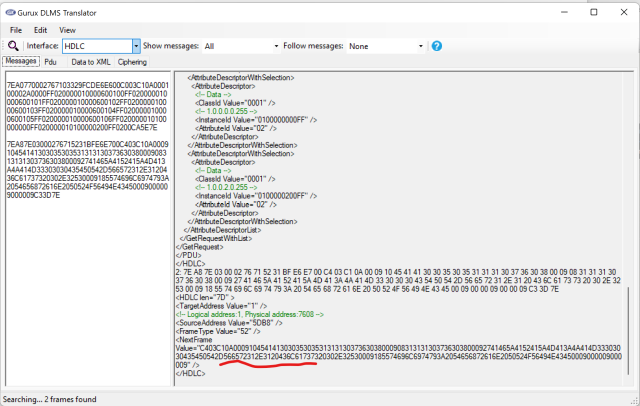
and the pdu parsing part
and the pdu parsing part
Hi,
Hi,
All the data doesn't fit into one frame and you need to ask next frame from the meter. You will receive a memory exception because all the bytes aren't there and that is correct.
BR,
Mikko
I think it's gurux internal
I think it's gurux internal problem. because it tries to parse this packets and gets error and does not send request for next packet.
I mean guux does not request for next packet in this case. (when the requested parameter are too much. here is 17 parameter to read with list)
Hi,
Hi,
This is used with several different meters. I need all the frames before the read list is used.
Just to make sure. GXDLMSDirector doesn't try to ask next frame after you have received the first reply from the meter? Or did you add only the first frame?
BR,
Mikko
as I know , there isn't
as I know , there isn't anywhere in GXDLMSDirector that I can use to read multiple object as list.
but I used "GxDlmsCommunicator" class and below method
public void ReadList(List<KeyValuePair<GXDLMSObject, int>> list)
to read objects as list.
as I understand in reading with this method, when the request object count is high (17 in this case), gurux does not request for additional frames after receiving the second packet I attached in question and throw exception like GXDLMSDirector whit this call stack:
at Gurux.DLMS.GXByteBuffer.GetUInt8(Int32 index)
at Gurux.DLMS.GXByteBuffer.GetUInt8()
at Gurux.DLMS.GXDLMS.HandleGetResponseWithList(GXDLMSSettings settings, GXReplyData reply)
at Gurux.DLMS.GXDLMS.HandleGetResponse(GXDLMSSettings settings, GXReplyData reply, Int32 index)
at Gurux.DLMS.GXDLMS.GetPdu(GXDLMSSettings settings, GXReplyData data)
at Gurux.DLMS.GXDLMS.GetData(GXDLMSSettings settings, GXByteBuffer reply, GXReplyData data, GXReplyData notify)
at Gurux.DLMS.GXDLMSClient.GetData(GXByteBuffer reply, GXReplyData data, GXReplyData notify)
at GxDlmsCommunicator.ReadDLMSPacket(Byte[] data, Int32 tryCount, GXReplyData reply) in
Hi,
Hi,
GXDLMSDirector reads scaler and unit of the register objects using ReadList. That is done if you select "File" and "Refresh". The first association view is read and after that scalers and units.
From the trace it seems that you are reading only one frame with ReadDLMSPacket. You need to use ReadDataBlock to read multiple frames or datablocks.
BR,
Mikko
thank for your reply.
thank for your reply.
I use this method as is in GXDLMSCommunicator class in GXDLMSDirector.
public void ReadList(List<KeyValuePair<GXDLMSObject, int>> list)
{
byte[][] data = client.ReadList(list);
GXReplyData reply = new GXReplyData();
List<object> values = new List<object>();
foreach (byte[] it in data)
{
ReadDataBlock(it, "", 1, 1, reply);
//Value is null if data is send in multiple frames.
if (reply.Value is IEnumerable<object>)
{
values.AddRange((IEnumerable<object>)reply.Value);
}
reply.Clear();
}
if (values.Count != list.Count)
{
throw new Exception("Invalid reply. Read items count do not match.");
}
client.UpdateValues(list, values);
}
this works fine until we keep list Item below 7 or 8.
my problem rises when I want to read 17 Items with list and the response is more than one packet.
Hi,
Hi,
Is this the same problem that occurred with GXDLMSDirector? Can you establish the connection and read the data with ReadList and then add a hex trace from send and received bytes so I can check it.
BR,
Mikko
I rechecked the problem and I
I rechecked the problem and I think there is problem in parsing pdu. as you can see in picture and below packets :
TX: 7EA04F00027671033239C5E6E600C003C106002D0000190400FF0200002D0000190400FF0300002C0000190300FF050000290000190000FF020000290000190000FF030000290000190000FF0600A4537E
RX: 7EA0350300027671520923E6E700C403C106000908696E7465726E657400120000000000120FDB0009060000190100FF00120258AC3C7E
the response packet contains 6 object value , but when gurux parse them, the order of response does not hold. I think your code cannot understand the correct data type and cannot parse the result correctly.
you can check the response packet translate with below picture. in response packet only third object value is null, but in gurux translation 2 value is null.
also value[5] should be in value[4] . the order is incorrect.
Hi,
Hi,
I checked this manually from the bytes and this is what the meter returns. You read this:
GprsSetup: 0.0.25.4.0.255 attribute index 02
GprsSetup 0.0.25.4.0.255 attribute index 03
PppSetup 0.0.25.3.0.255 attribute index 05
TcpUdpSetup 0.0.25.0.0.255 attribute index 02
TcpUdpSetup 0.0.25.0.0.255 attribute index 03
TcpUdpSetup 0.0.25.0.0.255 attribute index 06
This is what the meter returns:
09 08 69 6E 74 65 72 6E 65 74 //internet
00 12 00 00
00 //NULL
00 //NULL
00 12 0F DB
00 09 06 00 00 19 01 00 FF
00 12 02 58
Meter returns seven values but says that there are only six values. For that reason, the last value is not shown. There is an issue with the meter. You need to ask the meter vendor if there is a firmware update available. There is nothing we can do about this.
BR,
Mikko
I translated it already with
I translated it already with youe "gurux dlms translator" and the result is :
1: 7E A0 35 03 00 02 76 71 52 09 23 E6 E7 00 C4 03 C1 06 00 09 08 69 6E 74 65 72 6E 65 74 00 12 00 00 00 00 00 12 0F DB 00 09 06 00 00 19 01 00 FF 00 12 02 58 AC 3C 7E
<HDLC len="34" >
<TargetAddress Value="1" />
<!-- Logical address:1, Physical address:7608 -->
<SourceAddress Value="5DB8" />
<FrameType Value="52" />
<PDU>
<GetResponse>
<GetResponseWithList>
<!-- Priority: High, ServiceClass: Confirmed, Invoke ID: 1 -->
<InvokeIdAndPriority Value="C1" />
<Result Qty="06" >
<Data>
<!-- internet -->
<OctetString Value="696E7465726E6574" />
</Data>
<Data>
<UInt16 Value="0000" />
</Data>
<Data>
<None />
</Data>
<Data>
<UInt16 Value="0FDB" />
</Data>
<Data>
<!-- 0.0.25.1.0.255 -->
<OctetString Value="0000190100FF" />
</Data>
<Data>
<UInt16 Value="0258" />
</Data>
</Result>
</GetResponseWithList>
</GetResponse>
</PDU>
</HDLC>
as you can see in this translation, there is only one null value.
I think this zeros "00 00" is one null value , as you do in gurux translator.but in code , each "00" considered as null value.
can you please check this again ?
Hi,
Hi,
You are right. This was my mistake. The problem is a null value that is breaking the parser when readlist method is used. I created an issue from this.
http://gurux.fi/node/19910
This can be fixed for the HandleGetResponseWithList function so testing is easier and the fixed version is released today after ReadList tests are done.
BR,
Mikko
thank you very much I'm
thank you very much I'm waiting for new release