Before commenting read Forum rules
Don't comment the topic if you have a new question.
You can create a new topic selecting correct category from Gurux Forum and then create a new topic selecting "New Topic" from the top left.

Before commenting read Forum rules
Don't comment the topic if you have a new question.
You can create a new topic selecting correct category from Gurux Forum and then create a new topic selecting "New Topic" from the top left.
Hello
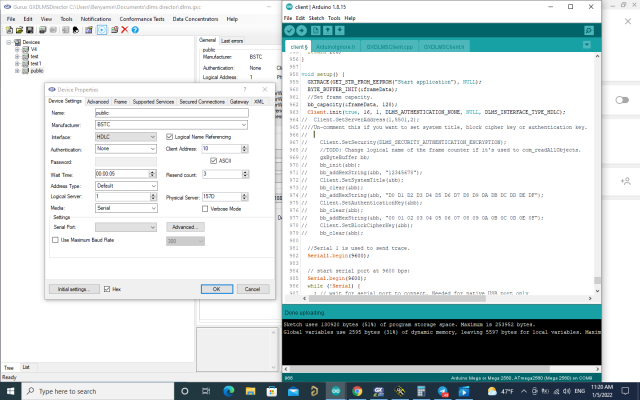
I connected the device with the gxdlms director, but does it answer this with Ardino client?
37:Data send failed. Try to resend. 1:Received bytes:
74:Data send failed. Try to resend. 2:Received bytes:
111:Data send failed. Try to resend. 3:Received bytes:
148:com_initializeConnection failed 252:Start reading:Received bytes:
Hi,
Hi,
You need to change the server address for Client.Init. Now it's One and it's different than in GXDLMSDirector.
You can count it like this:
Client.GetServerAddress(1, 0x157D, 0);
BR,
Mikko
im change client address to
im change client address to 0x157d
And this is the answer I got؟
But the information I get is
But the information I get is not true
12:03:46.405 -> 0 :Start reading :com_initializeConnection SUCCEEDED 0 :Logical Device NameIndex: 2 Value: 45 41 41 30 30 37 30 30 30 32 39 38 34 35 30 31
12:03:51.052 -> :com_read failed. 11 :com_read failed. 11 :ClockIndex: 2 Value: 01/01/1970 00:00:00 UTC+00:00
12:03:51.239 -> Index: 3 Value: 0
12:03:51.239 -> Index: 4 Value: 0
12:03:51.239 -> Index: 5 Value: 01/01/1970 00:00:00 UTC+00:00
12:03:51.330 -> Index: 6 Value: 01/01/1970 00:00:00 UTC+00:00
12:03:51.376 -> Index: 7 Value: 0
12:03:51.376 -> Index: 8 Value: 0
12:03:51.376 -> Index: 9 Value: 0
Hi,
Hi,
Meter returns error code 11 that is: Device reports an unavailable object.
I believe that the clock object is not available for the public client. Can you see the clock object in the GXDLMSDirector?
You can remove clock object with the COSEM object that you can access.
BR,
Mikko