Before commenting read Forum rules
Don't comment the topic if you have a new question.
You can create a new topic selecting correct category from Gurux Forum and then create a new topic selecting "New Topic" from the top left.

Before commenting read Forum rules
Don't comment the topic if you have a new question.
You can create a new topic selecting correct category from Gurux Forum and then create a new topic selecting "New Topic" from the top left.
Hi,
I am able to connect the meter from GXDLMSDirector and read all the data. But I am having some problems when I am trying to connect it from the client application. I am using -h ip -p port -c 16 -r ln -i HdlcWithModeE as program argument and it gives me error "gurux.net.GXNet cannot be cast to gurux.serial.GXSerial"
GXDLMSDirector parameters are:
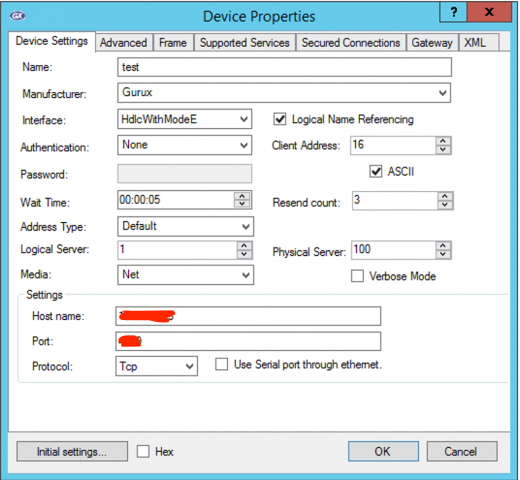
Hi,
Hi,
Mode E is used with optical probe and it's not used with TCP/IP. Change HdlcWithModeE to HDLC if you are using TCP/IP or UDP connection.
BR,
Mikko
Hi,
Hi,
Thanks for the reply.
I have just changed the interface to HDLC in both GXDLMSDirector and the argument in the program. I am able to read the from GXDLMSDirector again. However, I am not able to read it from the client application. It gives the following output. I double checked ip/port.
Connect using network connection gurux.net.GXNet@27d6c5e0
Authentication: None
ClientAddress: 0x10
ServerAddress: 0x1
Standard: DLMS
Data send failed. Try to resend 1/3
Data send failed. Try to resend 2/3
Data send failed. Try to resend 3/3
DisconnectRequest
Failed to receive reply from the device in given time.
Process finished with exit code 1
And this is the trace.txt
TX: 12:46:47.032 7E A0 07 03 21 93 0F 01 7E
TX: 12:47:47.040 7E A0 07 03 21 93 0F 01 7E
TX: 12:48:47.043 7E A0 07 03 21 93 0F 01 7E
TX: 12:49:47.047 7E A0 07 03 21 93 0F 01 7E
Thanks,
Hi,
Hi,
When you select the meter in GXDLMSDirector you can see command-line parameters it the right side. Try with them. I believe that you haven't give the server address.
BR,
Mikko
Hi,
Hi,
I couldn't find any command-line parameters in GXDLMSDirector when I select the meter from the left side.
I assumed the server address
I assumed the server address that you have mentioned corresponds to physical address in the GXDLMSDirector. I added - s 100 to the argument but it still cannot connect to the meter.
Connect using network connection gurux.net.GXNet@27d6c5e0
Authentication: None
ClientAddress: 0x10
ServerAddress: 0x64
Standard: DLMS
Data send failed. Try to resend 1/3
Invalid connection.
Hi,
Hi,
Update GXDLMSDirector to the latest version.
http://gurux.fi/Downloads/gxdlmsdirector46/GXDLMSDirector.application
BR,
Mikko
Hi,
Hi,
I just figured it out that I need to calculate the correct value of server address. It's working now.
Thanks for your help.