Before commenting read Forum rules
Don't comment the topic if you have a new question.
You can create a new topic selecting correct category from Gurux Forum and then create a new topic selecting "New Topic" from the top left.

Before commenting read Forum rules
Don't comment the topic if you have a new question.
You can create a new topic selecting correct category from Gurux Forum and then create a new topic selecting "New Topic" from the top left.
Hi
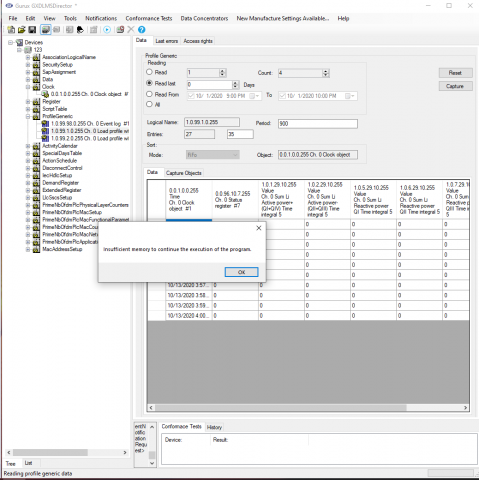
Sometimes when reading the profile generic, the GXDLMSDirector is not able to show us all the entries in use. It is giving an error saying that there is insufficient memory (check the picture).
In the example of the picture, we are 27 entries in use but the client was capable to show only 10.
Do you have any idea what is the problem? and how we can solve it?
Best Regards,
Lara Wakim
Hi Lara,
Hi Lara,
We can't repeat this. Can you send gxc device file or source code to me by email? We'll solve this if we can repeat it.
BR,
Mikko
Hi Mikko,
Hi Mikko,
This problem is still not solved. What do you mean by gxc device file?
We will explain to you what we did:
- We created a new load profile generic containing the clock, a status register, value of the active power import and export and the reactive power Q1, Q2, Q3 and Q4. The size of the capture object is 29 bytes.
- We allocate a size of 1024 in the memory to the buffer through the function allocateProfileGenericBuffer(fileName, 1024)
- We calculated the profiles entries through the function getProfileGenericBufferMaxRowCount. The size of the capture object is 29 bytes and the size in the memory is 1024 so we have 35 (1024/29) available profiles entries.
- We captured 10 rows (29 bytes each one * 10 = 290 bytes), we were able to display them in the GXDLMSDirector. We were able to captured more than 10 rows and when we tried to read them and show them in the dialog box in the client it told "insufficient memory to continue the execution of the program". It seems like we have a certain limit of bytes we can show in the dialog that we can't exceed.
- We tried to create a capture object with a smaller size (6 bytes instead of 29 bytes) we were able to read more rows (26 rows instead of 10 rows), but we did reach also a limit and the same pop up appeared "insufficient memory to continue the execution of the program".
Hope this explanation will help you to solve this issue. If you need more information feel free to ask us.
Best Regards,
Lara Wakim
Hi Mikko,
Hi Mikko,
Were you able to repeat this issue?
Best Regards,
Lara Wakim
Hi,
Hi,
This works as expected. Can you save GXDLMSDirector file and sent it to me by email?
BR,
Mikko
Hi,
Hi,
Yes sure, we will send them just right now.
Best Regards,
Lara Wakim