Before commenting read Forum rules
Don't comment the topic if you have a new question.
You can create a new topic selecting correct category from Gurux Forum and then create a new topic selecting "New Topic" from the top left.

Before commenting read Forum rules
Don't comment the topic if you have a new question.
You can create a new topic selecting correct category from Gurux Forum and then create a new topic selecting "New Topic" from the top left.
Hi sir,
i am facing some issue in IC 1 which is Data Ic and the object is Auto mode LCD parameter. its obis code is (0.0.21.0.1.255). the type is structure actually. but when we write any data it is showing error of unmatched type. here i am attaching screen shot for better understanding. please help me to solve this error.
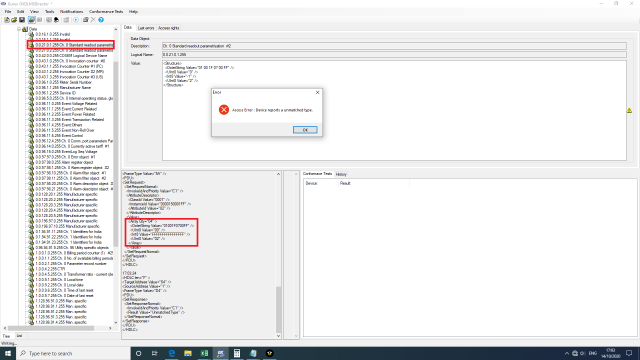
Also i want to know that how
Also i want to know that how to understand / debug the XML log ?
Hi,
Hi,
Please, don't add pics. They are compressed and It's hard to read the data.
It seems that your meter is returning an array where are four different items. That is wrong. Your meter should return a structure where are four items or an array of structures.
BR,
Mikko
thank you for your response,
thank you for your response,
I understood. will not add pics. afterward.
yes, it is returning an array whereas it should return structure. now, how can I solve this problem?
In the very first downloading of an object list, the type is showing as an array. and when I write any data the error of type mismatch is coming.
Hi,
Hi,
Meter should return data like this:
<Array>
<Structure>
<OctetString Value=""/>
<UInt Value=""/>
...
</Structure>
</Array>
Or if there is only structure like this:
<Structure>
<OctetString Value=""/>
<UInt Value=""/>
...
</Structure>
You can't change this. You need to ask the meter manufacturer to fix it.
BR,
Mikko
Thank you for your response,
Thank you for your response,
when I first download objects I am having data shown like this :
<Structure>
<OctetString Value=""/>
<UInt Value=""/>
...
</Structure>
and this is ok. I also checked in the XML log file, it is taking data in structure form. my data is in structure form only, not an array of structures. so when I read this object the type is proper,but when I write something in this structure type it is showing a data type mismatch error. In the XML log file I have seen the type Array when I write something.
Hi,
Hi,
It's hard to read the pic, but for me, it seems that there is <Array> tag and not <Structure>. Can you check that?
BR,
Mikko
yes, you are right. the
yes, you are right. the request is like:
<Array Qty ="04">
<Octet string value =""/>
<Uint8 Value=""/>
<Int8 Value=""/>
<Uint8 Value=""/>
</Array>
This is the Log for writing the Data. and when i Read the data the response is like:
<Structure>
<Octet string value =""/>
<Uint8 Value=""/>
<Int8 Value=""/>
<Uint8 Value=""/>
</Structure>
Hi,
Hi,
You need to write data like this:
<Structure>
<OctetString Value="01 02 03" />
<UInt8 Value="2" />
<Int8 Value="2" />
<UInt8 Value="3" />
</Structure>
I just tested this and it worked like should be. Just change the values.
BR,
Mikko
7E A0 26 03 C9 FE 5D 0D E6 E6
7E A0 26 03 C9 FE 5D 0D E6 E6 00 C1 01 C1 00 01 00 00 15 00 01 FF 02 00 01 04 09 03 01 02 03 11 02 0F 02 11 03 D0 A9 7E
<Value>
<Array Qty="04" >
<OctetString Value="010203" />
<UInt8 Value="02" />
<Int8 Value="02" />
<UInt8 Value="03" />
</Array>
</Value>
</SetRequestNormal>
</SetRequest>
</PDU>
</HDLC>
2: 7E A0 10 C9 03 1E 01 A3 E6 E7 00 C5 01 C1 0C 3C 43 7E
<HDLC len="F" >
<TargetAddress Value="64" />
<SourceAddress Value="1" />
<FrameType Value="1E" />
<PDU>
<SetResponse>
<SetResponseNormal>
<!-- Priority: High, ServiceClass: Confirmed, ID: 1 -->
<InvokeIdAndPriority Value="C1" />
<Result Value="UnmatchedType" />
</SetResponseNormal>
</SetResponse>
</PDU>
</HDLC>
This is the Log file that I tried the values as you say. since I am getting the same error.
Hi,
Hi,
What is data on the value Window? I can't read it from the pic.
BR,
Mikko
In value window, the data is
In value window, the data is like:
<Structure>
<Octet string value ="01 00 1F 07 00 FF"/>
<Uint8 Value="0"/>
<Int8 Value="-1"/>
<Uint8 Value="2"/>
</Structure>
Hi,
Hi,
Now I know the reason. Your meter is using logical name 0.0.21.0.1.255, Standard readout parameterization. The data type is defined as an array in DLMS specification. Ask the meter manufacturer to change the logical name to something else or change the value to structure array.
BR,
Mikko
thank you for the solution.
thank you for the solution.
now the problem is solved with a logical name change.