Before commenting read Forum rules
Don't comment the topic if you have a new question.
You can create a new topic selecting correct category from Gurux Forum and then create a new topic selecting "New Topic" from the top left.

Before commenting read Forum rules
Don't comment the topic if you have a new question.
You can create a new topic selecting correct category from Gurux Forum and then create a new topic selecting "New Topic" from the top left.
Hi,
I use optical port probe to communicate with the meter. I installed Gurux.DLMS.Python package with all requirements.
meter company | SAGECOM
I executed the following command
command:
python main.py -S COM22:9600:8None1 -t Verbose -d DLMS -C Authentication -A D0D1D2D3D4D5D6D7D8D9DADBDCDDDEDF -B 000102030405060708090A0B0C0D0E0F -D 00112233445566778899AABBCCDDEEFF
----------------------------------------------
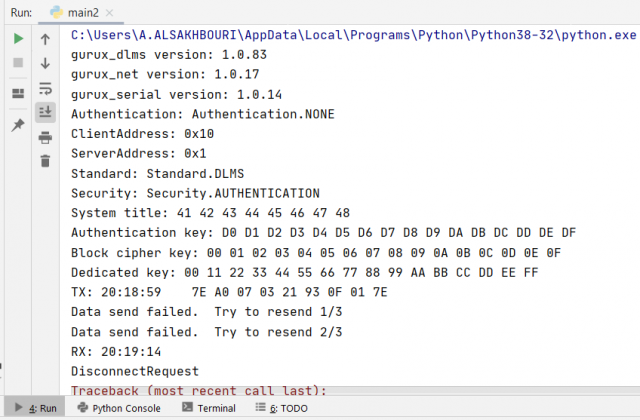
But the meter is not responding,
The output is shown in the image below.
Any help?
Hi,
Hi,
One of the settings is wrong. Can you connect without ciphering first?
I believe you should try with GXDLMSDirector first. I also believe that your client system title is wrong.
If this is the gas meter you need to activate optical port first.
BR,
Mikko
The meter is Electricity
The meter is Electricity Meter.
I already tried with GXDLMSDirector without ciphering but no response received (also I tested with ciphering) . It shows this message "Failed to receive reply from the device in given time".
I already tested the meter with the company software and it works successfully.
But I need to build my software using gurux python.
Thanks,
Hi,
Hi,
What is the meter model? Can you ask from the meter vendor that DLMS part is enabled?
BR,
Mikko
Meter model: T210-D
Meter model: T210-D
company : SAGEMCOM
Yes DLMS is enabled.
I solve it by changing the
I solve it by changing the client and server addressing.
Thanks,
Hi,
Hi,
If you share the client and server address we can add a device template so it's easier to use from GXDLMSDirector.
BR,
Mikko
Hi,
Hi,
This is the meter settings.
Client Address = 0x10
Physical Server = 0x10
Logical Server = 0x1
In Gurux.DLMS.Python , what will be the value of server address as decimal value?
Thanks,
Hi,
Hi,
The manufacturer settings file for Sagemcom Energy & Telecom is added.
The server address is -s 144.
BR,
Mikko
Hi ,
Hi ,
Thank you very much.
Yes I tested the new settings successfully.
Hi,
Hi,
I tried to read logical object 1.0.0.9.2.255 from the meter through gurux.DLMS.Python, but it displayed an error I think it means that no logical name found for this. But this logical name is correct.
How can I read these logical objects?
Hi,
Hi,
There are no objects with the logical name "1.0.0.9.2.255". Check the logical name.
BR,
Mikko