Before commenting read Forum rules
Don't comment the topic if you have a new question.
You can create a new topic selecting correct category from Gurux Forum and then create a new topic selecting "New Topic" from the top left.

Before commenting read Forum rules
Don't comment the topic if you have a new question.
You can create a new topic selecting correct category from Gurux Forum and then create a new topic selecting "New Topic" from the top left.
I'm having problem connecting to a meter using the Client.Example from python and c# through IP. Using GXDLMSDirector works, but with the example it doesn't.
This is how I run the example:
python main.py -r ln -c 1 -s 1 -h 10.242.26.172 -p 16000 -P 12345678 -a Low
And a get "Failed to receive reply from the device in given time". Is ther another configuration I need to set up or maybe I'm setting something wrong?
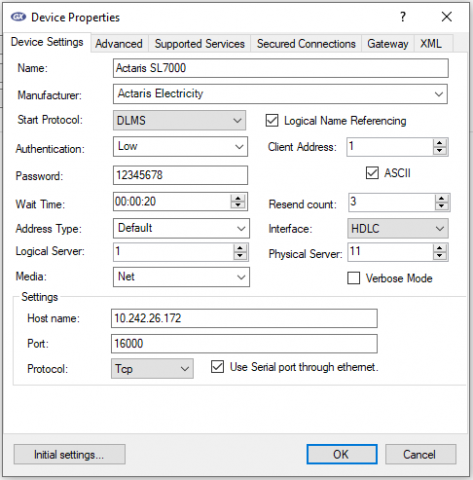
This is the configuration that works in the Director
Hi,
Hi,
You need to change the server address parameter to -s 16401.
BR,
Mikko
Thanks Kurumi that was the
Thanks Kurumi that was the problem. Can you tell me the reason of that number? because I haven't seen it on any documentation.
Another thing. Every time I run the script it takes a long time to give the response, but on the Director it was just the first time. Do I have to save some information for further attempts?
Hi,
Hi,
Client and server addresses vary between manufacturers. Manufacturers usually don't share this info.
I can't say why it takes a long time to get a response. It might depend on the connection.
BR,
Mikko
But I'm trying on the same
But I'm trying on the same computer just changing the method. The value object I'm trying to get is the manufacturing number so I add this to the python command "-g 0.0.96.1.0.255:2" and it works, I get the value but after 5 minutes of waiting.
On the Director I only had to wait that amount of time whe I added the new device and accepted to retrieve the objects, later every value that I want I get it instantly. That's why I suppose there must be a way of saving that objects information like the Director does and later I just retrieve the specific information I want
Hi,
Hi,
The current implementation reads the association view first. That is the reason why it's slow.
GXDLMSDirector saves this info and there is no need to read it again.
I'll have to think about how this can be improved. This is trivial when logical name referencing is used, but more complicated with the short name referencing
BR,
Mikko
I understand. Could you
I understand. Could you please let me know if there are some updates according to this issue?
Hi,
Hi,
We don't serialize the association view because it might change if you change the authentication level, even if the meter is the same. That was causing a lot of problems when people were wondering why some objects are not shown.
You need to do it yourself.
BR,
Mikko