Before commenting read Forum rules
Don't comment the topic if you have a new question.
You can create a new topic selecting correct category from Gurux Forum and then create a new topic selecting "New Topic" from the top left.

Before commenting read Forum rules
Don't comment the topic if you have a new question.
You can create a new topic selecting correct category from Gurux Forum and then create a new topic selecting "New Topic" from the top left.
We are trying to set our meters to local time instead of utc time. Which we used to do.
This means that we have set the offset and timezone info in the meter Clock object. We have done this correctly.
When we read the buffer (ReadRowsByRange) of most meters, we receive a GXDateTime per row that contains a correct DateTimeOffset for our time zone.
We have one type of meter (L&G ZMD e650) however, that reports the timezone incorrectly. It will use the local time of the VM it runs on.
We have debugged it into GXCommon.cs, and noticed that the Deviation bytes that are sent to us by the meter contains the following value:
0x8000
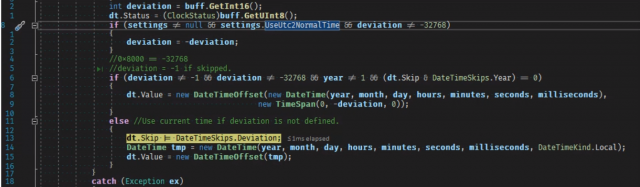
Line 822 of GXCommon.cs contains the following comment:
//0x8000 = -32768
If this value is returned, Gurux will default to current time in stead of using a deviation.
The byte[] that is being parsed in the method GetDateTime (of GXCommon.cs
private static object GetDateTime(GXDLMSSettings settings, GXByteBuffer buff, GXDataInfo info)
The byte[] (Buff)
{07 E3 08 1C 03 0A 1E 00 FF 80 00 80}
Is this an issue with the meter, can we do anything about it?
Hi,
Hi,
If the deviation is 0x8000 deviation is ignored.
If the deviation is ignored, application expects that time zone is same with the client app and the meter and uses client app time.
Can you try to set deviation to the meter?
BR,
Mikko
We have actually. We have
We have actually. We have succesfully set the clock deviation with the following method on which we pass the TimeZone we want to sync towards and the time. This results in the deviation being set on the clock object, also when we read the clock, the deviation is set. It is just not set on the readings that we retrieve using ReadRowsByRange. Our clock synchronization code:
https://www.codepile.net/pile/g2xJgXeY
When we use GX Director or the Landis Gyr Map110 software, we notice that the clock is set correctly as well.
Any more clues?
Our code in a readable way
I've updated the previous post with a link to readable code.
Hi,
Hi,
Check is the deviation set correctly to new values in profile generic (Values that are generated after you updated deviation).
BR,
Mikko
Hi Mikko,
Hi Mikko,
Thanks for the suggestion. We have tried this, and even values that are generated after we updated the deviation in the Clock do not have the deviation set correctly.
They have the same value. 0x8000.
Any more clues on how to fix this issue?
Best regards,
Rob
Hi,
Hi,
If the deviation is not given, the only option is that your VM is on the same time zone where meters are.
Ask from the vendor if there is a new firmware where this is improved.
BR,
Mikko
Hi Mikko,
Hi Mikko,
This does not appear to be the case. As a test, we've already changed the TimeZone of our VM to a different one (China). The meter still only sends us 0x8000. Gurux will then use the (wrong) local timezone of the VM. Even though the data should have been in CEST timezone. (+2:00).
We can indeed check if the firmware is out-of-date and improved. These meters are however manufactured very recently (2019) for a new metering project.
If you have any more suggestions on how to tackle this problem, we would love to hear from you!
Best regards,
Rob
Hi,
Hi,
If meter sends 0x8000, the only option is use PC's time zone. There is no way how to get it somewhere.
From the source code:
if devitation is 0x8000
DateTime tmp = new DateTime(year, month, day, hours, minutes, seconds, milliseconds, DateTimeKind.Local);
BR,
Mkko
Thanks for confirming that
Thanks for confirming that the problem lies within the meter. We are going to contact Landis + Gyr and see what they can do for us.