
Hi there,
This is my first post in this forum, so please be patient in asking dump questions.
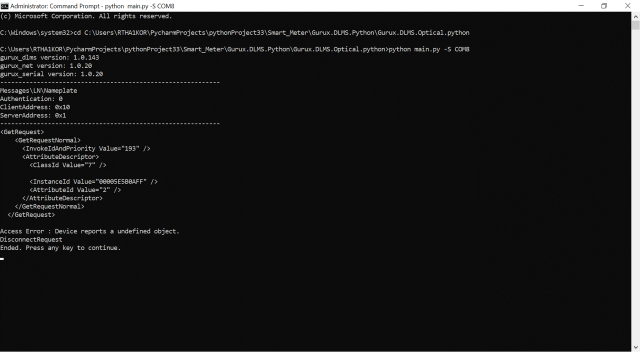
I can successfully execute configuration parameters (Clock and invocation counter) without any errors. But when i try to profiles Read, i am getting Access Error. Please let me know if there are any additional setttings or changes that needs to be done before executing in US type. I have re-validated the passwords and keys and they are as expected. I am pasting the trace below from Command.
C:\Users\RTHA1KOR\PycharmProjects\pythonProject33\Smart_Meter\Gurux.DLMS.Python\Gurux.DLMS.Optical.python>python main.py -S COM8
gurux_dlms version: 1.0.143
gurux_net version: 1.0.20
gurux_serial version: 1.0.20
------------------------------------------------------------
Messages\LN\Nameplate
Authentication: 0
ClientAddress: 0x10
ServerAddress: 0x1
------------------------------------------------------------
<GetRequest>
<GetRequestNormal>
<InvokeIdAndPriority Value="193" />
<AttributeDescriptor>
<ClassId Value="7" />
<InstanceId Value="00005E5B0AFF" />
<AttributeId Value="2" />
</AttributeDescriptor>
</GetRequestNormal>
</GetRequest>
Access Error : Device reports a undefined object.
DisconnectRequest
Ended. Press any key to continue.
Hi, Check that this profile…
Hi,
Check that this profile generic is available in the association view. You can easily check it if you download GXDLMSDirector. Try to establish the connection without authentication and the profile generic 0.0.94.91.10.255 should be shown on the left side. If it's not you need to connect using a different authentication level to access it.
BR,
Mikko
Thank You For your response…
Thank You For your response Mikko... GXDLMSDirector I got a response...I'm trying to connect serial Interface (Optical) using python script. I can successfully execute configuration parameters (Clock and invocation counter) without any errors. But when i try to profiles Read, i am getting Access Error.Please help me in reading profiles data from a serial interface using python script.
I am pasting the trace below from Command.
C:\Users\RTHA1KOR\PycharmProjects\pythonProject33\Smart_Meter\Gurux.DLMS.Python\Gurux.DLMS.Optical.python>python main.py -S COM8
gurux_dlms version: 1.0.143
gurux_net version: 1.0.20
gurux_serial version: 1.0.20
------------------------------------------------------------
Messages\LN\Nameplate
Authentication: 0
ClientAddress: 0x10
ServerAddress: 0x1
------------------------------------------------------------
<GetRequest>
<GetRequestNormal>
<InvokeIdAndPriority Value="193" />
<AttributeDescriptor>
<ClassId Value="7" />
<InstanceId Value="00005E5B0AFF" />
<AttributeId Value="2" />
</AttributeDescriptor>
</GetRequestNormal>
</GetRequest>
Access Error : Device reports a undefined object.
DisconnectRequest
Ended. Press any key to continue.
I'm trying to read Nameplate…
I'm trying to read Nameplate profile but i am getting access error.
code:
import os
import os.path
import sys
import traceback
from gurux_common.enums import TraceLevel
from gurux_common.GXCommon import GXCommon
from gurux_serial import GXSerial
from gurux_net import GXNet
from gurux_dlms import GXDLMSException, GXDLMSExceptionResponse, GXDLMSConfirmedServiceError
from gurux_dlms import GXReplyData
from gurux_dlms.enums import InterfaceType, Command
from GXSettings import GXSettings
from GXDLMSReader import GXDLMSReader
dlms_endpoint: str = 1
dlms_System_title:str = "qwertyui"
dlms_authentication_key: bytes = "4145575F5057525F414B5F454B5F3234"
dlms_block_cipher_key: bytes = "4145575F5057525F414B5F454B5F3234"
dlms_password:bytes = "4145575F504F5745525F534D5F303234"
Nameplate_obis_code: str = "0.0.94.91.10.255"
instantaneous_obis_code: str = "1.0.94.91.0.255"
billing_obis_code: str = "1.0.98.1.0.255"
block_load_obis_code: str = "1.0.99.1.0.255"
Event_Voltage_Related_obis_code: str = "0.0.99.98.0.255"
Event_Current_Related_obis_code: str = "0.0.99.98.1.255"
Event_Power_Related_obis_code: str = "0.0.99.98.2.255"
Event_Transaction_Related_obis_code: str = "0.0.99.98.3.255"
Event_Other_Related_obis_code: str = "0.0.99.98.4.255"
Event_NonRollOver_Related_obis_code: str = "0.0.99.98.5.255"
Event_Control_Related_obis_code: str = "0.0.99.98.6.255"
try:
import pkg_resources
#pylint: disable=broad-except
except Exception:
#It's OK if this fails.
print("pkg_resources not found")
#pylint: disable=too-few-public-methods,broad-except
class sampleclient():
#Returns True, is command is in XML file.
@classmethod
def ___containsCommand(cls, actions, command):
for it in actions:
if it.command == command:
return True
return False
# Handle meter reply.
# reply: Received reply.
@classmethod
def handleReply(cls, reply):
if isinstance(reply.value, (bytes, bytearray)):
print(GXCommon.toHex(reply.value))
print(str(reply))
else:
print(str(reply))
@classmethod
def main(cls, args):
try:
print("gurux_dlms version: " + pkg_resources.get_distribution("gurux_dlms").version)
print("gurux_net version: " + pkg_resources.get_distribution("gurux_net").version)
print("gurux_serial version: " + pkg_resources.get_distribution("gurux_serial").version)
except Exception:
#It's OK if this fails.
print("pkg_resources not found")
# args: the command line arguments
reader = None
settings = GXSettings()
try:
# //////////////////////////////////////
# Handle command line parameters.
ret = settings.getParameters(args)
if ret != 0:
return
# //////////////////////////////////////
# Initialize connection settings.
if not isinstance(settings.media, (GXSerial, GXNet)):
raise Exception("Unknown media type.")
# //////////////////////////////////////
if not settings.path:
if settings.client.useLogicalNameReferencing:
settings.path = "Messages\\LN"
else:
settings.path = "Messages\\SN"
if os.path.isdir(settings.path):
#files = os.listdir(settings.path)
files = [os.path.join(settings.path, name) for name in os.listdir(settings.path)]
else:
files = []
files.append(settings.path)
#Execute messages.
for file in files:
name = os.path.splitext(file)[0]
if settings.trace > TraceLevel.WARNING:
print("------------------------------------------------------------")
print(name)
actions = settings.client.load(file)
#If there aren't actions in the file.
if not actions:
continue
try:
settings.media.open()
reader = GXDLMSReader(settings.client, settings.media, settings.trace, settings.invocationCounter)
reply = GXReplyData()
#Send SNRM if not in xml.
if settings.client.interfaceType == InterfaceType.HDLC:
if not sampleclient.___containsCommand(actions, Command.SNRM):
reader.snrmRequest()
#Send AARQ if not in xml.
if not sampleclient.___containsCommand(actions, Command.AARQ):
if not sampleclient.___containsCommand(actions, Command.SNRM):
reader.aarqRequest()
for it in actions:
if it.command == Command.SNRM and settings.client.interfaceType == InterfaceType.WRAPPER:
continue
if it.command == Command.DISCONNECT_REQUEST and settings.client.interfaceType == InterfaceType.WRAPPER:
break
#Send
reply.clear()
if settings.trace > TraceLevel.WARNING:
print("------------------------------------------------------------")
print(str(it))
if it.isRequest():
reader.readDataBlock(settings.client.pduToMessages(it), reply)
cls.handleReply(reply)
except (ValueError, GXDLMSException, GXDLMSExceptionResponse, GXDLMSConfirmedServiceError) as ex:
print(ex)
except (KeyboardInterrupt, SystemExit, Exception) as ex:
traceback.print_exc()
if settings.media:
settings.media.close()
reader = None
finally:
if reader:
try:
#Send disconnect if not in xml.
if not sampleclient.___containsCommand(actions, Command.DISCONNECT_REQUEST):
reader.disconnect()
else:
settings.media.close()
reader.close()
except Exception:
traceback.print_exc()
print("Ended. Press any key to continue.")
if __name__ == '__main__':
sampleclient.main(sys.argv)
Inside LN path :
<?xml version="1.0" encoding="utf-8"?>
<!--Connect to the LN meter and read Nameplate Profile.-->
<Messages>
<GetRequest>
<GetRequestNormal>
<InvokeIdAndPriority Value="193" />
<AttributeDescriptor>
<ClassId Value="7" />
<!--0.0.94.91.10.255-->
<InstanceId Value="00005E5B0AFF" />
<AttributeId Value="2" />
</AttributeDescriptor>
</GetRequestNormal>
</GetRequest>
</Messages>
I can successfully execute configuration parameters (Clock and invocation counter) without any errors. But when i try to profiles Read, i am getting Access Error.Please help me in reading profiles data from a serial interface using python script. Kindly do the needful....