
Hello,
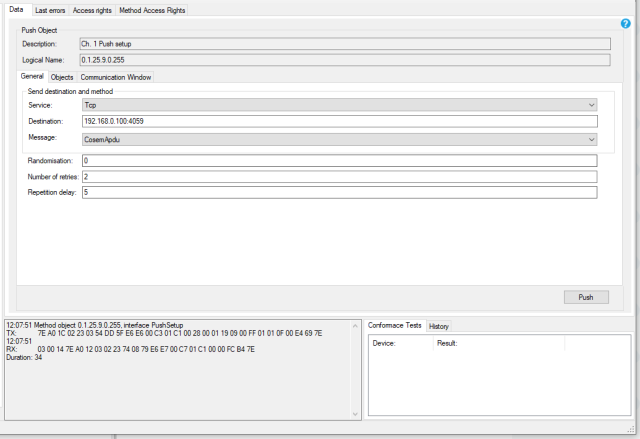
I am working with power meter MT880. I am trying to set-up Ethernet Push for my smart meter (picture in attachment).
I also preconfigured MT880 in MC software (with this I mean:
- Ethernet push destination IP address (192.168.0.100 - and also changed network adapter options for my ethernet computer adapter)
- Ethernet push destination port (4059)
- Ethernet push protocol type (0-TCP).
When I tried to set-up Push in MC software (Push action scheduler - Interval 1 --> so the values would come every hour (also tried every minute)), the values does not come (looking with wireshark), push object list 1 contains only Device ID 1 (0.0.96.1.0).
I also tried with Gurux software, but also no success - if I press Push button in GXDLMSDirector, I see 3 columns in Wireshark - DLMS, DLMS, TCP.
Hex trace:
12:07:51 Method object 0.1.25.9.0.255, interface PushSetup
TX: 7E A0 1C 02 23 03 54 DD 5F E6 E6 00 C3 01 C1 00 28 00 01 19 09 00 FF 01 01 0F 00 E4 69 7E
12:07:51
RX: 03 00 14 7E A0 12 03 02 23 74 08 79 E6 E7 00 C7 01 C1 00 00 FC B4 7E
Duration: 34
I am missing something, but I don't know what. All other functions work without problems, but the push does not come to the computer.
Thank you and best regards,
David
Hi, When you press the Push…
Hi,
When you press the Push button, it will ask the meter to send the push message. Because the meter returns an acknowledge message it should send the push message.
Have you set the capture objects? Have you set communication windows when push messages are allowed to be sent?
Make sure that your meter can access the target host 192.168.0.100. Make sure that there are no firewalls, etc that might block the message.
BR,
Mikko