
Hi
I am trying to read the data in a Landis+Gyr LGZ405 electric meter associated to historical data profiles, via optical cable, using GuruX DLMS for Python.
I already could read simpler data succesfully, but, for example, when I do the command ' python .\main.py -r ln -S COM7 -d DLMS -i HdlcWithModeE -g "0.0.98.1.0.126:2" ', it returns "Read capture objects first", and I do not know what it means by "Capture Objects".
When trying to read this data in MAP110 (official reader for the meter), or with GDLMS, it asks you in what period of time you want to make those reads. What I thought is that it is telling me that when I do the command, I have to specify the period of time in some way, but I tried various different things and I couldn't get to anything, so I don't know if it is that.
Also, in the attached image, there's a list of OBIS that shows up in a part that says "Capture Objects" when you read the OBIS 0.0.98.1.0.126:2 in GDLMS. So I thought this could something to do with the problem I'm having.
Thank you for reading
Forums
Image
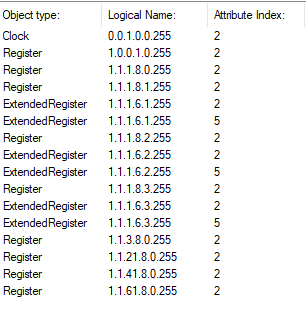
Hi, Capture objects error…
Hi,
Capture objects error means that you need to add command line arguments where capture objects read first. You can do it like this:
"0.0.98.1.0.126:3;"0.0.98.1.0.126:2""
Capture objects are saved for attribute index 3.
You can use readRowsByRange to read values using start and end time.
You can find the example from here:
https://github.com/Gurux/Gurux.DLMS.Python/blob/430bf80789e45f8a61ce688…
I hope this will help you with profile generic:
https://www.gurux.fi/Gurux.DLMS.Objects.GXDLMSProfileGeneric
I believe that the best way for you is that you modify the example and don't read association view at all. Add objects that you wan to read and read them like this:
pg = GXDLMSProfileGeneric("0.0.98.1.0.126")
#read capture objects.
self.read(pg, 3)
#Read rows using start and end time.
start = datetime.datetime.now()
end = start
start = start.replace(hour=0, minute=0, second=0, microsecond=0)
end = end.replace(minute=0, second=0, microsecond=0)
cells = self.readRowsByRange(pg, start, end)
BR,
Mikko
Thanks you for your reply! I…
Thanks you for your reply! I will be trying that