Before commenting read Forum rules
Don't comment the topic if you have a new question.
You can create a new topic selecting correct category from Gurux Forum and then create a new topic selecting "New Topic" from the top left.

Before commenting read Forum rules
Don't comment the topic if you have a new question.
You can create a new topic selecting correct category from Gurux Forum and then create a new topic selecting "New Topic" from the top left.
Hello,
I trying to connect to landis+gyr ZMD410CT which is connected to virtual com port by optical interface.
The com port works fine but when I'm trying to connect with Gurux i get "Filed to recive replay from the device in given time" replay. I checked initial settings but the manual seems out of date. Can enyone help ?
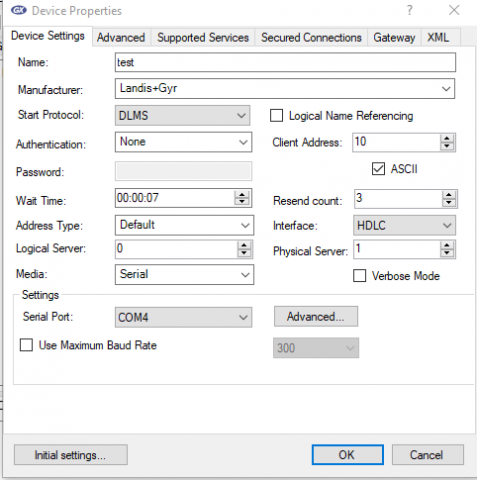
Hi,
Hi,
If you are using optical port change "Start Protocol" from DLMS to IEC.
BR,
Mikko
It doesn't help. I tried a
It doesn't help. I tried a lot of different combinations but always this same problem occurs.
When i'm using telnet with standard frame "/?! " i'm getting an answer.
BR
Piter
Hi Piter,
Hi Piter,
"/?! " is IEC message. Are you getting any reply when you are using IEC as a start protocol?
BR,
Mikko
Nope, u can see below, I read
Nope, u can see below, I read that the optical interface needs handshake before connection, but it starts with SNRM frame.
13:13:33 Send SNRM request.
TX: 7E A0 07 03 21 93 0F 01 7E
13:13:38 Data send failed. Try to resend 1/3
13:13:43 Data send failed. Try to resend 2/3
13:13:48 Failed to receive reply from the device in given time.
13:13:48 Send Disconnect request.
TX: 7E A0 07 03 21 53 03 C7 7E
13:13:53 Data send failed. Try to resend 1/3
13:13:58 Data send failed. Try to resend 2/3
13:14:03 Failed to receive reply from the device in given time.
BR
Piter
Hi,
Hi,
Have you changed this?
If you are using optical port change "Start Protocol" from DLMS to IEC.
BR,
Mikko
Yes offcourse.
Yes offcourse.
Hi,
Hi,
In your first post you said that you are using a virtual com port. Do you have a virtual COM port or are you using an optical probe (head) that is connected to USB?
Try to select "Use maximum baud rate". It helps with some optical probes. Communication is slow, but you can check if communication works.
What optical probe you are using (modem and manufacturer)?
BR,
Mikko
Hi,
Hi,
That was helpful. I set the "use max baud rate" and I got first anwser.
I'm using numeron optical head with rs232 port via ser2net.
[26/05/2020 08:23:45] Written data (COM4)
2f 3f 21 0d 0a /?!..
[26/05/2020 08:23:46] Read data (COM4)
2f 4c 47 5a 35 5c 32 5a 4d 44 34 31 30 34 34 30 /LGZ5\2ZMD410440
39 2e 42 32 34 0d 0a 9.B24..
[26/05/2020 08:23:47] Written data (COM4)
06 32 30 32 0d 0a .202..
[26/05/2020 08:23:47] Read data (COM4)
06 32 30 32 0d 0a .202..
[26/05/2020 08:23:48] - Close port COM4
[26/05/2020 08:23:48] - Open port COM4
[26/05/2020 08:23:49] Written data (COM4)
7e a0 07 03 21 93 0f 01 7e ~ ..!“..~
[26/05/2020 08:23:54] Written data (COM4)
7e a0 07 03 21 93 0f 01 7e ~ ..!“..~
[26/05/2020 08:24:00] Written data (COM4)
7e a0 07 03 21 93 0f 01 7e ~ ..!“..~
[26/05/2020 08:24:05] Written data (COM4)
7e a0 07 03 21 53 03 c7 7e ~ ..!S.Ç~
[26/05/2020 08:24:10] Written data (COM4)
7e a0 07 03 21 53 03 c7 7e ~ ..!S.Ç~
[26/05/2020 08:24:15] Written data (COM4)
7e a0 07 03 21 53 03 c7 7e ~ ..!S.Ç~
[26/05/2020 08:24:20] Written data (COM4)
01 42 30 03 0d 0a .B0...
[26/05/2020 08:24:26] - Close port COM4
Hi,
Hi,
That the problem. ser2net can't change baud rate after initializing and it's using 300 and not 9600 what you propose and the meter starts to use. Can you communicate without ser2net first? It might cause some problems.
BR,
Mikko
Yep, but if I stay on 300 it
Yep, but if I stay on 300 it should work fine, but I still doesn't have any answer for SNRM frame.
For now i don't have that possibility.
Hi,
Hi,
Your bytes are correct and the meter should reply. The problem is in the connection.
BR,
Mikko
Hi,
Hi,
I read date directly from rs232 and everything works perfect!
Thanks a lot!
BR
Piter
Hi Piter,
Hi Piter,
Problem is that when you start to communicate with an optical probe settings are 300 7Even1. After moving from IEC to DLMS, settings are changed to 9600 8None1. ser2net can't handle this.
You can read your meter using serial port because baud rate, parity, stop bits or data bits don't change.
BR,
Mikko
So if I connect via serial
So if I connect via serial port i will start e.g. from 9600 8n1 (I know it's programable baud rate), but still it will be IEC right?
BR
Piter
Hi Piter,
Hi Piter,
If you are connecting using serial port your meter is communicating directly using DLMS and IEC is not needed. IEC is needed when communicating using an optical port to change the baud rate from 300 ti higher one and moving to binary mode.
BR,
Mikko
hmm it's weird, becouse i
hmm it's weird, becouse i finally got access to rs port, and now I can send IEC "/?!" to meter but on 9600 probably.
BR
Piter
Hi,
Hi,
If you are using the serial port connection starting baud rate can be anything and usually it's 9600. If you are using the optical probe (head) default starting baud rate is usually 300.
BR,
Mikko
Hi,
Hi,
I know but as You said "If you are connecting using serial port your meter is communicating directly using DLMS and IEC is not needed", but it still operate on IEC, because it respond to standard IEC frame.
BR
Piter
Hi,
Hi,
Your meter is supporting both IEC 62056-21 and DLMS. If you are sending "/?!\r\n" it will start to operate with IEC 62056-21 and you need to move to mode E if you want to communicate with DLMS.
BR,
Mikko
Hi,
Hi,
So, if I understood correctly, when I'm sending "/?!\r\n" imeter starts to operate with IEC 62056-21. But is it possible to start with DLMS using serial port or I must still start with IEC and move to mode E?
Because it's still looks like it operate in this same way like from opto port, but only difference is baud rate, becuse we starting at 9600.
I tried both methods but still unsuccessful. When I try to start with IEC it's sending "move to mode E" frame but sometimes it's too late because I have standard reply with data, and sometimes just no reply like bellow:
08:14:31 Send SNRM request.
TX: 7E A0 07 03 21 93 0F 01 7E
08:14:36 Data send failed. Try to resend 1/3
Hi Piter,
Hi Piter,
If you are using serial port don't send /?!\r\n. You can communicate directly with DLMS.
The idea of sending /?!\r\n is to check that the communication channel is working. That was the original problem at the beginning of this topic. Communication was not working. Now you can get the reply.
I propose that you make communication work without ser2net. It might cause all kinds of problems that cause that communication is not working even the parameters are correct.
Problem with your meter is that if the serial port is opened and no data is sent meter sends IEC readout and it will cause problems.
BR,
Mikko
Right now I'm using moxa
Right now I'm using moxa rs232/485 converter to tcp, no ser2net because ser2net didn't work properly like u said. My connection parameters looks that:
Hi Piter,
Hi Piter,
You must set the same serial port settings to Moxa as in the meter or it doesn't work.
BR,
Mikko