Before commenting read Forum rules
Don't comment the topic if you have a new question.
You can create a new topic selecting correct category from Gurux Forum and then create a new topic selecting "New Topic" from the top left.

Before commenting read Forum rules
Don't comment the topic if you have a new question.
You can create a new topic selecting correct category from Gurux Forum and then create a new topic selecting "New Topic" from the top left.
Greetings,
Dear All,
I am using the GURUX UI in windows and it does work perfectly but when I use the Linux Version or even the terminal version in windows it says there is no data:
Win UI:- Connected and there is data
Linux or Windows PowerShell:- Not Connected
Image in next comment
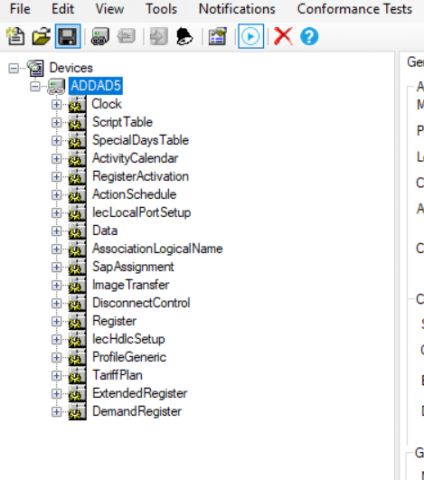
Linux or Windows PowerShell:-
Linux or Windows PowerShell:- Not Connected
Windows Conf:
Windows Conf:
Dear Sir,
Dear Sir,
Can you run the command-line application with -t Verbose parameter and post trace here?
BR,
Mikko
This is the -t Verbose
This is the -t Verbose
Hi,
Hi,
Please, don't post images. Paste plain text. Getting bytes is pain from the image.
Try with server address -s 17347
BR,
Mikko
can we please have a call in
can we please have a call in team or zoom, I am so sorry if I am taking your time but I am in a rush and I need to finish it today.
this is the test using Server
this is the test using Server address you gave: in the user interface i used 963 and it converted it to 3C3 and it does work.
python3 main.py -S /dev/ttyUSB0 -a Low -P 'Sec_Ami_!?' -c 3 -s 17347 -t Verbose -r ln -g "0.0.1.0.0.255:1" -v 0.0.1.0.0.255
gurux_dlms version: 1.0.68
gurux_net version: 1.0.17
gurux_serial version: 1.0.14
Authentication: Authentication.LOW
ClientAddress: 0x3
ServerAddress: 0x43c3
Standard: Standard.DLMS
TX: 13:10:03 7E A0 0A 00 02 0E 87 07 93 0F C4 7E
Data send failed. Try to resend 1/3
Data send failed. Try to resend 2/3
RX: 13:10:18
Traceback (most recent call last):
File "main.py", line 81, in main
reader.initializeConnection()
File "/home/ssamg/meter/AEC/Gurux.DLMS.Python/Gurux.DLMS.Client.Example.python/GXDLMSReader.py", line 308, in initializeConnection
self.readDLMSPacket(data, reply)
File "/home/ssamg/meter/AEC/Gurux.DLMS.Python/Gurux.DLMS.Client.Example.python/GXDLMSReader.py", line 119, in readDLMSPacket
self.readDLMSPacket2(data, reply)
File "/home/ssamg/meter/AEC/Gurux.DLMS.Python/Gurux.DLMS.Client.Example.python/GXDLMSReader.py", line 170, in readDLMSPacket2
raise e
File "/home/ssamg/meter/AEC/Gurux.DLMS.Python/Gurux.DLMS.Client.Example.python/GXDLMSReader.py", line 162, in readDLMSPacket2
raise TimeoutException("Failed to receive reply from the device in given time.")
gurux_common.TimeoutException.TimeoutException: Failed to receive reply from the device in given time.
DisconnectRequest
Ended. Press any key to continue.
Hi,
Hi,
I'm sorry, but we can help only our clients by telco. Your logical address is set to one in GXDLMSDirector. That is the reason why you must use 17347.
Your data matches for GXDLMSDirector settings.
7E A0 0A 00 02 0E 87 07 93 0F C4 7E
Check your serial port settings. What is baudrate in GXDLMSDirector?
BR,
Mikko
Can I subscribe to your
Can I subscribe to your services to be a client?
in both Linux and windows
in both Linux and windows
root@ssamg-Edge-Gateway-5000:~/meter/AEC/Gurux.DLMS.Python/Gurux.DLMS.Client.Example.python# p main.py -S /dev/ttyUSB0:9600:8None1 -t Verbose -c 3 -s 17347 -a Low -P 'Sec_Ami_!?' -r ln -g "0.0.1.0.0.255:1"
gurux_dlms version: 1.0.68
gurux_net version: 1.0.17
gurux_serial version: 1.0.14
Authentication: Authentication.LOW
ClientAddress: 0x3
ServerAddress: 0x43c3
Standard: Standard.DLMS
TX: 16:01:05 7E A0 0A 00 02 0E 87 07 93 0F C4 7E
Data send failed. Try to resend 1/3
Data send failed. Try to resend 2/3
RX: 16:01:20
Traceback (most recent call last):
File "main.py", line 81, in main
reader.initializeConnection()
File "/home/ssamg/meter/AEC/Gurux.DLMS.Python/Gurux.DLMS.Client.Example.python/GXDLMSReader.py", line 308, in initializeConnection
self.readDLMSPacket(data, reply)
File "/home/ssamg/meter/AEC/Gurux.DLMS.Python/Gurux.DLMS.Client.Example.python/GXDLMSReader.py", line 119, in readDLMSPacket
self.readDLMSPacket2(data, reply)
File "/home/ssamg/meter/AEC/Gurux.DLMS.Python/Gurux.DLMS.Client.Example.python/GXDLMSReader.py", line 170, in readDLMSPacket2
raise e
File "/home/ssamg/meter/AEC/Gurux.DLMS.Python/Gurux.DLMS.Client.Example.python/GXDLMSReader.py", line 162, in readDLMSPacket2
raise TimeoutException("Failed to receive reply from the device in given time.")
gurux_common.TimeoutException.TimeoutException: Failed to receive reply from the device in given time.
DisconnectRequest
Ended. Press any key to continue.
root@ssamg-Edge-Gateway-5000:~/meter/AEC/Gurux.DLMS.Python/Gurux.DLMS.Client.Example.python#
Hi,
Hi,
Can you run python in Windows using the same PC that you are using with GXDLMSDirector?
What is your Python version?
BR,
Mikko
yes sure, this from the same
yes sure, this from the same windows using python 3.8.2 :
PS C:\Users\neal\Desktop\meters\Gurux.DLMS.Python\Gurux.DLMS.Client.Example.python> python .\main.py -S COM7:9600:8None1 -t Verbose -c 3 -s 17347 -a Low -P 'Sec_Ami_!?'
gurux_dlms version: 1.0.68
gurux_net version: 1.0.17
gurux_serial version: 1.0.14
Authentication: Authentication.LOW
ClientAddress: 0x3
ServerAddress: 0x43c3
Standard: Standard.DLMS
TX: 16:53:12 7E A0 0A 00 02 0E 87 07 93 0F C4 7E
Data send failed. Try to resend 1/3
Data send failed. Try to resend 2/3
RX: 16:53:29
DisconnectRequest
PS C:\Users\neal\Desktop\meters\Gurux.DLMS.Python\Gurux.DLMS.Client.Example.python>
I finally made it, you were
I finally made it, you were really helpful, I appreciate your hospitality.
you can see both the current then the voltage, I have then to multiply them by 0.001 to get the correct scales.
all the best,
Nezar
one last question, How did
one last question, How did you calculate the address, it was:
logical = 1
physical = 963
and then it is 17347, How did you do it?
Hi,
Hi,
May I ask what was the reason? I have explained the address counting here:
https://www.gurux.fi/dlmsAddress
BR,
Mikko
I think the reason was the
I think the reason was the the address most likely and some of the missing parameters. i double checked the parameters and it worked.
Hi,
Hi,
Thanks for letting me know. It's always a big help if I know that reason has found.
BR,
Mikko