Before commenting read Forum rules
Don't comment the topic if you have a new question.
You can create a new topic selecting correct category from Gurux Forum and then create a new topic selecting "New Topic" from the top left.

Before commenting read Forum rules
Don't comment the topic if you have a new question.
You can create a new topic selecting correct category from Gurux Forum and then create a new topic selecting "New Topic" from the top left.
Hello Mikko
I'm interested in experimenting with DLMS/COSEM protocol I'm using Gurux.DLMS.Python example for readout data from meter
~/Downloads/Gurux.DLMS.Python-master/Gurux.DLMS.Client.Example.python (master ✘)✭ ᐅ python main.py
GuruxDlmsSample reads data from the DLMS/COSEM device.
GuruxDlmsSample -h [Meter IP Address] -p [Meter Port No] -c 16 -s 1 -r SN
-h host name or IP address.
-p port number or name (Example: 1000).
-S serial port.
-i IEC is a start protocol.
-a Authentication (None, Low, High).
-P Password for authentication.
-c Client address. (Default: 16)
-s Server address. (Default: 1)
-n Server address as serial number.
-r [sn, sn] Short name or Logican Name (default) referencing is used.
-w WRAPPER profile is used. HDLC is default.
-t [Error, Warning, Info, Verbose] Trace messages.
-g "0.0.1.0.0.255:1; 0.0.1.0.0.255:2" Get selected object(s) with given attribute index.
Example:
Read LG device using TCP/IP connection.
GuruxDlmsSample -r SN -c 16 -s 1 -h [Meter IP Address] -p [Meter Port No]
Read LG device using serial port connection.
GuruxDlmsSample -r SN -c 16 -s 1 -sp COM1 -i
Read Indian device using serial port connection.
GuruxDlmsSample -S COM1 -c 16 -s 1 -a Low -P [password]
------------------------------------------------------
Available serial ports:
[COM1]
Ended. Press any key to continue.
Please help me
BR
Janenarong
Hi Mikko
Hi Mikko
Hello Mikko
Hello Mikko
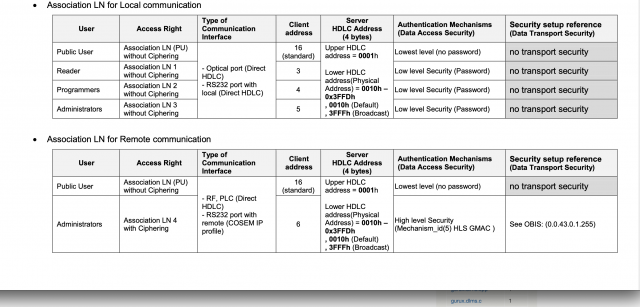
Gurux GXDLMSDriector is work for my meter
My settings Gurux GXDLMSDirector
Manufacturer: Gurux
Physical Address: 1
Logical Address : 0
Client Address: 5
Authentication: Low
Password: 22222222222222222222
Baud rate: 19200
Port COM1
BR
Janenarong
Hi,
Hi,
Happy holidays. Back on the office. Try with this:
python main.py -S COM1:19200:8None1 -a Low -P 22222222222222222222
BR,
Mikko
Hi
Hi
Thank you very much for your quick response and Happy new year :) ;)
BR
Janenarong Kundern