Before commenting read Forum rules
Don't comment the topic if you have a new question.
You can create a new topic selecting correct category from Gurux Forum and then create a new topic selecting "New Topic" from the top left.

Before commenting read Forum rules
Don't comment the topic if you have a new question.
You can create a new topic selecting correct category from Gurux Forum and then create a new topic selecting "New Topic" from the top left.
Hello,
We are using the DLMS Python Library from the github and were able to run it. However, we are facing some issues with getting data and are also seeing frequent disconnections.
Here is a screenshot
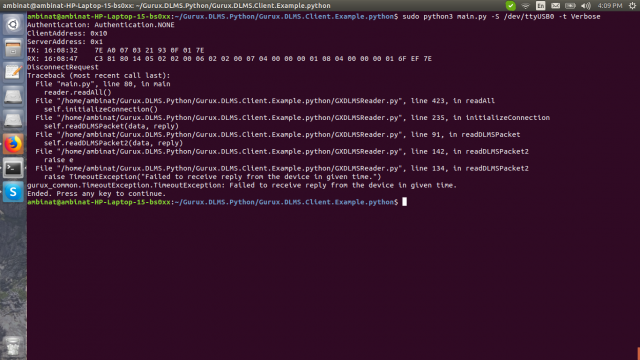
Hi,
Hi,
Please, don't post an image if you have problems. It's easier to check bytes from the textual trace.
Meter is replying, but few bytes are missing from the begin of reply. What Linux distro you are using?
What USB 2 serial port converter you are using?
BR,
Mikko
Linux distro :- Ubuntu 16.04
Linux distro :- Ubuntu 16.04
USB 2 serial port converter :- PL2303.
Hi,
Hi,
Thanks from this info. There is one PL2303 USB2serial port converter. We'll install Ubuntu and check this.
BR,
Mikko
That would be great!
That would be great!
Thanks for the support.
We are trying to write our own script to also see the response (which should start with a 7E) and will post the results as soon as we have something.
Hi,
Hi,
This is tested with Ubuntu 16.04.6 Xenial 64 bit using Python3. USB to serial port converter is from Prolific.
Everything is working without problems.
Can you check installed gurux-serial? Run
sudo python3 -m pip install --upgrade gurux-serial.
Version should be 1.0.12
BR,
Mikko
same problem. This is my log.
same problem. This is my log.
Authentication: Authentication.NONE
ClientAddress: 0x10
ServerAddress: 0x1
TX: 11:07:15 7E A0 07 03 21 93 0F 01 7E
RX: 11:07:30 81 80 14 05 02 02 00 06 02 02 00 07 04 00 00 00 01 08 04 00 00 00 01 6F EF 7E
DisconnectRequest
Hi,
Hi,
This is strange. Data is correct but few bytes are missing from the begin of the packet. Is your Ubuntu 64 or 32 bits?
BR,
Mikko
I tried in raspberry pi also.
I tried in raspberry pi also. It gives me same error.
But when i send this command '7E A0 07 03 21 93 0F 01 7E' using serial tool (H-term) I get response.
7E A0 20 21 03 73 73 98 81 80 14 05 02 02 00 06 02 02 00 07 04 00 00 00 01 08 04 00 00 00 01 6F EF 7E
Hi,
Hi,
What version you are using from gurux-serial? Run this:
python3 -m pip install --upgrade gurux-serial.
BR,
Mikko
Hi
Hi
Do you have a web link or pic from the used converter?
BR,
Mikko
Sure.
Sure.
Here is the image of the packet.
This same converter works well when we use an off-the-shelf serial software like hterm. It also works fine when we send the hex data from our own python code.
Hello,
Hello,
Where are we going wrong?
We are sending the commands like this:
neel@neel-HP-Notebook:~/Documents/git-repo/Gurux.DLMS.Python/Gurux.DLMS.Client.Example.python$ python3 main.py
GuruxDlmsSample reads data from the DLMS/COSEM device.
GuruxDlmsSample -h [Meter IP Address] -p [Meter Port No] -c 16 -s 1 -r SN
-h host name or IP address.
-p port number or name (Example: 1000).
-S serial port.
-i IEC is a start protocol.
-a Authentication (None, Low, High).
-P Password for authentication.
-c Client address. (Default: 16)
-s Server address. (Default: 1)
-n Server address as serial number.
-r [sn, sn] Short name or Logican Name (default) referencing is used.
-w WRAPPER profile is used. HDLC is default.
-t [Error, Warning, Info, Verbose] Trace messages.
-g "0.0.1.0.0.255:1; 0.0.1.0.0.255:2" Get selected object(s) with given attribute index.
Example:
Read LG device using TCP/IP connection.
GuruxDlmsSample -r SN -c 16 -s 1 -h [Meter IP Address] -p [Meter Port No]
Read LG device using serial port connection.
GuruxDlmsSample -r SN -c 16 -s 1 -sp COM1 -i
Read Indian device using serial port connection.
GuruxDlmsSample -S COM1 -c 16 -s 1 -a Low -P [password]
------------------------------------------------------
Available serial ports:
['/dev/ttyS31', '/dev/ttyS30', '/dev/ttyS29', '/dev/ttyS28', '/dev/ttyS27', '/dev/ttyS26', '/dev/ttyS25', '/dev/ttyS24', '/dev/ttyS23', '/dev/ttyS22', '/dev/ttyS21', '/dev/ttyS20', '/dev/ttyS19', '/dev/ttyS18', '/dev/ttyS17', '/dev/ttyS16', '/dev/ttyS15', '/dev/ttyS14', '/dev/ttyS13', '/dev/ttyS12', '/dev/ttyS11', '/dev/ttyS10', '/dev/ttyS9', '/dev/ttyS8', '/dev/ttyS7', '/dev/ttyS6', '/dev/ttyS5', '/dev/ttyS4', '/dev/ttyS3', '/dev/ttyS2', '/dev/ttyS1', '/dev/ttyS0', '/dev/ttyUSB0']
neel@neel-HP-Notebook:~/Documents/git-repo/Gurux.DLMS.Python/Gurux.DLMS.Client.Example.python$ python3 main.py -S /dev/ttyUSB0
Authentication: Authentication.NONE
ClientAddress: 0x10
ServerAddress: 0x1
RX: 14:32:06 87 5E 80 14 05 02 02 00 06 02 02 00 07 04 00 00 00 01 08 04 00 00 00 01 6F EF 7E
DisconnectRequest
^Z
[1]+ Stopped python3 main.py -S /dev/ttyUSB0
neel@neel-HP-Notebook:~/Documents/git-repo/Gurux.DLMS.Python/Gurux.DLMS.Client.Example.python$ python3 main.py -S /dev/ttyUSB0 -t Verbose
Authentication: Authentication.NONE
ClientAddress: 0x10
ServerAddress: 0x1
TX: 14:32:36 7E A0 07 03 21 93 0F 01 7E
RX: 14:32:51 2E 80 14 05 02 02 00 06 02 02 00 07 04 00 00 00 01 08 04 00 00 00 01 6F EF 7E
DisconnectRequest
Hi,
Hi,
Can you try to connect using GXDLMSDirector? We have order same cable what you are using but it's not arrived yet.
BR,
Mikko
Hi Kurumi,
Hi Kurumi,
Yes, we are able to communicate with the meter using the DLMS Director.
Can you suggest what we are missing in the Python Script though?
We are looking at reading close to a 100 different values from the meters but the DLMSDirector only provides 15-20 parameters. We want to understand how to receive the remaining ones and what to do to receive them.
Ambimat.
Hi,
Hi,
You need to change the authentication level. When you have a higher authentication level you can see more objects.
BR,
Mikko