Before commenting read Forum rules
Don't comment the topic if you have a new question.
You can create a new topic selecting correct category from Gurux Forum and then create a new topic selecting "New Topic" from the top left.

Before commenting read Forum rules
Don't comment the topic if you have a new question.
You can create a new topic selecting correct category from Gurux Forum and then create a new topic selecting "New Topic" from the top left.
Hi,
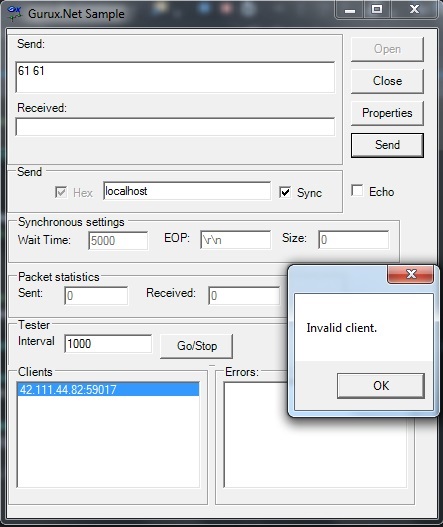
i tried to read meter over GPRS, meter is connecting successfully to software, but when i send command to read it, i am getting invalid client exception from software.
Please check the screenshot below.
Thanks
same problem here. Is a
same problem here. Is a meterSit meter?
Hi,
Hi,
You can't use GXNet sample to communicate with DLMS meter. If your meter is using static IP address, you can use GXDLMSDirector to communicate with it. You can read more from static and dynamic IP addresses from here:
https://www.gurux.fi/Gurux.DLMS.DynamicIP
BR,
Mikko
Hi Mikko,
Hi Mikko,
I am using Gurux.DLMS.Meter.Listener.Net solution but I always get the error "Invalid Client" even for public client address 16 (0x11) when sending AARQ message. It is an italian meterSit meter and I am using WRAPPER interfacetype. Thanks
Omar
Hi,
Hi,
Can you open appsettings.json and change LogLevel from Info to Debug. You can now see send and received bytes on the command prompt or Visual Studio output. You need to change "Show output from" debug (default) to "Gurux.DLMS.AMI". Can you add sent and received bytes so I can check what is happening?
BR,
Mikko
Hi, I am using the C# project
Hi, I am using the C# project. I can't see appsettings.json. I have app.config but no LogLevel entry on it.
In Visual Studio "Show output from" doesn't show "Gurux.DLMS.AMI", only Debug, Build, Build Order
Also http://www.gurux.fi/dlmsAddress:
Public ClientID is 16 or 0x16? It makes quite a big difference
Thanks
Omar
Hi,
Hi,
Sorry, I was just talking from Gurux.DLMS.AMI. You are right. I fixed 0x16 to 0x10.
Do you see any bytes (hex) in the command prompt?
BR,
Mikko
I am using this line of code:
I am using this line of code:
GXDLMSClient client = new GXDLMSClient(true, 0x10, 1, Enums.Authentication.None, null, Enums.InterfaceType.WRAPPER);
console output:
Client 95.129.20.18:7733 is connected.
Send AARQ request
<- 09:42:43 00 01 00 10 00 01 00 1F 60 1D A1 09 06 07 60 85 74 05 08 01 01 BE 10 04 0E 01 00 00 00 06 5F 1F 04 00 00 1E 1D FF FF
Invalid client.
Disconnecting from the meter.
Hi,
Hi,
Have you modified the source code? What if you connect to the listener using Gurux.Net.CSharp.Example?
https://github.com/Gurux/Gurux.Net
Do you see bytes that listener sends in the Gurux.Net.CSharp.Example?
Is meter sending push notification here or is meter connecting (Auto connect) in certain time?
If you start Gurux.Net.CSharp.Example using this port number do you see any data that meter sends or is output empty?
BR,
Mikko
BR,
Mikko
same error Invalid Client
same error Invalid Client
10:12:03.648 Info Opening
10:12:03.654 Info Server Settings: Protocol Tcp Port: 44062
10:12:03.655 Info Open
Exception thrown: 'System.Exception' in Gurux.Net.dll
-> 10:13:28.780 Received 2B 2B 2B
It is a Auto connect meter (over GPRS, dynamic IP) but now we are forcing the connection manually to test the software
Hi,
Hi,
This +++ is not DLMS message. Can you ask from the meter vendor that meter is supporting Italy Standard UNI/TS 11291-11-2 and it's enabled?
BR,
Mikko
I tried again and response is
I tried again and response is 2B-2B-2B41-54-0D-0A which is +++AT
looks like a AT command from the modem???
Hi,
Hi,
I believe that you might be right. Is there an external modem? Try to return OK\r\n.
Let's see what happens.
BR,
Mikko
It is a meterSit gas meter G4
It is a meterSit gas meter G4 GPRS. Embedded module for communications. No external modem. They confirmed they use clientId 16 for public. Could it be the serverId or at this stage the meter is not using DLMS at all?
I was just wondering if you had any experience with meterSit device.
Thanks
Hi,
Hi,
Our clients are readin SamGas, Meter Italia, MeterSit, etc meters. They are reading MeterSit devices using Data Concentrator and direct TCP/IP connection, but not like you are using it.
Is your meter using a static IP or dynamic IP address?
BR,
Mikko
Hi,
Hi,
Meter is using dynamic IP over GPRS. I am checking with meterSit if we need to enable something on the meter. I dont understand why the meter is connecting but doesnt reply. For Invalid Client you mean the communication is in the wrong format? Thanks
Hi,
Hi,
Invalid Client error is coming because the application doesn't reply data that modem expects. For this reason, the meter closes the connection and you see Invalid Client error.
BR,
Mikko
Hi, I am sniffing the network
Hi, I am sniffing the network traffic and it looks like the software send a FIN, ACK packet and close the connection. It is not the meter. It is a GPRS connection. Do I need to use a kind of keeplalive setting???
Meter 95.129.20.99
DataCollector 10.44.1.138
95.129.20.99 10.44.1.138 TCP 60 4346 → 44012 [SYN] Seq=0 Win=32120 Len=0 MSS=1136
10.44.1.138 95.129.20.99 TCP 58 44062 → 4346 [SYN, ACK] Seq=0 Ack=1 Win=64752 Len=0 MSS=1460
95.129.20.99 10.44.1.138 TCP 60 4346 → 44012 [ACK] Seq=1 Ack=1 Win=32120 Len=0
10.44.1.138 95.129.20.99 TCP 54 44062 → 4346 [FIN, ACK] Seq=1 Ack=1 Win=64752 Len=0
95.129.20.99 10.44.1.138 TCP 60 4346 → 44012 [ACK] Seq=1 Ack=2 Win=32120 Len=0
private static void OnClientConnected(object sender, Common.ConnectionEventArgs e)
{
Console.WriteLine("Client {0} is connected.", e.Info);
GXNet server = (GXNet)sender;
try
{
using (GXNet cl = server.Attach(e.Info))
{
ReadMeter(cl);
}
}
catch (Exception ex)
{
Console.WriteLine(ex.Message);
}
}
private static void ReadMeter(GXNet media)
{
GXDLMSClient client = new GXDLMSClient(true, 0x10, 1, Enums.Authentication.None, null, Enums.InterfaceType.WRAPPER);
GXDLMSReader reader = null;
try
{
reader = new GXDLMSReader(client, media, TraceLevel.Verbose);
reader.ReadAll(false);
//Create own thread for each meter if you are handling multiple meters simultaneously.
//new Thread(new ThreadStart(reader.ReadAll));
}
finally
{
if (reader != null)
{
reader.Close();
}
}
}
Thanks
Hi,
Hi,
In your previous post, you said that the modem is sending +++. Did you handle that? You don't need to send keepalive because the meter is read right away.
There is no trace of what kind of messages meter and server are sending so it's hard to tell what is the problem.
BR,
Mikko
Hi, I think the +++ AT
Hi, I think the +++ AT commands where sent by the meter because of the timeout (if you don't open the socket in 5sec or if you don't send commands within 15sec)
What I noticed is: when Client.SNRMRequest() I can see the packet with data on Wireshark. When Client.AARQRequest() no data can be seen on Wireshark. I can only see [FIN, ACK] Seq=1 Ack=1 Win=64752 Len=0
Is there something I need to change???
Looks like Client.AARQRequest() is unable to send the packet. I am using the solution Gurux.DLMS.Meter.Listener.Net.sln with package:
<packages>
<package id="Gurux.Common" version="8.1.1711.2301" targetFramework="net40" />
<package id="Gurux.DLMS" version="8.5.1711.1701" targetFramework="net40" />
<package id="Gurux.Net" version="8.1.1711.2301" targetFramework="net40" />
<package id="Gurux.Serial" version="8.1.1711.2301" targetFramework="net40" />
</packages>
Thanks
Hi,
Hi,
If you are using WRAPPER, SNRM is not sent. You can see AARQ message. Verify the client and server addresses from the meter vendor. Ask also is HDLC or WRAPPER framing used.
BR,
Mikko
Yes I noticed that. WRAPPER
Yes I noticed that. WRAPPER doesn't send SNRM but I wanted to test the client to see if it was able to send some packets which it did when using HDLC.
What I don't understand is why AARQ messages are not sent by the client at all. I can't see anything on Wireshark...
Client is 16, server is 1
Hi,
Hi,
If you are using HDLC SNRM message will fail and AARQ is not sent.
BR,
Mikko
yes I know... I am trying
yes I know... I am trying everything.
Anyway I think I have to use WRAPPER (meterSit said the first message to send is AARQ) but still same problem AARQ packet not sent at all by the client, nothing appears on the trace log...
Thanks
Hi,
Hi,
Connect to server with Gurux.Net.CSharp.Example as a client. Can you see the bytes?
BR,
Mikko
Th server (meter) has a
Th server (meter) has a dynamic IP address over GPRS. How can I use Gurux.Net.CSharp.Example?
Thanks
Hi,
Hi,
I mean your listener application. Try to connect to it. You should see send bytes in the Gurux.Net.CSharp.Example.
BR,
Mikko
using Gurux.DLMS.Meter
using Gurux.DLMS.Meter.Listener.Net - Looks like there is a bug somewhere....
When WRAPPER doesn't send SNRM (but it runs some code after Client.SNRMRequest()) which I think breaks the connection).
I commented the whole code for SNRM Request and now I can see the client sending AARQ messages!!!
Hope makes sense
Thanks
Hi,
Hi,
Just come to my mind. Is your meter using an IP v6 address? If it is, try to set UseIPv6 to true.
If WRAPPER is used SNRM Request is null and it's skipped. Check this from InitializeConnection.
BR,
Mikko
BR,
Mikko
IPv4
IPv4
sonmething wrong in InitializeConnection
If WRAPPER is used SNRM Request is null and it's skipped (but it breaks the connection somehow)
//byte[] data;
//data = Client.SNRMRequest();
//if (data != null)
//{
// if (Trace > TraceLevel.Info)
// {
// Console.WriteLine("Send SNRM request." + GXCommon.ToHex(data, true));
// }
// ReadDataBlock(data, reply);
// if (Trace == TraceLevel.Verbose)
// {
// Console.WriteLine("Parsing UA reply." + reply.ToString());
// }
// //Has server accepted client.
// Client.ParseUAResponse(reply.Data);
// if (Trace > TraceLevel.Info)
// {
// Console.WriteLine("Parsing UA reply succeeded.");
// }
//}
Hi,
Hi,
I managed to make it work. I think the problem was a different version of DLL.
Can you help me with this: I need to make 2 connection sequentially (public and private) but after the first connection I am unable to connect again. Looking at the code, where can I open the second connection?
private static void OnClientConnected(object sender, Common.ConnectionEventArgs e)
{
Console.WriteLine("Client {0} is connected.", e.Info);
GXNet server = (GXNet)sender;
try
{
using (GXNet cl = server.Attach(e.Info))
{
ReadMeter(cl);
ReadMeter2(cl);
}
}
catch (Exception ex)
{
Console.WriteLine(ex.Message);
}
}
The above doesn't work...
Many Thanks
Hi,
Hi,
Some meters allow only one connection. Do you call Release after you close the first connection? With some meters, it might help if you don't call it and for some meters expect that you call it.
BR,
Mikko
Hello,
Hello,
I have the same issue.
It seems to be that the cause is Gurux.Net library update on 10.02.2020 (v. 8.1.2002.1001). There were some changes in GXNet.cs.
After this update when a meter is connected to the server via TCP I immediately receive the "Invalid Client" error (connection to Public client, InterfaceType.WRAPPER)
With the previous version of Gurux.Net library (8.1.2002.501) everything works fine.
I don't know if this issue appears only with my meters or it affects others.
Hi,
Hi,
Please, create a new topic if you have a new question. Can you describe this a little bit more? I just tested this and everything works like expected.
BR,
Mikko
Hello, can you communicate…
Hello, can you communicate via HDLC with Metersit meters ? If yes, I need help. Thank you