Before commenting read Forum rules
Don't comment the topic if you have a new question.
You can create a new topic selecting correct category from Gurux Forum and then create a new topic selecting "New Topic" from the top left.

Before commenting read Forum rules
Don't comment the topic if you have a new question.
You can create a new topic selecting correct category from Gurux Forum and then create a new topic selecting "New Topic" from the top left.
Hi Mikko,
I am trying to update firmware into IS15992 standard meter.
In firmware update, all blocks (Total 625 blocks) were transmitted successfully.
After completion checked for all block transferred status. In that getting 589 were successfully updated out of 624 blocks.
Again started firmware update and it starts from 589 and again all blocks were updated successfully.
Then checked for all block transferred status and again got 589 from the meter.
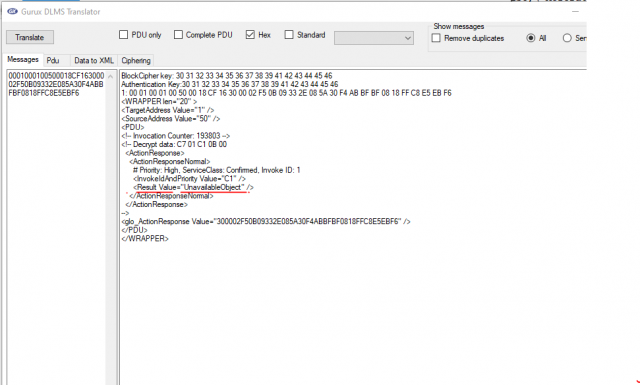
I have checked from DLMS translator and in that show "<Result Value="UnavailableObject" />" error.
BlockCipher key: 30 31 32 33 34 35 36 37 38 39 41 42 43 44 45 46
Authentication Key:30 31 32 33 34 35 36 37 38 39 41 42 43 44 45 46
1: 00 01 00 01 00 50 00 18 CF 16 30 00 02 F5 0B 09 33 2E 08 5A 30 F4 AB BF BF 08 18 FF C8 E5 EB F6
<WRAPPER len="20" >
<TargetAddress Value="1" />
<SourceAddress Value="50" />
<PDU>
<!-- Invocation Counter: 193803 -->
<!-- Decrypt data: C7 01 C1 0B 00
<ActionResponse>
<ActionResponseNormal>
# Priority: High, ServiceClass: Confirmed, Invoke ID: 1
<InvokeIdAndPriority Value="C1" />
<Result Value="UnavailableObject" />
</ActionResponseNormal>
</ActionResponse>
-->
<glo_ActionResponse Value="300002F50B09332E085A30F4ABBFBF0818FFC8E5EBF6" />
</PDU>
</WRAPPER>
Please find attached a screenshot for the same.
Can you please check and provide your suggestion?
Hi,
Hi,
There is something wrong with the meter. Is image verification or activation causing this error?
You should ask the meter vendor if there is a fix for this.
BR,
Mikko
Hi Mikko,
Hi Mikko,
This happened during the firmware update process only. In an ongoing process, suddenly got this type of response. And for the rest of all blocks getting the same error response.
Image verification and activation method were not executed. So it is not causing this error.
Let me confirm with the meter vendor also.