Before commenting read Forum rules
Don't comment the topic if you have a new question.
You can create a new topic selecting correct category from Gurux Forum and then create a new topic selecting "New Topic" from the top left.

Before commenting read Forum rules
Don't comment the topic if you have a new question.
You can create a new topic selecting correct category from Gurux Forum and then create a new topic selecting "New Topic" from the top left.
Hello,
Goals :
- Test reading DLMS value of Actaris SL7000 meter using Gurux.DLMS.Client.Example.python program
Issues and Consideration :
- Return 'Data Sent failed' when running (proof attached)
python main.py -S COM5 -a Low -P 065066067068069070071072 -c 1 -s 1 -r ln
- I have sucessfully read DLMS value using GXDLMSDirector (proof attached)
Please do give advice, I think the problem is that I cannot input logical address and physical address using main.py command
Thank You,
Best Regards
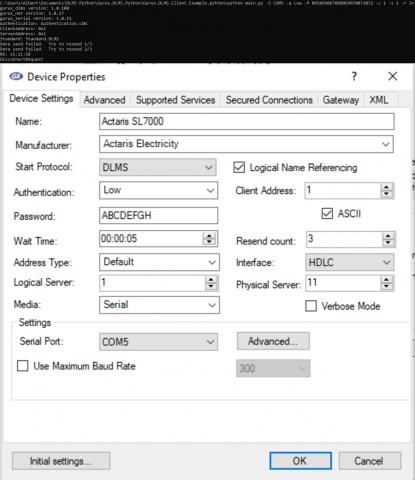
Hi,
Hi,
Try with those settings:
python main.py -S COM5 -a Low -P ABCDEFGH -c 1 -s 1-c 2194
BR,
Mikko
Hi,
Hi,
I have tried that. It returns
"Invalid parameter:2194" (proof attached)
maybe is there any typing error?
Hi,
Hi,
Please, add plain text. It's easier to read.
Space is missing, This is the correct:
python main.py -S COM5 -a Low -P ABCDEFGH -c 1 -s 1 -c 2194
BR,
Mikko
Hello Mikko,
Hello Mikko,
Still got error. It said "byte must be in range(0,256)"
This is the result
C:\Users\Ignatius Albert\Documents\Python DLMS Testing\Gurux.DLMS.Python\Gurux.DLMS.Client.Example.python>python main.py -S COM1 -a Low -P ABCDEFGH -c 1 -s 1 -c 2194
gurux_dlms version: 1.0.100
gurux_net version: 1.0.17
gurux_serial version: 1.0.15
Authentication: Authentication.LOW
ClientAddress: 0x892
ServerAddress: 0x1
Standard: Standard.DLMS
DisconnectRequest
byte must be in range(0, 256)
Ended. Press any key to continue.
Hi,
Hi,
Typo again. This is correct.
python main.py -S COM5 -a Low -P ABCDEFGH -c 1 -s 2194
BR,
Mikko
Hello there,
Hello there,
Now still have error
"Data send failed"
Please consider the logical address is 1, physical address is 17 (default)
Hi,
Hi,
Please, add plain text instead of pics. It's easier to read.
I count the address wrong. Try with -s 145
If you can't connect with that can you check what is server address side in GXDLMSDirector settings? You can find this information from the Frame tab.
BR,
Mikko