Before commenting read Forum rules
Don't comment the topic if you have a new question.
You can create a new topic selecting correct category from Gurux Forum and then create a new topic selecting "New Topic" from the top left.

Before commenting read Forum rules
Don't comment the topic if you have a new question.
You can create a new topic selecting correct category from Gurux Forum and then create a new topic selecting "New Topic" from the top left.
Hi Mikko,
I am updated gurux Client new version: 8.1.2102;2301.
I am not able to read individual objects. it is throwing error and disconnecting the client.
please help why it showing like this?
previous versions it is working fine.
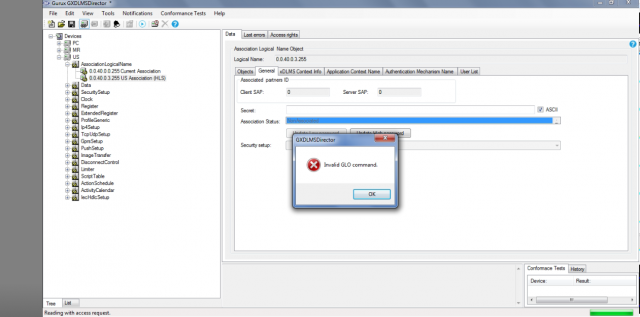
Hi,
Hi,
Thank you for this info. We'll check what is causing this.
BR,
Mikko
Hi,
Hi,
We can't repeat this. It works without problems. Can you check your "Secured Connections" tab from the meter settings? What is the used security level?
BR,
Mikko
Hi Mikko,
Hi Mikko,
Thank you for your reply,
there is newly securitysuite: GMAC showing.
Actually I am connecting PC Association I did not given any security related data at secured connections.
please find below screen shot.
similarly for remaining association also it showing as same like this.
Hi Mikko,
Hi Mikko,
but in code i am using security_suite as :DLMS_SECURITY_SUITE_V0
this option is not available in the secured connection tab in the meter settings.
Hi,
Hi,
DLMS_SECURITY_SUITE_V0 is GMac. You need to set authentication and block cipher keys if you want to use security suite 0. They must be the same on the client and server-side.
BR,
Mikko
Hi Mikko,
Hi Mikko,
for US and MR I given authentication and block cipher keys and for PC association I given NONE.
In three Associations I am getting the problem. I am not able to read individually.and i given Security-suite as GMAC
Hi,
Hi,
Can you read anything? First, I have to say that you need to verify that the keys are the same on the client and the meter. This is usually the reason.
BR,
Mikko
Hi,
Hi,
Can you add send and received data as hex here so I can check them?
BR,
Mikko
Hi Mikko,
Hi Mikko,
logs added below US association with none security-policy
While reading the profile generic Object:
10:29:40 Access Request
TX: 7E A0 56 03 61 54 77 3C E6 E6 00 D9 C0 00 00 04 00 06 01 00 07 01 00 5E 5B 04 FF 04 01 00 07 01 00 5E 5B 04 FF 05 01 00 07 01 00 5E 5B 04 FF 06 01 00 07 01 00 5E 5B 04 FF 02 01 00 07 01 00 5E 5B 04 FF 07 01 00 07 01 00 5E 5B 04 FF 08 06 00 00 00 00 00 00 DF D9 7E
10:29:40
RX: 7E A0 07 61 03 97 5D E7 7E
10:30:29 Disconnect request
TX: 7E A0 07 03 61 53 65 81 7E
10:30:29
RX: 7E A0 1E 61 03 73 B5 7C 81 80 00 05 01 F0 06 01 F0 07 04 00 00 00 01 08 04 00 00 00 01 73 99 7E
while reading individual data class objects...
10:31:41 Access Request
TX: 7E A0 1F 03 61 54 A3 D3 E6 E6 00 D9 C0 00 00 05 00 01 01 00 01 00 00 2A 00 00 FF 02 01 00 AD 53 7E
10:31:42
RX: 7E A0 07 61 03 97 5D E7 7E
10:32:39 Disconnect request
TX: 7E A0 07 03 61 53 65 81 7E
10:32:40
RX: 7E A0 1E 61 03 73 B5 7C 81 80 00 05 01 F0 06 01 F0 07 04 00 00 00 01 08 04 00 00 00 01 73 99 7E
while reading association individually
10:33:56 Access Request
TX: 7E A0 77 03 61 54 9F AF E6 E6 00 D9 C0 00 00 06 00 09 01 00 0F 00 00 28 00 03 FF 03 01 00 0F 00 00 28 00 03 FF 04 01 00 0F 00 00 28 00 03 FF 05 01 00 0F 00 00 28 00 03 FF 06 01 00 0F 00 00 28 00 03 FF 07 01 00 0F 00 00 28 00 03 FF 08 01 00 0F 00 00 28 00 03 FF 09 01 00 0F 00 00 28 00 03 FF 0A 01 00 0F 00 00 28 00 03 FF 0B 09 00 00 00 00 00 00 00 00 00 53 96 7E
10:33:56
RX: 7E A0 07 61 03 97 5D E7 7E
10:35:39 Disconnect request
TX: 7E A0 07 03 61 53 65 81 7E
10:35:39
RX: 7E A0 1E 61 03 73 B5 7C 81 80 00 05 01 F0 06 01 F0 07 04 00 00 00 01 08 04 00 00 00 01 73 99 7E
Hi,
Hi,
You have set access conformance for the meter side. Remove it from the meter side. Access is using a lot of memory and it's not implemented for the meter side for that reason. Using the access service you can read or write several objects with one command. It's a good idea, but some people try to read multiple profile generic buffers at the same time and it's using too much memory.
BR,
Mikko