Before commenting read Forum rules
Don't comment the topic if you have a new question.
You can create a new topic selecting correct category from Gurux Forum and then create a new topic selecting "New Topic" from the top left.

Before commenting read Forum rules
Don't comment the topic if you have a new question.
You can create a new topic selecting correct category from Gurux Forum and then create a new topic selecting "New Topic" from the top left.
Hello, I'm using Gurux.Net for reading instant values and profile generic
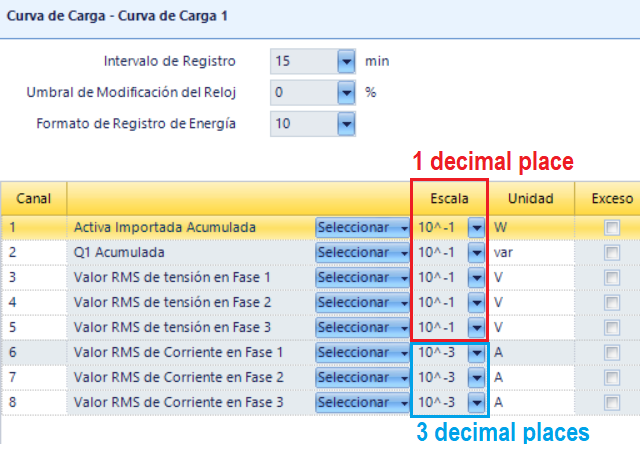
On the profile generic 1, the first five channels are configured with 1 decimal place (10^-1) and the last 3 channels are configured with 3 decimal places (10^-3)
When the profile generic is read with Gurux.net, the values come without decimals
For example,
tension on phase 1 is configured 10^-1 and the value in ACPilot is 229.1 but DLMSDirector and Gurux.Net reads 2291 without decimals
current on phase 1 is configured 10^-3 and the value in ACPilot is 0.202 but DLMSDirector and Gurux.Net reads 202 without decimals
My C# code is as follows:
GXDLMSProfileGeneric oLoadProfile = new GXDLMSProfileGeneric("0.0.99.1.0.255");
Read(oLoadProfile, 3);
ReadRowsByRange(oLoadProfile, DateTime.Today.AddDays(-1), DateTime.Today);
List<object[]> oLista = oLoadProfile.Buffer;
for (int fila = 0; fila < oLista.Count; fila++ ) {
for (int col = 0; col < oLoadProfile.CaptureObjects.Count; col++ ) {
// parse data
}
}
With the Curux.Net library, i'm using
Client.Object.Save("template.xml",new GXXmlWriterSettings(){ UserMeterTime=true, IgnoreDefaultValues=false});
But I cannot find any "Scaler" atributes on the profile generic portion for "0.0.99.1.0.255"
- Gurux.Net supports the scaler in the profile generic of the SL7000 meter?
- Am I making a mistake in the code?
Hi,
Hi,
You need to update register scalers. You can read them from the meter (check GetScalersAndUnits -method from the client example) or set scalers manually like this.
Read(oLoadProfile, 3);
//Now set the scalers. for capture objects.
((GXDLMSRegister)oLoadProfile.CaptureObjects[0].Key).Scaler = 0.1;
BR,
Mikko