Before commenting read Forum rules
Don't comment the topic if you have a new question.
You can create a new topic selecting correct category from Gurux Forum and then create a new topic selecting "New Topic" from the top left.

Before commenting read Forum rules
Don't comment the topic if you have a new question.
You can create a new topic selecting correct category from Gurux Forum and then create a new topic selecting "New Topic" from the top left.
Hi Sir,
We would like to integrate indian standard L&T make ER300P meters using your Gurux DLMS .Net libraries.
As part of the requirement, we need to read only registers (Active Energy, Reactive Energy etc. with use of its OBIS codes) from its RS485 interface using serial communication. And few meters will be looped in daisy chain. so we need to read each meters registers one by one which are in the same loop.
examples provided are with reading of all the objects. but couldn't find a way to read registers alone.
So kindly provide complete code to read 1 or 2 registers from one meter. we will modify the same to read from multiple meters. it will be a great help if you can arrange the code for the above.
Thanks in advance.
Also attaching the sample screenshot of the meter data read from DLMS director.
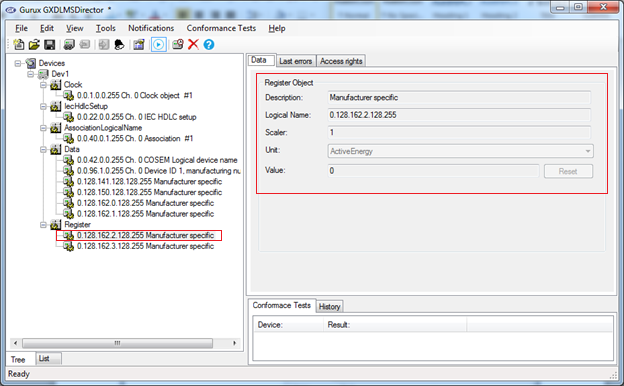
Hi,
Hi,
The client example reads all the values from the association view. You can read register values only like this:
GXDLMSRegister r = new GXDLMSRegister("0.128.162.128.255");
com.Read(r, 2);
You need to add all values that you want to read and read them.
BR,
Mikko
Dear sir,
Dear sir,
Thanks for your quick response. will follow the same.
Extended to our request, if you can provide the code with the following functionality, it will be a great help as we are having less time to build the solution. Else no problem, we will try to do our self.
we wanted a Class Library with the following 3 methods.
-> Initialize Connection with the following inputs : Manufacturer=Indian Standard, Start protocol=DLMS, Authentication Level=None, Client Address=16, Password='', Address Type =SerialNumber,Interface = Wrapper,Logical Device='Serial No',Media=Serial, Serial Port='COM1',Port Settings=(Baudrate, parity, Data Bits,Stop Bits)
-> Read Register : Will follow your suggestion
-> Close connection
Thanks in Advance.
Hi,
Hi,
You should check the client example. It'll do this.
BR,
Mikko