Before commenting read Forum rules
Don't comment the topic if you have a new question.
You can create a new topic selecting correct category from Gurux Forum and then create a new topic selecting "New Topic" from the top left.

Before commenting read Forum rules
Don't comment the topic if you have a new question.
You can create a new topic selecting correct category from Gurux Forum and then create a new topic selecting "New Topic" from the top left.
Hi Mikko,
I am trying to do secured connection with the meter using the serial interface with following configuration.
Authentication : Low
password : ABCD111
Secured Connection Configuration : As shown in attached image.
It gives error message as
"Specified argument was out of valid values.
Parameter name: Invalid System Title".
Please let me know how I can do secured connection.
Thanks,
Bhaumik
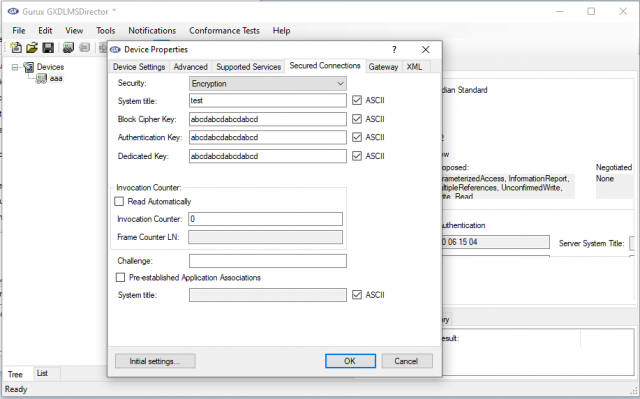
Hi,
Hi,
The system title size is 8 bytes. Your keys also looks strange.
Secured connection means that your messages are ciphered (encrypted). Are you sure that you want to do this?
BR,
Mikko
Hi Mikko,
Hi Mikko,
Now I am able to connect with the meter using serial interface having authentication level "Low". Apart from that AARQ response is not able to parse and in logs it shows following error "ApplicationContextUnsupported".
<AssociationResponse>
<ApplicationContextName Value="LN_WITH_CIPHERING" />
<AssociationResult Value="01" />
<ResultSourceDiagnostic>
<ACSEServiceUser Value="02" />
</ResultSourceDiagnostic>
<RespondingAPTitle Value="AABBVV3030303735" />
<ConfirmedServiceError>
<Service Value="01" />
<ServiceError>
<ApplicationReference Value="ApplicationContextUnsupported" />
</ServiceError>
</ConfirmedServiceError>
</AssociationResponse>
SNRM response parsed successfully.
Is there any other configuration I have to do ?
Hi,
Hi,
Can you make the connection without ciphering, using just Low authentication?
It might be that your meter is not support ciphering.
BR,
Mikko
Hi Mikko,
Hi Mikko,
I have tried with Low Authentication but it gives error message as shown in the attached image.
Using None Authentication I am able to read Clock and Data DLMS objects.
FYI, Meter supports Indian Standard 15959 protocol.
Hi,
Hi,
We are reading a lot of different Indian meters. What meter model this is?
What is your client's address? I can't see it from the pic.
BR,
Mikko
Hi Mikko,
Hi Mikko,
I am trying to read from Single phase 2 wire ac static smart meter having IS16444 standard.
And client address is 32 and the association requirement is of Meter Reader type.
Hi,
Hi,
I believe that the reason for this is that there is a context in APDU that you meter don't understand.
Can you ask the meter manufacturer to fix this?
If you can't, can you read it with some other app? If you can, can you post the first two traces so I can check what meter don't understand.
BR,
Mikko